
Key Takeaways
- According to Microsoft reports, organizations using built-in security capabilities experienced a 62% reduction in security incidents, along with a 3 times decrease in firmware-related attacks
- Windows Built-in Security Protects Against Phishing, Malware, and Credential Theft
- Advanced security systems helped prevent around 4 billion in fraud attempts within one year through improved policies, detection models, and investigation methods.
- The secure-by-design approach applies across all Windows editions including Home, Pro, Enterprise, Enterprise IoT, and Education.
6 Core Security Pillars of Windows 11 Chip-to-Cloud Protection! Windows 11 is designed to help users focus on their work without worrying about complex security configurations. The operating system combines hardware and software protections to reduce the attack surface, maintain system integrity, and safeguard sensitive data. Built-in security features such as credential protection, malware defense, and application safeguards are enabled by default, providing strong protection from the moment a device is set up.
Table of Content
Table of Contents
6 Core Security Pillars of Windows 11 Chip-to-Cloud Protection
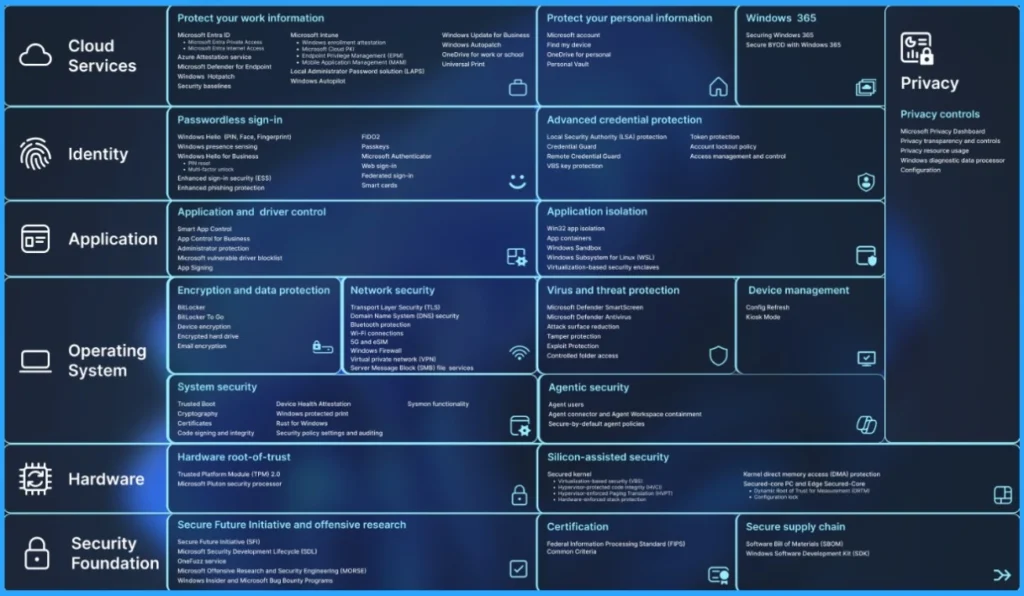
Windows 11 provides strong identity and data protection to defend against modern cyber threats that increasingly target employees and their devices. Security technologies such as Windows Hello and Trusted Platform Module (TPM) 2.0 help protect user identities by enabling secure biometric authentication and safeguarding credentials at the hardware level.
| 6 Core Security Pillars of Windows 11 Chip-to-Cloud Protection | Protect Your work information | Protect your personal information |
|---|---|---|
| Cloud Services | Microsoft Entra ID . Microsoft Entra Private Access . Microsoft Entra Intemet Access Azure Attestation service Microsoft Defender for Endpoint Windows Hotpatch Security baselines Microsoft Intune . Windows enrollment attestation . Microsoft Cloud PKI . Endpoint Privilege Management (EPM) . Mobile Application Management (MAM) Local Administrator Password solution (LAPS) Windows Autopilot Windows Update for Business Windows Autopatch OneDrive for work or school Universal Print | Protect your personal information Microsoft account Find my device OneDrive for personal Personal Vault Windows 365 Securing Windows 365 Secure BYOD with Windows 365 |
| Identity | Passwordless sign-in Windows Hello (PIN, Face, Fingerprint) Windows presence sensing Windows Hello for Business . PIN reset . Multi-factor unlock Enhanced sign-in security (ESS) Enhanced phishing protection FIDO2 Passkeys Microsoft Authenticator Web sign-in Federated sign-in Smart cards | Advanced credential protection Local Security Authority (LSA) protection Credential Guard Remote Credential Guard VBS key protection Token protection Account lockout policy Access management and control |
| Application | Application and driver control Smart App Control App Control for Business Administrator protection Microsoft vulnerable driver blocklist App Signing | Application isolation Win32 app isolation App containers Windows Sandbox Windows Subsystem for Linux (WSL) Virtualization-based security enclaves |
| Operating System | Encryption and data protection BitLocker BitLocker To Go Device encryption Encrypted hard drive Email encryption Network security Transport Layer Security (TLS) Domain Name System (DNS) security Bluetooth protection Wi-Fi connections 5G and eSIM Windows Firewall Virtual private network (VPN) Server Message Block (SMB) file services System security Trusted Boot Cryptography Certificates Code signing and integrity | Virus and threat protection Microsoft Defender SmartScreen Microsoft Defender Antivirus Attack surface reduction Tamper protection Exploit Protection Controlled folder access Device management Config Refresh Kiosk Mode |
| Hardware | Hardware root-of-trust Trusted Platform Module (TPM) 2.0 Microsoft Pluton security processor | Silicon-assisted security Secured kernel . Virtualization-based security (VBS) . Hypervisor-protected code integrity (HVCI) . Hypervisor-enforced Paging Translation (HVPT) . Hardware-enforced stack protection Kernel direct memory access (DMA) protection Secured-core PC and Edge Secured-Core . Dynamic Root of Trust for Measurement (DRTM) . Configuration lock |
| Security Foundation | Secure Future Initiative and offensive research Secure Future Initiative (SFI) Microsoft Security Development Lifecycle (SDL) OneFuzz service Microsoft Offensive Research and Security Engineering (MORSE) Windows Insider and Microsoft Bug Bounty Programs | Certification Federal Information Processing Standard (FIPS) Common Criteria Secure supply chain Software Bill of Materials (SBOM) Windows Software Development Kit (SDK) |
- Advancing Windows 11 Security with In-Memory Patching and Zero Trust DNS
- 8 Ways to Know Security Identifier SID of User in Windows 11
- TPM 2.0 Transition to Windows 11 For Better Security
Application Safeguards and Trusted App Protection in Windows 11
Windows 11 includes strong application safeguards to help organizations protect business data while maintaining employee productivity. Security features such as Windows App Control for Business ensure that only trusted and approved applications can run on corporate devices, reducing the risk of malware or unauthorized software
Chip-to-Cloud Security and Device Trust Management in Windows 11
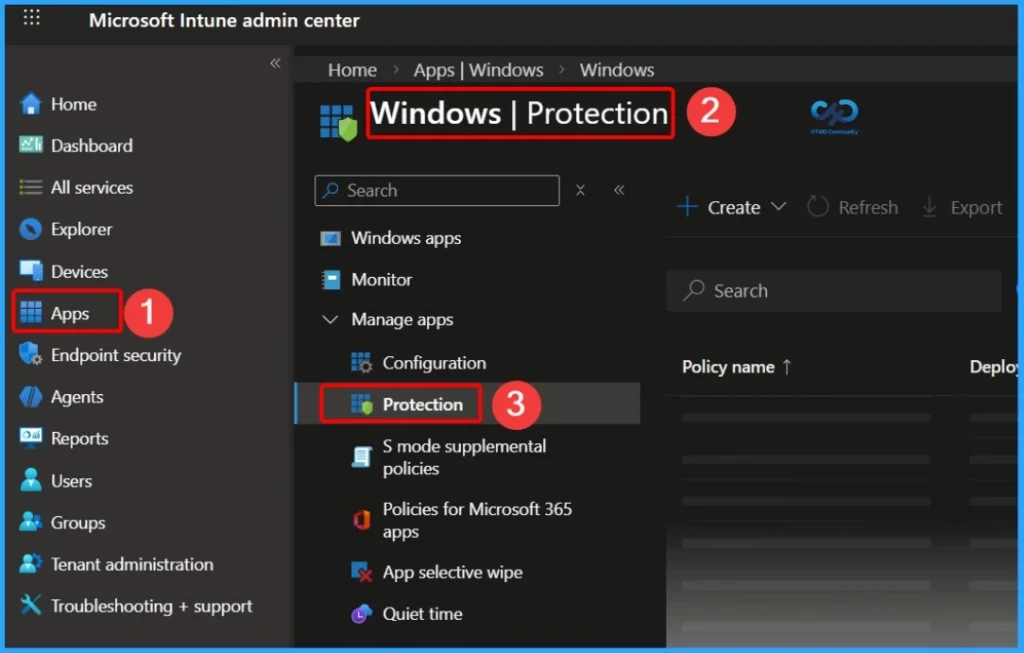
With management platforms such as Microsoft Intune and Microsoft Entra ID, administrators can apply conditional access policies, manage devices remotely, and implement comprehensive security baselines. This security-by-default design enables employees to work securely from anywhere while simplifying IT operations.


Need Further Assistance or Have Technical Questions?
Join the LinkedIn Page and Telegram group to get the latest step-by-step guides and news updates. Join our Meetup Page to participate in User group meetings. Also, join the WhatsApp Community and the Whatsapp channel to get the latest news on Microsoft Technologies. We are there on Reddit as well.
Author
Anoop C Nair has been Microsoft MVP for 10 consecutive years from 2015 onwards. He is a Workplace Solution Architect with more than 22+ years of experience in Workplace technologies. He is a Blogger, Speaker, and Local User Group Community leader. His primary focus is on Device Management technologies like SCCM and Intune. He writes about technologies like Intune, SCCM, Windows, Cloud PC, Windows, Entra, Microsoft Security, Career, etc.