

Key Takeaways
- Microsoft Intune added new Apple device settings to the Settings Catalog.
- A new AirPlay Device Name setting is available for iOS / iPadOS and macOS devices.
- The Microsoft Defender category now includes new settings for macOS security management.
- Administrators can configure these settings when creating a Settings Catalog policy in Intune.
In this post, we are discussing Microsoft Intune Expands Apple Device Settings with AirPlay Controls and Adds macOS Defender Security Policies. Microsoft has introduced new Apple device (iOS / iPadOS) settings in the Settings Catalog in Microsoft Intune. This update expands the list of Apple settings that can be managed directly through Intune.
Table of Contents
Table of Contents
Microsoft Intune Expands Apple Device Settings with AirPlay Controls and Adds macOS Defender Security Policies
With this update, IT administrators can configure additional settings for iOS, iPadOS, and macOS devices. By adding these options to the Settings Catalog, Microsoft makes it easier for organizations to manage Apple devices using a Intune configuration. The update also includes improvements to security management. New and updated settings are available in the Microsoft Defender category for macOS devices, helping administrators configure security policies more easily.
- Microsoft Intune Adds Assignment Filters Support for Apple Declarative Device Management
- Apple Deprecates Legacy MDM Updates as Intune Shifts to Declarative Device Management
- How to Manage Apple Intelligence on iOS or iPadOS Devices using Intune
The New Device Name Airplay Setting for iOS iPadOS
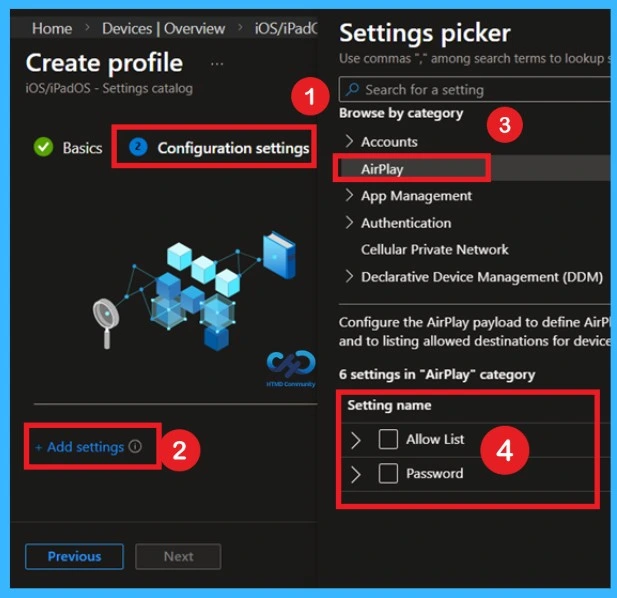
According to the MS documentation 2026, there is Airplay Device Name setting has been added for iOS/iPadOS and macOS device. This setting allows administrators to configure or manage the name used by devices when they connect through AirPlay. These settings can be configured through the iOS iPadOS Setting catalog.
- If you want to check the AirPlay setting by navigate through Devices > Manage devices > Configuration > Create > New policy > Select platform (macOS) > Settings Catalog.
- In the configuration tab you can click on the +Add Settings. Then you will get the settings picker there you can search for the Airplay.
- There are 2 Airplay setting available that are: Allow List and Password.
Updates to Microsoft Defender Settings for macOS
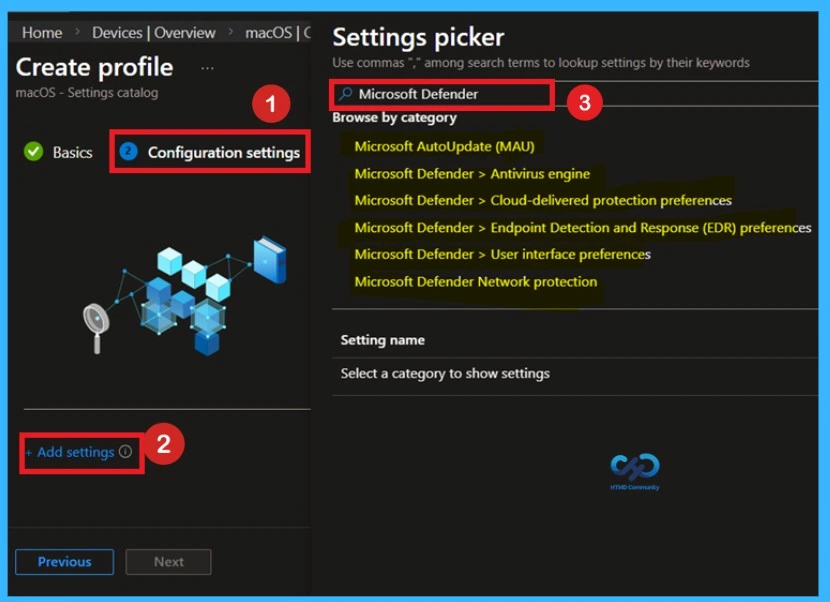
The Microsoft Defender category in the Settings Catalog has been updated with additional settings for macOS devices. These settings allow administrators to manage security configurations for Defender more effectively, improving protection and control for macOS endpoints managed through Intune.

You can get the setting by navigate through Devices > Manage devices > Configuration > Create > New policy > Select platform (macOS) > Settings Catalog. In the configuration tab you can click on the +Add Settings. Then you will get the settings picker there you can search for the Microsoft Defender.
| Microsoft Defender Settings |
|---|
| Microsoft AutoUpdate (MAU) |
| Microsoft Defender > Antivirus engine |
| Microsoft Defender > Cloud-delivered protection preferences |
| Microsoft Defender > Endpoint Detection and Response (EDR) preferences |
| Microsoft Defender > User interface preferences |
| Microsoft Defender Network protection |
Need Further Assistance or Have Technical Questions?
Join the LinkedIn Page and Telegram group to get the latest step-by-step guides and news updates. Join our Meetup Page to participate in User group meetings. Also, join the WhatsApp Community and the Whatsapp channel to get the latest news on Microsoft Technologies. We are there on Reddit as well.
Author
Anoop C Nair is a Workplace Technology solution architect with 25+ years of experience. Microsoft Certified Trainer. Microsoft MVP from 2015 onwards for consecutive 11+ years! He is a blogger, Speaker, and Founder of HTMD Community and HTMD Conference. His main focus is on Device Management technologies like Intune, Windows, and Cloud PC. He writes about technologies like Intune, SCCM, Windows, Cloud PC, Entra, and Microsoft Security