
Key Takeaways
- Advanced Analytics helps you see how devices are performing.
- Device Query uses a special language (KQL) to find device details.
- It helps spot problems like crashes or high CPU early.
- You can fix issues faster with real-time data.
- Keeping devices healthy improves user productivity.
Hey, let’s discuss about Advanced Analytics for Proactive Endpoint Monitoring and Troubleshooting. Advanced Analytics helps organisations proactively address endpoint performance issues by improving visibility into devices and detecting potential problems early. It enables IT teams to monitor device health, analyse performance data, and quickly identify issues that may impact user experience.
Table of Contents
Table of Contents
Advanced Analytics for Proactive Endpoint Monitoring and Troubleshooting
With advanced insights and analytics tools, administrators can investigate abnormal device behaviour, monitor hardware performance, and troubleshoot problems faster. This improves operational efficiency and ensures devices across the organisation run smoothly.
Identify unusual device behaviour using device timelines and analytics. | Description |
|---|---|
| Enhance Device Visibility | View device status and configuration using interactive queries. |
| Detect Issues Early | Identify unusual device behavior using device timelines and analytics. |
| Device Health Monitoring | Track device health and detect productivity issues across devices. |
- Enhancing Data Exploration and Action with Microsoft Intune using Copilot
- Get macOS Office Suite Managed App Details App ID and Last Modified Date using Intune Copilot Explorer
- Get macOS PKG App Details with ID Publisher and Last Modified Date using Intune Copilot Explorer
Device Query in Intune
The Device Query feature in Advanced Analytics allows IT administrators to explore and analyse device data using Kusto Query Language (KQL). It helps organisations quickly retrieve information about devices, applications, and system properties within the tenant. By running queries, administrators can identify device configurations, monitor performance metrics, and troubleshoot issues more efficiently across managed endpoints.
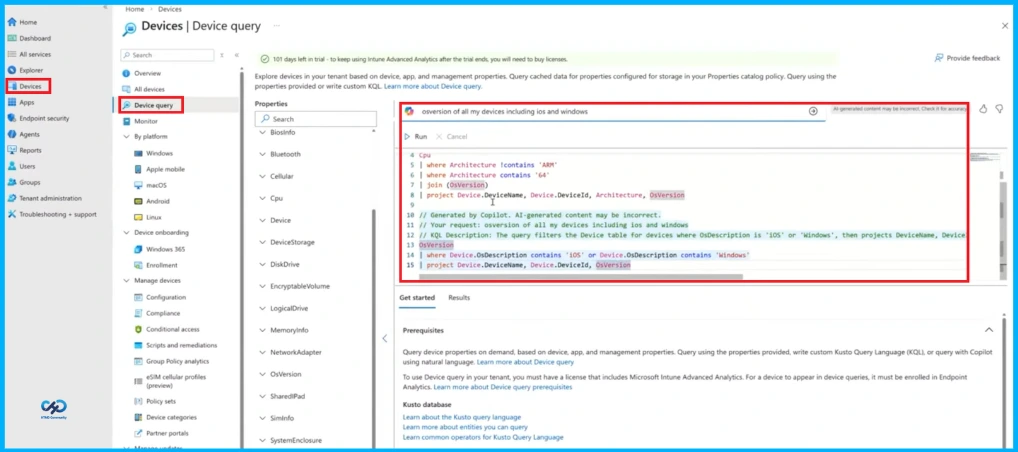
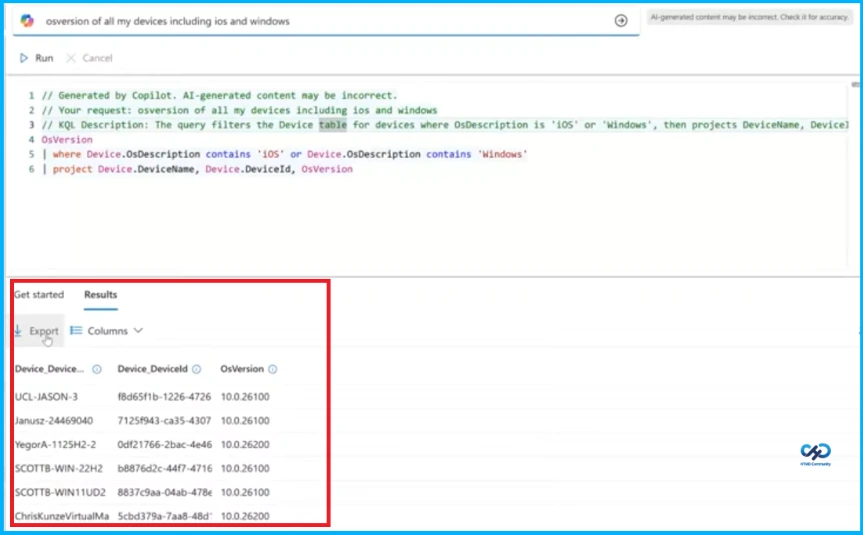
Viewing OS Version of iOS and Windows Devices
This screen shows how a query can be used to get an overview of devices running iOS and Windows and check their operating system versions. The query filters devices based on their OS description and displays key details such as the device name, device ID, and OS version. The results help administrators quickly monitor and manage devices across different platforms from a single view.

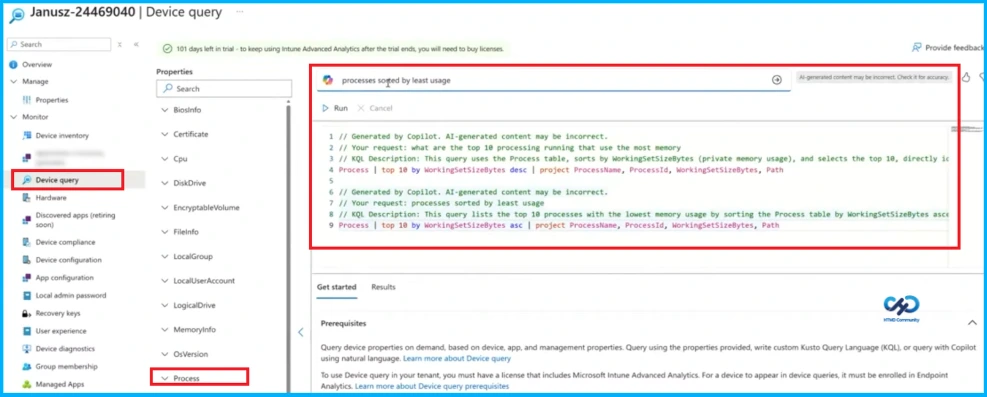
Running a Process Query in Intune
The given screenshot shows the Device query section in Microsoft Intune, where administrators can analyse device information. From the Process property, a query is generated using Microsoft Copilot to list processes sorted by memory usage. The query retrieves details such as process name, process ID, working set size, and file path, helping IT admins quickly identify which applications are using more or less memory on the selected device.
Need Further Assistance or Have Technical Questions?
Join the LinkedIn Page and Telegram group to get the latest step-by-step guides and news updates. Join our Meetup Page to participate in User group meetings. Also, join the WhatsApp Community and the Whatsapp channel to get the latest news on Microsoft Technologies. We are there on Reddit as well.
Author
Anoop C Nair is a Workplace Technology solution architect with 25+ years of experience. Microsoft Certified Trainer. Microsoft MVP from 2015 onwards for consecutive 11+ years! He is a blogger, Speaker, and Founder of HTMD Community and HTMD Conference. His main focus is on Device Management technologies like Intune, Windows, and Cloud PC. He writes about technologies like Intune, SCCM, Windows, Cloud PC, Entra, and Microsoft Security.