
Key Takeaways
- Intune Management Extension Supports more features like Endpoint Analytics and Remote Help
- IME now supports more capabilities like Endpoint Analytics, Remote Help, remediations, and BIOS updates, not just apps and scripts.
- IME works with its own 8-hour check-in cycle, independent from regular MDM sync.
- Company Portal sync triggers both MDM and IME, while other sync options trigger only MDM.
New IME Version Requirement Announced for Windows Device Management! If you are managing Windows devices, it’s important to act now, as Microsoft has introduced a new minimum version requirement for the Intune Management Extension (IME). To ensure your Windows 10 and Windows 11 devices continue receiving critical configurations and updates, they must be running version1.58.103.0 or later. Keeping IME up to date helps maintain proper device management, security, and policy enforcement across your environment.
Table of Contents
Table of Contents
How IME Works?
Once installed, IME connects to Intune services and regularly checks for updates. It performs a check-in every 8 hours to receive new instructions such as app installations or script execution. This process works independently from the standard MDM sync, ensuring tasks are completed reliably without waiting for regular device sync cycles.
Microsoft Intune Enhances Windows Management with Updated Intune Management Extension
The Intune Management Extension is a background agent that extends the capabilities of Windows device management. It helps organisations with basic settings by enabling script execution, application deployment, and advanced policy control. IME handling tasks that are not supported by the default mobile device management. This includes managing complex applications and running automated fixes on devices.
Microsoft Intune recently introduced update for the Intune Management Extension (IME). With the latest 2026 improvements, IME now supports more features and provides better troubleshooting and visibility. This makes it an essential component for managing Windows devices using Microsoft Intune.

- Simple Admin Steps
- Verify device sync to ensure updates are received
- Check IME versions and find outdated devices
- Troubleshoot devices that are not updating
Note: The Intune Management Extension (IME) updates automatically in most cases, so a majority of devices should already be compliant. However, it’s important to verify, as some devices may not have received the latest version yet.
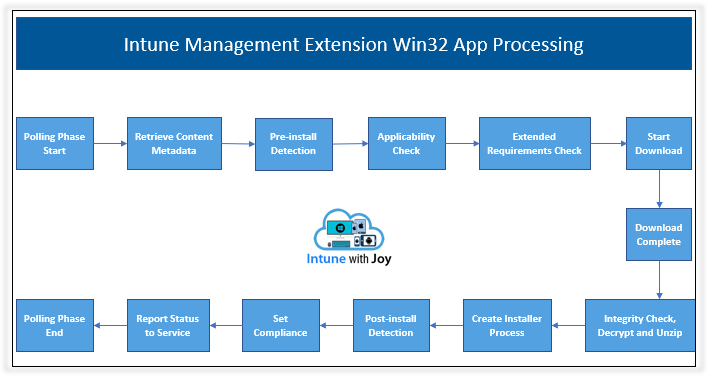
See more IME related post: Intune Management Extension Deep Dive – Win32 App Deployment Troubleshooting Help Guide
| Why This Matters | Impact if IME is Outdated |
|---|---|
| Win32 app deployments | Apps will not install or update |
| PowerShell scripts | Scripts will fail to run |
| Remediations | Issue fixes and automation will stop |
| Platform scripts | Management tasks won’t execute |
- Enable Extensions Reporting Policy in Microsoft Edge for Sending Data about Extensions using Intune
- Allow or Blocks External Extensions from Being Installed for User Policy using Intune
- Enable or Disable Extensions Performance Detector in MS Edge Browser using M365 Admin Center
What’s New in this Update
The latest update expands the IME by supporting more features, such as Endpoint Analytics and Remote Help. It also clearly explains how IME works with its own sync cycle, separate from standard device sync. In addition, Microsoft has improved troubleshooting guidance and provided more detailed logging information to help administrators manage devices more effectively.
- Troubleshooting has been improved with better handling of proxy settings and fixes for issues like service or authentication failures. This helps IT teams resolve problems more easily.
- Users and admins can manually trigger IME sync through the Company Portal or by restarting the IME service. This gives more control when immediate updates are required.
| Feature | info |
|---|---|
| Silent Authentication | The IME automatically authenticates with Intune services in the background, without requiring user input. |
| Independent Check‑in | IME checks for new or updated installations every 8 hours, separate from the standard MDM check‑in cycle. |
| Health Checks | IME periodically validates connectivity to Intune services. |
Automatic Installation
IME now installs automatically when any of these advanced features are assigned to a device or user. This reduces manual work and ensures the required components are available without extra steps. The Intune Management Extension installs automatically when certain features are assigned to a device or user. These include PowerShell scripts, Win32 applications, remediations, and other advanced capabilities. There is no need for manual setup, making the process simple for administrators.
- The Intune management extension has the following prerequisites
| Requirement | Details |
|---|---|
| Supported Windows editions | IME doesn’t support Windows in S mode (blocks non‑Store apps). |
| Device must be joined/registered | • Hybrid joined (Entra + on‑prem AD) • Registered/Workplace joined (WPJ) BYOD devices with work/school account |
| Device must be enrolled in Intune | • Via Group Policy (GPO) • Manual enrollment (local account > Entra join > Intune) • Automatic enrollment enabled in Entra ID. |
| ConfigMgr + Intune devices | For Win32 apps, set Apps workload to Pilot Intune or Intune. • PowerShell scripts run even if workload is set to ConfigMgr. |
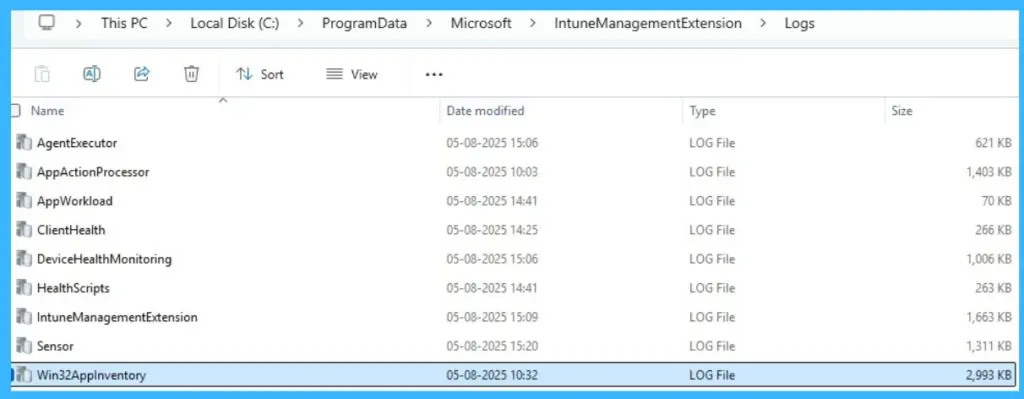
More Detailed Logging
IME now generates detailed log files for scripts, applications, remediations, analytics, and device inventory. These logs provide better visibility and make it easier to identify and fix issues quickly.
Need Further Assistance or Have Technical Questions?
Join the LinkedIn Page and Telegram group to get the latest step-by-step guides and news updates. Join our Meetup Page to participate in User group meetings. Also, join the WhatsApp Community and the Whatsapp channel to get the latest news on Microsoft Technologies. We are there on Reddit as well.
Author
Anoop C Nair is a Workplace Technology solution architect with 25+ years of experience. Microsoft Certified Trainer. Microsoft MVP from 2015 onwards for consecutive 11+ years! He is a blogger, Speaker, and Founder of HTMD Community and HTMD Conference. His main focus is on Device Management technologies like Intune, Windows, and Cloud PC. He writes about technologies like Intune, SCCM, Windows, Cloud PC, Entra, and Microsoft Security.