
Key Takeaways
- Use phishing-resistant MFA for administrators and sensitive accounts.
- Automate updates using Windows Autopatch.
- Deploy Microsoft security baselines during device enrollment.
- Enable Multi-Admin Approval for critical administrative actions.
In this post we are discussing the Important Intune Security Recommendations Organizations Should Follow in 2026. Recently, security experts have been encouraging organizations to boost their Microsoft Intune security settings as cyberattacks continue to increase. With phishing attacks, ransomware, and account compromises becoming more common, companies are now focusing more on protecting devices and user identities.
Table of Contents
Table of Contents
Important Intune Security Recommendations Organizations Should Follow in 2026
In 2026, Intune is no longer used only for device management. It is becoming an important security platform that helps organizations secure corporate data, control device access, and manage security updates more effectively.
- How to Manage Agents through Microsoft Entra Agent ID Interface for Security and Zero Trust Enforcement
- Understanding Entra Agentic AI in Security From Manual Work to Fully Autonomous Agents
- How Windows 365 for Agents Performs Intelligent PowerPoint Editing in Cloud PC
What’s New in Intune Security for 2026
In 2026, organizations are focusing more on identity security and device compliance. Traditional password protection is no longer enough to stop cyberattacks. New Intune recommendations encourage businesses to stronger authentication methods, automated patch management, and stricter access controls to improve overall security.
| Area | What’s New |
|---|---|
| MFA Security | Shift to phishing‑resistant MFA like FIDO2 keys and Microsoft Authenticator |
| Patch Management | Faster deployment of critical updates using Windows Autopatch and Expedite |
| Device Protection | Defaults now include security baselines, BitLocker encryption, and Windows Hello for Business |
| Conditional Access | Zero Trust policies blocking unmanaged and non compliant devices |
| Compliance Focus | Faster patching and stronger device controls help meet new compliance standards |
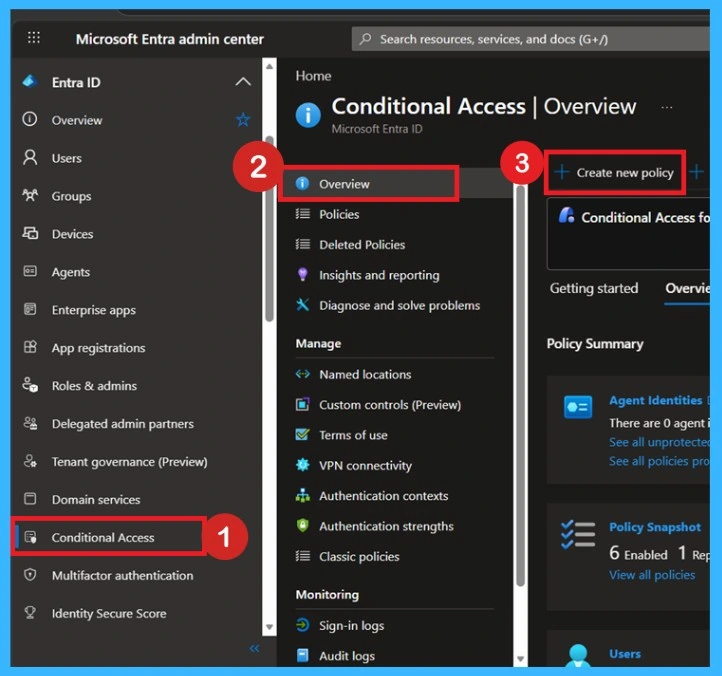
- Admins can create a more smooth and secure sign-in Administrators can configure Conditional Access policies through Microsoft Entra admin center by navigating to Conditional Access > Overview > Create Policy to restrict access from unmanaged or non compliant devices.
Intune Security Recommendations for 2026
As cyberattacks increase, organizations are being advised to improve their Microsoft Intune security settings in 2026. Experts say businesses should focus on betterlogin protection, faster security updates, stronger device security, and stricter access controls to keep company data safe. These recommendations can help organizations protect devices and reduce security risks more effectively.

- Enforce Phishing-Resistant MFA – Use stronger authentication methods like FIDO2 security keys or Microsoft Authenticator instead of SMS-based MFA.
- Automate Patching with Autopatch and Expedite– Use Windows Autopatch and Expedite updates to quickly deploy critical security patches and respond to zero-day threats.
- Deploy Hardened Security Baselines– Apply Microsoft security baselines during device enrollment, including Windows Hello for Business and BitLocker encryption
- Implement Multi-Admin Approval– Require approval from multiple administrators for sensitive actions such as device wipes and RBAC role changes.
- Adopt Zero Trust Conditional Access– Block access from unmanaged or non-compliant devices and allow access only from secure and trusted devices.
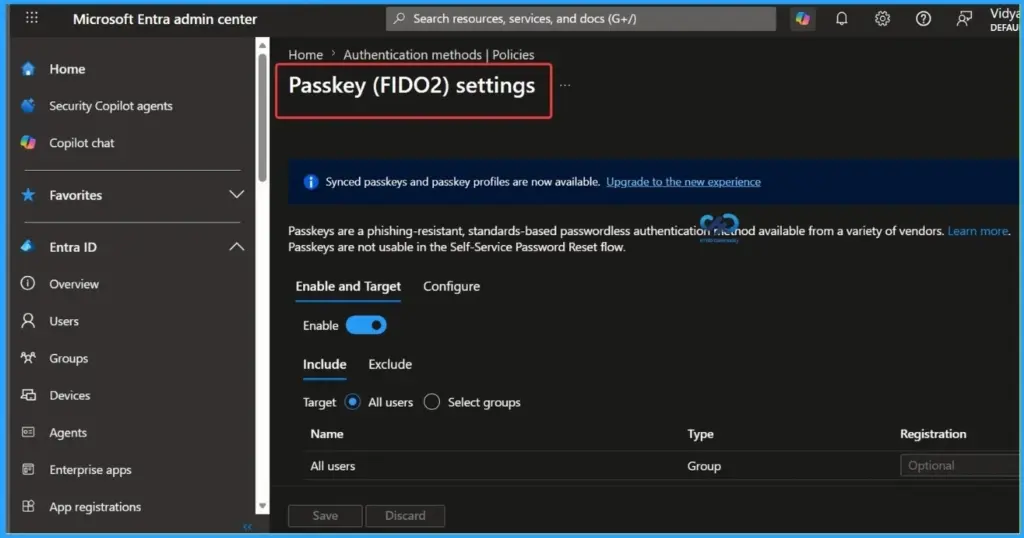
Microsoft recommends stronger authentication methods like FIDO2 passkeys to improve endpoint security in 2026.
Need Further Assistance or Have Technical Questions?
Join the LinkedIn Page and Telegram group to get the latest step-by-step guides and news updates. Join our Meetup Page to participate in User group meetings. Also, join the WhatsApp Community and the WhatsApp channel to get the latest news on Microsoft Technologies. We are there on Reddit as well.
Author
Anoop C Nair is a Workplace Technology solution architect with 25+ years of experience. Microsoft Certified Trainer. Microsoft MVP from 2015 onwards for consecutive 11+ years! He is a blogger, Speaker, and Founder of HTMD Community and HTMD Conference. His main focus is on Device Management technologies like Intune, Windows, and Cloud PC. He writes about technologies like Intune, SCCM, Windows, Cloud PC, Entra, and Microsoft Security.