
Key Takeaways
- New approval controls are available for different Windows quality update types.
- Administrators can configure automatic or manual approval for updates.
- Administrators can review and approve updates before deployment when manual approval is selected.
- The new experience provides more control over Windows update deployment and recovery-related updates.
In this post we are discussing, Microsoft Intune Expands Windows Quality Update Management with New Approval Settings. Microsoft is expanding the Windows quality update management experience with new controls that provide administrators with greater flexibility when approving and deploying different types of Windows updates. These capabilities are part of Microsoft’s ongoing improvements to Windows update management. The updated Quality Update Policy experience allows administrators to configure separate approval settings for monthly security updates, preview updates, and out-of-band updates.
Table of Contents
Table of Contents
Microsoft Intune Expands Windows Quality Update Management with New Approval Settings
Administrators can choose between automatic approval and manual review based on their organization’s update management requirements. The updated experience covers multiple Windows update categories, including monthly B-week security updates, monthly D-week preview updates, and out-of-band security and non-security updates.
This allows organizations to use different approval approaches depending on the update type. These update management capabilities were highlighted as part of Microsoft’s Ctrl + Manage Windows management series, with the first episode focusing on update management.
- How to Set Pause Start Date for Quality Updates using Intune Policy
- How to Configure Engaged Restart Snooze options for End Users during Monthly Patch Cycle using Intune
- Easy way to Block Pause Updates Ability in Windows Update for Business via Intune
What’s New in Windows Quality Update Policies
The updated Quality Update Policy experience provides separate approval controls for different types of Windows updates. Administrators can configure settings for monthly B-week security updates, monthly D-week preview updates, out-of-band security updates, and out-of-band non-security updates.

How to Create a Quality Update Policy in Intune
Microsoft is also bringing Quick Machine Recovery updates into the Quality Update Policy experience. To create a quality update policy, administrators can start from the Devices section in the Microsoft Intune admin center. From the Devices page, expand by platform and select Windows.
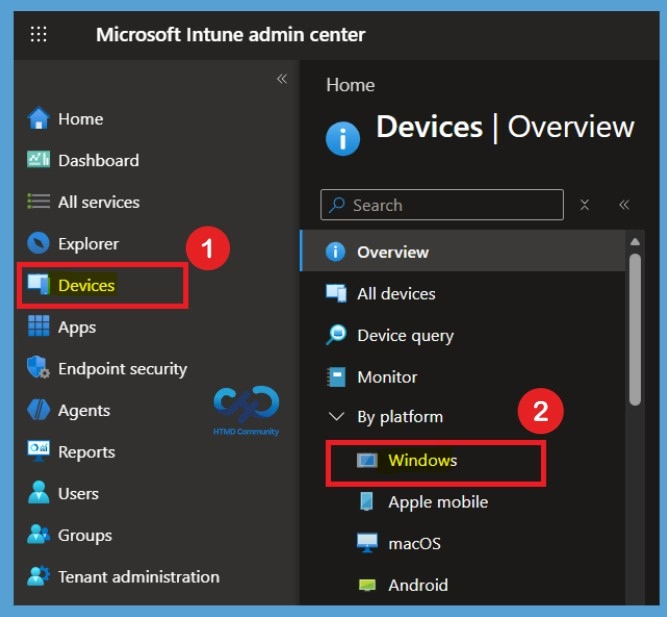
On the Windows page, select Windows updates under the Manage updates section. This opens the Windows updates management page, where administrators can access different update management options. The page provides different sections for managing feature updates, quality updates, driver updates, and update rings. Administrators can select the appropriate update category based on their organization’s deployment and management requirements.
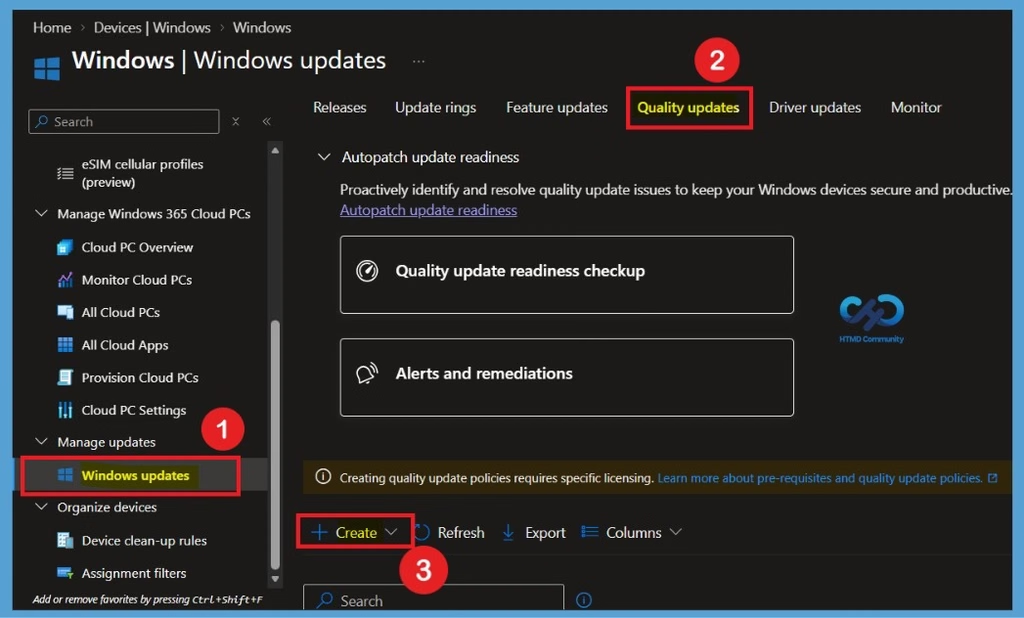
After selecting Create under Quality updates, the Create quality update policy page opens. This is where administrators can configure how different Windows quality updates are approved and deployed across managed devices.
Configure Quality Update Policy Settings
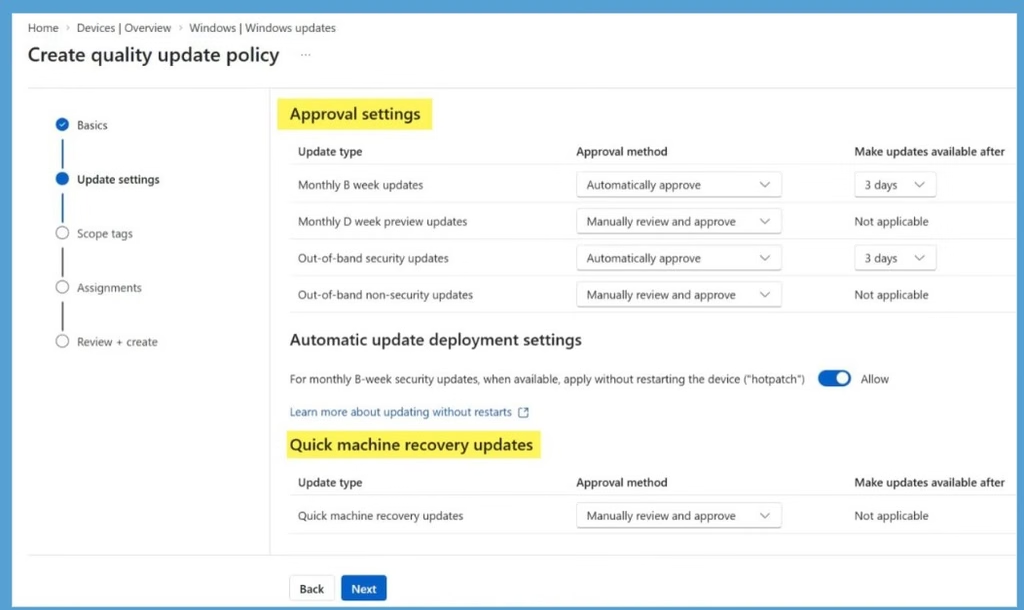
In the updated settings, you can see that under Approval settings, administrators can choose whether updates are automatically approved or require manual review and approval. The page also includes Automatic update deployment settings, where supported monthly B-week security updates can be applied without restarting the device through hotpatching, along with a dedicated Quick Machine Recovery update setting for controlling the approval of recovery updates.
| Update Settings | Update Type | Approval Method |
|---|---|---|
| Approval settings | Monthly B week updates | Automatically approve |
| Monthly D week preview updates | Manually review and approve | |
| Out-of-band security updates | Automatically approve | |
| Out-of-band non-security updates | Manually review and approve | |
| Automatic update deployment settings | Hotpatch (apply without restarting device) | Allow toggle enabled |
| Quick machine recovery updates | Quick machine recovery updates | Manually review and approve |
Need Further Assistance or Have Technical Questions?
Join the LinkedIn Page and Telegram group to get the latest step-by-step guides and news updates. Join our Meetup Page to participate in User group meetings. Also, join the WhatsApp Community and the Whatsapp channel to get the latest news on Microsoft Technologies. We are there on Reddit as well.
Author
Anoop C Nair is Workplace Technology solution architect with 25+ years of experience in global enterprise organizations such as JP Morgan, Capgemini, etc. He is Microsoft Certified Trainer. Microsoft MVP from 2015 onwards for consecutive 11 years! He also conducts Intune and modern workplace tech training for enterprise organizations. He is Blogger, Speaker, and Founder of HTMD Community and HTMD Conference. His focus is on Device Management technologies such as Intune, Windows, Cloud PC. He writes about technologies like Intune, SCCM, Windows, Cloud PC, Windows, Entra, Microsoft Security.