

Key Takeaways
- Intune will introduce a one-time action to decouple permissions assigned via scope tags.
- Permissions across roles with different scope tags are merged this can unintentionally give admins broader access.
- After decoupling, permissions will be strictly enforced based on role + scope tag, improving security and clarity.
- Helps you review current permissions and preview how they will change after decoupling.
How to Improve Intune RBAC Permissions with Scope Tag Decoupling! In Intune, if an admin has multiple roles with different scope tags, their permissions can get combined. This may give them more access than they actually need. Microsoft is fixing this by introducing a one-time change that separates these permissions. After this, access will be controlled more accurately based on each role and its scope tag, improving security and preventing unwanted access.
Table of Content
Table of Contents
How to Improve Intune RBAC Permissions with Scope Tag Decoupling
Intune is introducing a new Permissions Assessment Report to help you prepare for this one-time change. This report shows your current permissions and previews how they will look after the update. You can use this information to review and make any necessary changes before applying the decoupling action.
- Apply the one-time decoupling action in Intune
- Permissions will no longer be combined across roles
- Access will be based strictly on:
- Assigned role
- Assigned scope tag
- Admins will get only the exact permissions they need
- Helps prevent unwanted or extra access
- Improves overall security and control
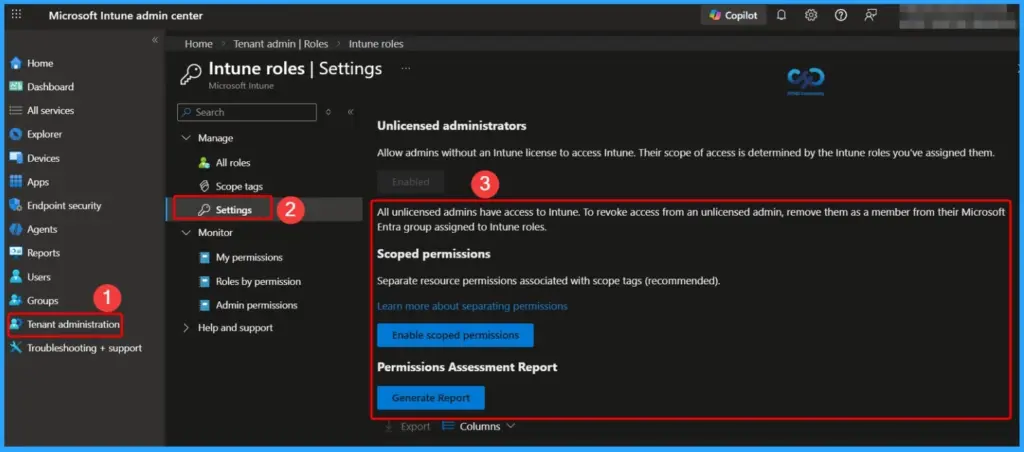
| Scoped Permissions |
|---|
| Separate resource permissions associated with scope tags (recommended). |
- Microsoft Intune Introduces Permission Level RBAC Visibility for Admins
- Microsoft Introduces Platform Level Device Cleanup Rules in Intune with Scoped RBAC Permissions
- Create Custom Roles RBAC in Intune
- New Intune RBAC Permission for Android Device Enrollment Profiles
Intune RBAC Issue: Permission Merging Can Lead to Over-Access
Currently, in Intune, permissions for the same resource across different roles with different scope tags are combined. This can unintentionally give admins more access than required. The upcoming change will stop this merging, helping organizations manage permissions more clearly and securely, especially in complex environments.
- Unlicensed administrators
- Allow admins without an Intune license to access Intune. Their scope of access is determined by the Intune roles you’ve assigned them. All unlicensed admins have access to Intune. To revoke access from an unlicensed admin, remove them as a member from their Microsoft Entra group assigned to Intune roles.
Preview Current and Future Permissions with Assessment Report
This report shows your tenant’s current permissions and provides a clear preview of how they will change after the one-time update. It helps you understand the impact in advance so you can review and adjust permissions if needed.

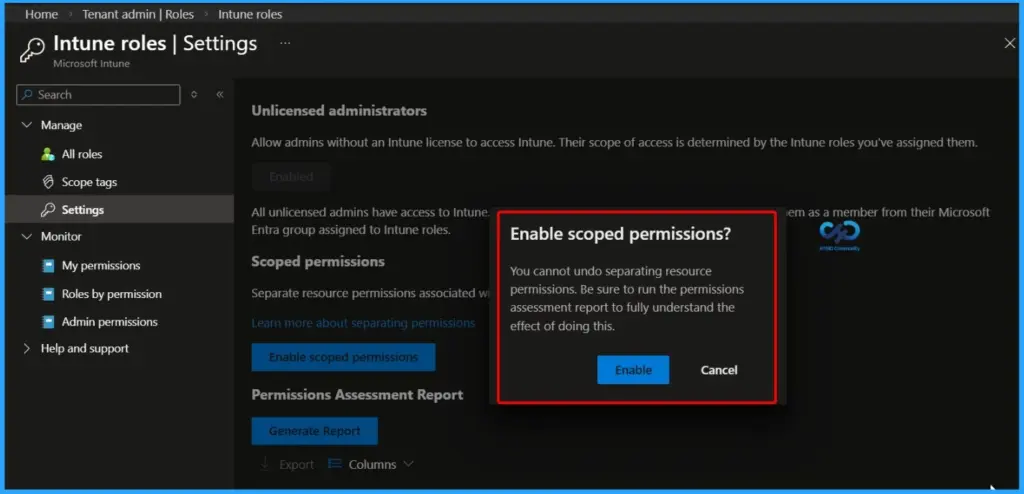
| Enable Scoped Permissions |
|---|
| You cannot undo separating resource permissions. Be sure to run the permissions assessment report to fully understand the effect of doing this |
Resources
In development – Microsoft Intune | Microsoft Learn
Need Further Assistance or Have Technical Questions?
Join the LinkedIn Page and Telegram group to get the latest step-by-step guides and news updates. Join our Meetup Page to participate in User group meetings. Also, join the WhatsApp Community and the Whatsapp channel to get the latest news on Microsoft Technologies. We are there on Reddit as well.
Author
Anoop C Nair is a Workplace Technology solution architect with 25+ years of experience. Microsoft Certified Trainer. Microsoft MVP from 2015 onwards for consecutive 11+ years! He is a blogger, Speaker, and Founder of HTMD Community and HTMD Conference. His main focus is on Device Management technologies like Intune, Windows, and Cloud PC. He writes about technologies like Intune, SCCM, Windows, Cloud PC, Entra, and Microsoft Security.