
Key Takeaways
- Intune supports Windows 11 25H2 from day one.
- 36 new settings are added to the settings catalog.
- IT admins can control AI features like Recall and Copilot.
- Policies help with user experience, compliance, and energy saving.
Hey, let’s discuss about Microsoft Intune Settings Catalog Expands Support for Windows 11 25H2 with 36 New Day-One Management Policies for IT Admins. With the recent release of Windows 11 version 25H2, Microsoft Intune introduced support for 36 new settings, allowing IT administrators to manage devices running the latest OS right from initial deployment, whether for testing or production. Ongoing investments in the settings catalog infrastructure ensure that new Windows policy settings are supported promptly, helping organizations quickly adopt new OS versions and features while keeping their environments secure, compliant, and well managed.
Table of Contents
Table of Contents
Microsoft Intune Settings Catalog Expands Support for Windows 11 25H2 with 36 New Day-One Management Policies for IT Admins
Microsoft’s approach ensures Intune can manage devices running Windows 11 25H2 from day one, preventing compatibility gaps that could delay deployments or testing. With new controls for Recall, Copilot, and Cocreator, IT admins can decide how and if users interact with AI tools, helping maintain data protection and user privacy.
Settings for Start menu layout, backup, and privacy provide a standardised desktop experience, reducing confusion and support tickets, especially in managed environments like schools and public-sector institutions. Policies such as EnableEnergySaver support sustainability goals and can be enforced through compliance policies, while Microsoft continues to close the gap between new Windows releases and management readiness with day-zero Intune Settings Catalog support for Windows 11 25H2.
- How to Enable or Disable Energy Saver Always-on Mode in Intune Settings Catalog
- How to Remove Assigned Group from Energy Saver Battery Threshold Policy in Intune Settings Catalog
- Enforce DDM Software Updates on macOS Device using Intune Settings Catalog
New Settings in the Settings Catalog
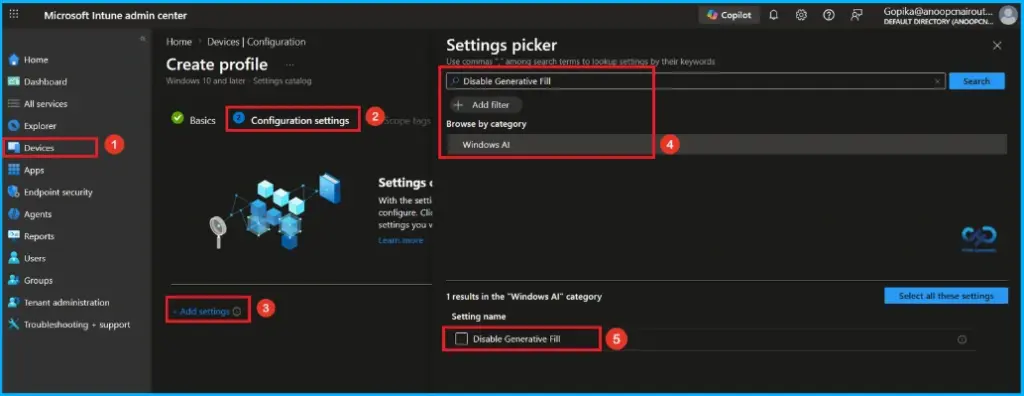
As part of day-zero support for Windows 11 version 25H2, the settings catalog now includes newly released settings for this version. These settings are available for configuration and can be used in device configuration profiles to manage Windows endpoints.

| Category Name | Name | Friendly Name |
|---|---|---|
| Administrative Templates\Windows Components\App Package Deployment | RemoveDefaultMicrosoftStorePackages | Remove Default Microsoft Store packages from the system |
| Administrative Templates\Windows Components\Sync your settings | EnableWindowsBackup | Enable Windows Backup |
| Auditing | AccountLogonLogoff_AuditGroupMembership | Account Logon Logoff Audit Group Membership |
| Human Presence | ForceOnlookerDetectionAction | Force Onlooker Detection Action |
| Human Presence | ForceOnlookerDetection | Force Onlooker Detection |
| Microsoft App Store | ConfigureMSIXAuthenticationAuthorizedDomains | Configure MSIX Authentication Authorized Domains |
| News And Interests | DisableWidgetsBoard | Disable Widgets Board |
| News And Interests | DisableWidgetsOnLockScreen | Disable Widgets On Lock Screen |
| Power | EnableEnergySaver | Enable Energy Saver |
| Printers | RequireIppsPolicy | Require Ipps Policy |
| Privacy | LetAppsAccessSystemAIModels | Let Apps Access System AI Models |
| Start | TurnOffAbbreviatedDateTimeFormat | Turn Off Abbreviated Date Time Format (User) |
| Start | HideCategoryView | Hide Category View (User) |
| Start | ConfigureStartPins | Configure Start Pins (User) |
| Start | AlwaysShowNotificationIcon | Always Show Notification Icon (User) |
| Start | ConfigureStartPins | Configure Start Pins |
| Start | HideCategoryView | Hide Category View |
| System | AllowOOBEUpdates | Allow OOBE Updates |
| Windows AI | SetMaximumStorageSpaceForRecallSnapshots | Set Maximum Storage Space For Recall Snapshots |
| Windows AI | DisableSettingsAgent | Disable Settings Agent |
| Windows AI | AllowRecallEnablement | Allow Recall Enablement |
| Windows AI | SetDenyAppListForRecall | Set Deny App List For Recall (User) |
| Windows AI | DisableClickToDo | Disable Click To Do (User) |
| Windows AI | SetCopilotHardwareKey | Set Copilot Hardware Key (User) |
| Windows AI | SetDenyAppListForRecall | Set Deny App List For Recall |
| Windows AI | DisableImageCreator | Disable Image Creator |
| Windows AI | DisableCocreator | Disable Cocreator |
| Windows AI | SetMaximumStorageSpaceForRecallSnapshots | Set Maximum Storage Space For Recall Snapshots (User) |
| Windows AI | DisableClickToDo | Disable Click To Do |
| Windows AI | SetDenyUriListForRecall | Set Deny Uri List For Recall (User) |
| Windows AI | DisableGenerativeFill | Disable Generative Fill |
| Windows AI | SetDenyUriListForRecall | Set Deny Uri List For Recall |
| Display | ConfigureMultipleDisplayMode | Configure Multiple Display Mode (User) |
| Windows Backup And Restore | EnableWindowsRestore | Enable Windows Restore |
Need Further Assistance or Have Technical Questions?
Join the LinkedIn Page and Telegram group to get the latest step-by-step guides and news updates. Join our Meetup Page to participate in User group meetings. Also, join the WhatsApp Community and the Whatsapp channel to get the latest news on Microsoft Technologies. We are there on Reddit as well
Author
Anoop C Nair is a Workplace Technology solution architect with 25+ years of experience. Microsoft Certified Trainer. Microsoft MVP from 2015 onwards for consecutive 11+ years! He is a blogger, Speaker, and Founder of HTMD Community and HTMD Conference. His main focus is on Device Management technologies like Intune, Windows, and Cloud PC. He writes about technologies like Intune, SCCM, Windows, Cloud PC, Entra, and Microsoft Security.