
Key Takeaways
- Managing traffic effectively helps reduce unnecessary notifications and optimize device check-in.
- Reduced unnecessary notifications by 25–35%, improving overall efficiency.
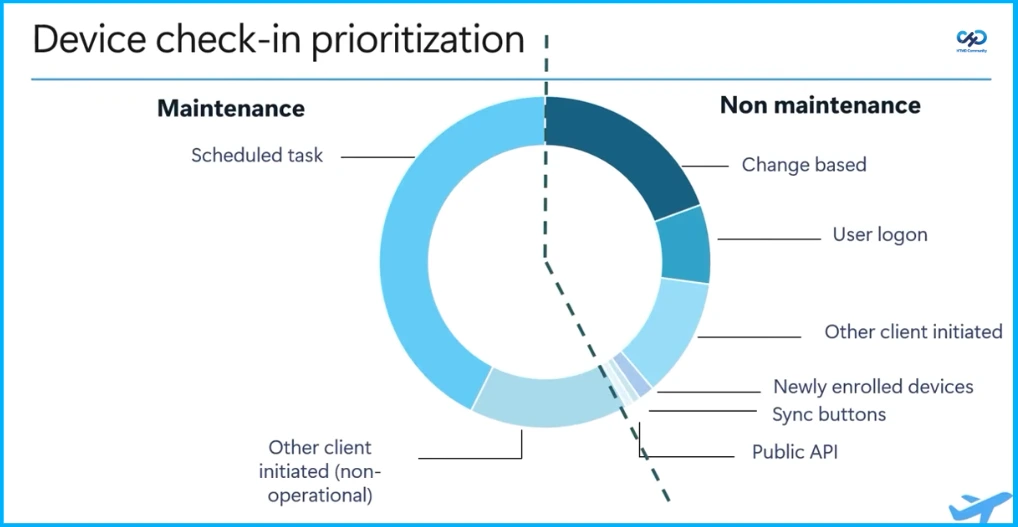
- Device check-ins are prioritized by dividing them into maintenance and non-maintenance activities.
- Maintenance tasks mainly include scheduled operations and some non-operational client-initiated actions.
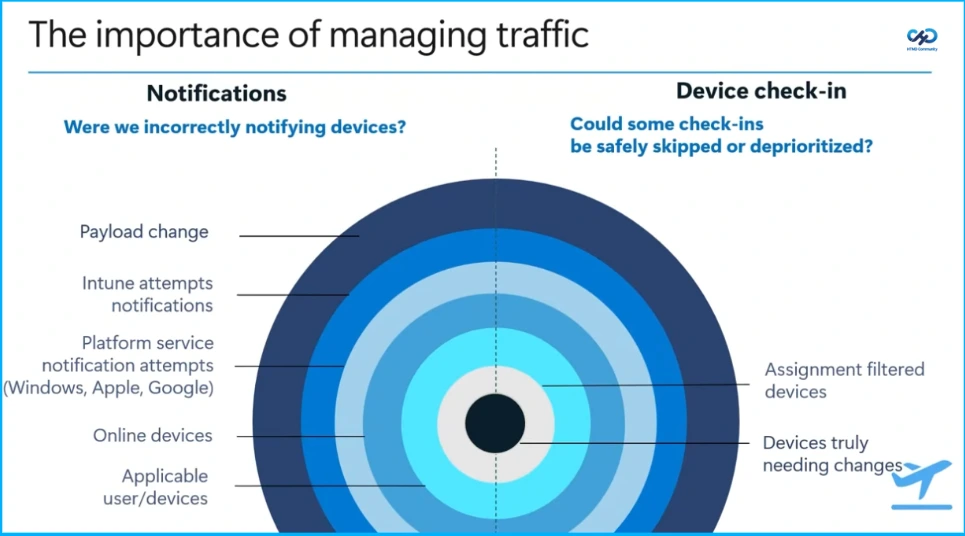
Hey, let’s discuss about Importance of Managing Traffic and Device Check-in Prioritization. The importance of managing traffic lies in ensuring that devices are notified and checked in efficiently without unnecessary load. On the notification side, issues can arise from payload changes, repeated notification attempts, platform service notifications across systems like Windows, Apple, and Google, and targeting devices that are merely online rather than truly needing updates. On the device check-in side, optimization involves determining whether some check-ins can be skipped or deprioritized by filtering assigned devices and focusing only on those that genuinely require changes.
Table of Contents
Table of Contents
Importance of Managing Traffic and Device Check-in Prioritization
Managing traffic effectively helps reduce unnecessary notifications and optimize device check-ins. Several optimizations can cut 25–35% of redundant notifications, while improvements in the check-in process allow some to be skipped or deprioritized. Additionally, redesigning the check-in stack enables better scaling, supporting around 40% more sessions efficiently.
- How to use Intune Inventory to Check BitLocker Encryption Status of Windows Devices
- How Intune Manages Change Tracking with Changes in Devices Check-ins Device Remediation and Applicable Devices
- New Intune Device Check-in Sends Complete Desired State at Once
Check-in Performance
The outcomes show significant improvements in efficiency and performance, including a 25–35% reduction in unnecessary notifications, a 25% increase in processed check-ins during peak hours, and a 30% decrease in delayed check-ins. Additionally, notification speed increased by up to four times, over 97% of change-based check-ins were processed on the first attempt, and remediation times were reduced by an average of 25%.
Device Check-in Prioritization
The given screenshot shows how device check-ins are prioritized by dividing them into maintenance and non-maintenance activities. Maintenance tasks mainly include scheduled operations and some non-operational client-initiated actions. Non-maintenance check-ins are driven by real-time events such as configuration changes, user logons, client actions, newly enrolled devices, sync button triggers, and API calls, ensuring that important updates and user-driven activities are handled promptly.

Classifications
This table shows the classification of tasks based on urgency and impact, ranging from critical tasks that must be processed urgently to low-priority tasks where delays do not affect productivity, security, or compliance.
| Classification | Definition | Scenarios |
|---|---|---|
| Critical | Process Urgently,avoid delays | Newly enrolled devices |
| High | Important but not always urgent, impact of delay is moderate | Service side changes |
| Medium | Normal user activity | user logon |
| Low | Where delays would not impact productivity, security or compliance | Scheduled task public API(Medium? Low?) |
Smarter Check-in Prioritization
This includes granular prioritization beyond maintenance and non-maintenance, tracking devices with pending changes, and combining multiple signals to adjust priority, along with dynamically adjusting quotas to handle surges, enabling faster retries for higher priorities while slower for lower ones, and including retries in the prioritization formula.
Need Further Assistance or Have Technical Questions?
Join the LinkedIn Page and Telegram group to get the latest step-by-step guides and news updates. Join our Meetup Page to participate in User group meetings. Also, join the WhatsApp Community and the WhatAapp channel to get the latest news on Microsoft Technologies. We are there on Reddit as well
Author
Anoop C Nair is a Workplace Technology solution architect with 25+ years of experience. Microsoft Certified Trainer. Microsoft MVP from 2015 onwards for consecutive 11+ years! He is a blogger, Speaker, and Founder of HTMD Community and HTMD Conference. His main focus is on Device Management technologies like Intune, Windows, and Cloud PC. He writes about technologies like Intune, SCCM, Windows, Cloud PC, Entra, and Microsoft Security.