
Key Takeaways
- Enrollment Time Grouping will make device setup faster and more efficient.
- Defender risk scoring will help identify secure and non-secure devices.
- New deployment and enrollment features help prepare devices faster.
- Upcoming features include admin password rotation and recovery lock management.
In this post, we are discussing Microsoft Intune Adds Recovery Lock and Admin Password Rotation for macOS. According to the technical takeoff session, Neil Johnson said that some new updates to improve macOS management in Microsoft Intune. Microsoft has also announced several important features that are coming soon. Some upcoming capabilities include admin password rotation for Mac devices, macOS recovery lock management, Defender device risk scoring, and enrollment-time grouping.
Table of Contents
Table of Contents
Microsoft Intune Adds Recovery Lock and Admin Password Rotation for macOS
These features will help organizations improve security, manage devices more efficiently, and ensure that Macs are properly configured from the moment they are enrolled. Another exciting development is the expansion of Platform Single Sign-On (SSO). This feature is now generally available and helps users sign in to their Mac devices using their organization’s credentials.
Microsoft and Apple are also working to enable Platform SSO directly during device setup with Automated Device Enrollment (ADE), which will make the login experience smoother while maintaining strong security.
- Microsoft Intune Expands Apple Device Settings with AirPlay Controls and Adds macOS Defender Security Policies
- Microsoft Intune Adds Assignment Filters Support for Apple Declarative Device Management
- Apple Deprecates Legacy MDM Updates as Intune Shifts to Declarative Device Management
- How to Manage Apple Intelligence on iOS or iPadOS Devices using Intune
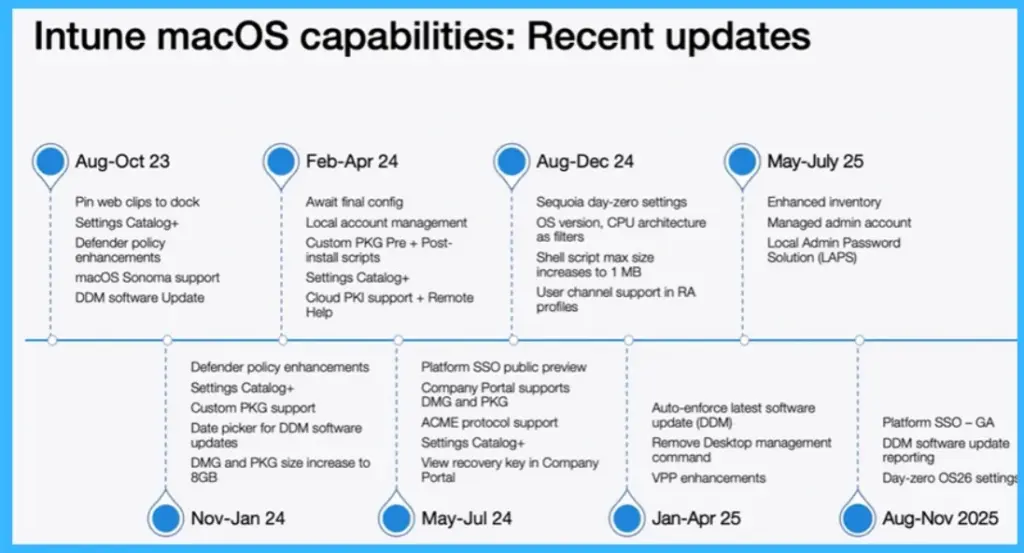
Recent Updates in macOS Management with Intune
Over the past year, Microsoft Intune has made macOS management easier with many regular updates. It started with simple improvements like pinning web apps to the dock, adding more settings, and supporting macOS Sonoma. Then Microsoft added useful features like holding devices in setup until ready, managing local accounts, and deploying apps using PKG files.

Later, features like Platform Single Sign-On, better software updates, improved device insights, and admin password management (LAPS) were introduced. Overall, these updates make managing Mac devices more simple, secure, and automated.
| Intune macOS capabilities: Recent updates | Info |
|---|---|
| Aug-Oct 23 | Pin web clips to dock Settings Catalog+ Defender policy enhancements macOS Sonoma support DDM software Update |
| Feb-Apr 24 | Await final config Local account management Custom PKG Pre + Post install scripts Settings Catalog+ Cloud PKI support + Remote Help |
| Aug-Dec 24 | Sequoia day-zero settings OS version, CPU architecture as fitters Shell script max size increases to 1 MB User channel support in RA profiles |
| May-July 25 | Enhanced inventory Managed admin account Local Admin Password Solution (LAPS) |
| Nov-Jan 24 | Defender policy enhancements Settings Catalog+ Custom PKG support Date picker for DDM software updates DMG and PKG size increase to 8GB |
| May-Jul 24 | Platform SSO public preview Company Portal supports DMG and PKG ACME protocol support Settings Catalog+ View recovery key in Company Portal |
| Jan-Apr 25 | Auto-enforce latest software update (DDM) Remove Desktop management command VPP enhancements |
| Aug-Nov 2025 | Platform SSO – GA DDM software update reporting Day-zero OS26 setting |
Upcoming macOS Features in Microsoft Intune
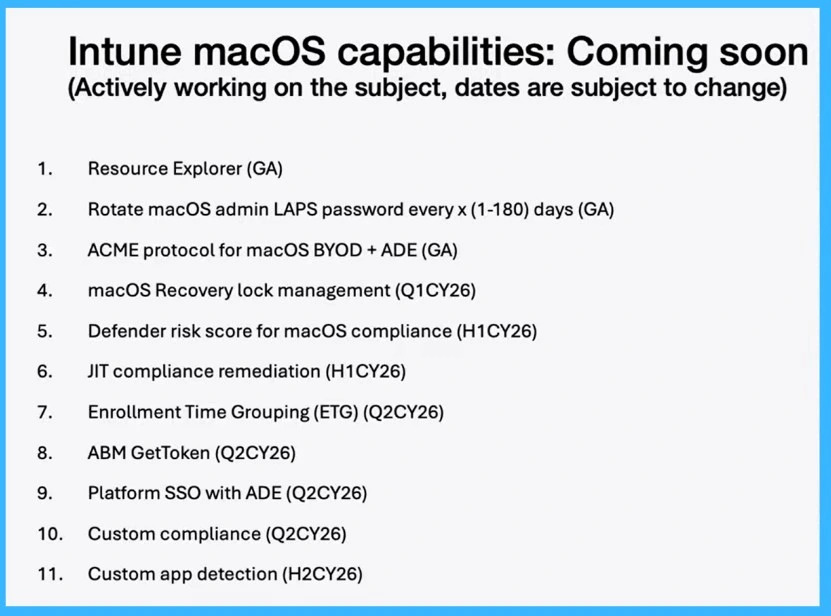
The below image that showing the list of Upcoming macOS Features in Microsoft Intune. showing what Microsoft is planning next based on customer feedback and recent progress. Key features include Resource Explorer for better device visibility, admin password rotation (LAPS) to improve security, and ACME protocol support for easier certificate management across BYOD and ADE devices.
Microsoft is also introducing macOS Recovery Lock management to protect devices from unauthorized access, along with Defender risk scoring and Just-in-Time (JIT) compliance remediation to strengthen security and compliance in real time.
- Features like Enrollment Time Grouping (ETG), Platform SSO with ADE, and ABM Get Token integration will make device setup smoother and more automated from the start.
- Finally, custom compliance policies and custom app detection will give organizations more flexibility to define their own rules and manage applications more efficiently.
| No. | Intune macOS capabilities |
|---|---|
| 1 | Resource Explorer (GA) |
| 2 | Rotate macOS admin LAPS password every x (1-180) days (GA) |
| 3 | ACME protocol for macOS BYOD + ADE (GA) |
| 4 | macOS Recovery lock management (Q1CY26) |
| 5 | Defender risk score for macOS compliance (H1CY26) |
| 6 | JIT compliance remediation (H1CY26) |
| 7 | Enrollment Time Grouping (ETG) (Q2CY26) |
| 8 | ABM GetToken (Q2CY26) |
| 9 | Platform SSO with ADE (Q2CY26) |
| 10 | Custom compliance (Q2CY26) |
| 11 | Custom app detection (H2CY26) |
Need Further Assistance or Have Technical Questions?
Join the LinkedIn Page and Telegram group to get the latest step-by-step guides and news updates. Join our Meetup Page to participate in User group meetings. Also, join the WhatsApp Community and the Whatsapp channel to get the latest news on Microsoft Technologies. We are there on Reddit as well.
Author
Anoop C Nair is a Workplace Technology solution architect with 25+ years of experience. Microsoft Certified Trainer. Microsoft MVP from 2015 onwards for consecutive 11+ years! He is a blogger, Speaker, and Founder of HTMD Community and HTMD Conference. His main focus is on Device Management technologies like Intune, Windows, and Cloud PC. He writes about technologies like Intune, SCCM, Windows, Cloud PC, Entra, and Microsoft Security.