
Key Takeaways
- Windows 365 and Azure Virtual Desktop support different types of organisations and workstyles.
- Windows 365 is simple and ready to use, while Azure Virtual Desktop offers more control and flexibility.
- New updates like price cuts, Windows 365 Flex (formerly Windows 365 Frontline), and Azure Virtual Desktop Hybrid make adoption easier.
- Together, they help organisations move to cloud Windows at their own pace.
Windows 365 Frontline is Now Windows 365 Flex with No Change to Features or Licensing! Hey, let’s discuss about Windows 365 and Azure Virtual Desktop Expanding Access to Cloud Windows for Every Workstyle. The way people work is evolving, and so are cloud-delivered Windows solutions. From small businesses to enterprises and shift workers, Windows 365 and Azure Virtual Desktop continue to expand, supporting more environments and flexible work styles. These updates build on this momentum, helping more customers adopt cloud-powered Windows experiences that fit their needs.
Table of Contents
Table of Contents
Windows 365 Flex Enables Cost-Optimised Shared and On-Demand Cloud PC Access for Modern Workforces
Small-to-medium-sized businesses have different technology needs than large enterprises, and Windows 365 Business is built to meet those needs with simple, ready-to-use Cloud PCs that require no additional Microsoft licenses.
To make it more accessible, the list price has been reduced by 20% across all configurations starting May 1, 2026, with eligible new customers able to save an additional 20% for a limited time. This change lowers the barrier to entry, making it easier for smaller organisations to provide a secure, full Windows experience from the cloud.
- Built-In Resilience and Reliable Architecture Highlights for Windows 365 and Azure Virtual Desktop
- How Windows App Enhances File and Folder Access on Azure Virtual Desktop and Windows 365
- How to Assign Multiple Personal Desktops to a Single User in Azure Virtual Desktop
Windows 365 Flex
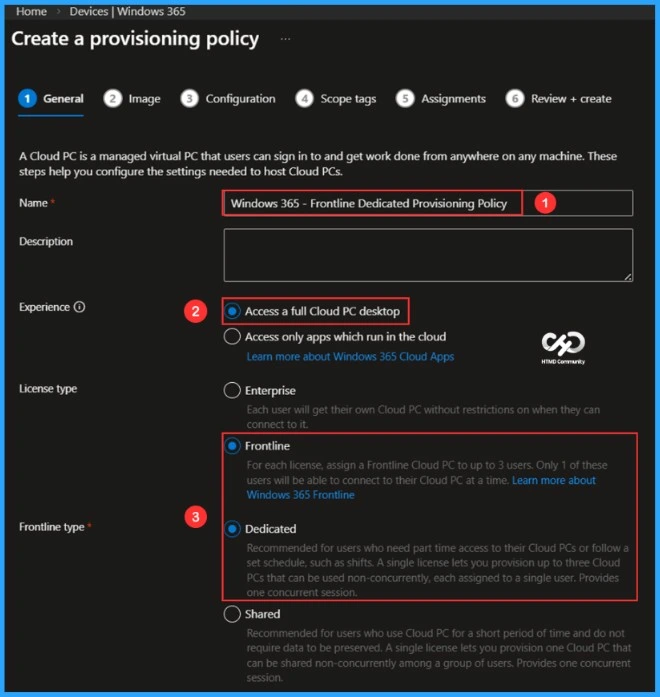
Windows 365 Flex (formerly Windows 365 Frontline) is designed for shift workers, part-time employees, and others who need a PC only for periodic use. As shared physical devices become less practical in distributed workplaces, it provides a secure and flexible way to deliver Cloud PCs without requiring a dedicated device for every user.

Employees can sign in and access their apps, data, desktops, and settings instantly, while organisations can extend cost-effective and personalised technology access. The new name reflects this broader flexibility, with no change to how the service works or is purchased.
- Enables shared or cost-efficient dedicated Cloud PC access
- Provides access to apps, data, desktops, and settings on sign-in
- Supports shared mode with reset or persistent user experiences
- Powers app-only access through Windows 365 Cloud Apps
- Suitable for part-time, seasonal, and task-based roles
- Renamed to reflect flexibility, with no change in service or purchasing
Azure Virtual Desktop Hybrid
Azure Virtual Desktop Hybrid supports organisations that need a gradual path to the cloud due to regulatory, operational, or infrastructure constraints. Now in public preview, it extends the Azure-managed Virtual Desktop service to on-premises environments, allowing customers to use their existing hardware and preferred hypervisors without replacement. While the service remains in Azure, session hosts can run on Azure Arc-enabled servers on-premises, giving users seamless access to their desktops through the familiar Windows App.
| Benefits |
|---|
| Modernise legacy VDI environments at their own pace, preserving investments in datacenters, hardware, and operational tools. |
| Adopt cloud-managed desktops incrementally, with a clear path to migrate session hosts to Azure when the time is right. |
| Keep existing partner integrations for virtual machine management and provisioning. |
Windows Cloud Portfolio
Windows 365 and Azure Virtual Desktop together form a unified Windows cloud portfolio that supports different types of work and customers. Windows 365 provides a simple, secure Windows experience streamed from the cloud, while Azure Virtual Desktop offers more flexibility and control for enterprise VDI needs.
Updates such as lower pricing for Windows 365 Business, the introduction of Windows 365 Flex, and Azure Virtual Desktop Hybrid in public preview expand these solutions to more environments and use cases, helping organizations adopt cloud Windows in a way that fits their needs.
Need Further Assistance or Have Technical Questions?
Join the LinkedIn Page and Telegram group to get the latest step-by-step guides and news updates. Join our Meetup Page to participate in User group meetings. Also, join the WhatsApp Community and the WhatsApp channel to get the latest news on Microsoft Technologies. We are there on Reddit as well.
Author
Anoop C Nair is a Workplace Technology solution architect with 25+ years of experience. Microsoft Certified Trainer. Microsoft MVP from 2015 onwards for consecutive 11+ years! He is a blogger, Speaker, and Founder of HTMD Community and HTMD Conference. His main focus is on Device Management technologies like Intune, Windows, and Cloud PC. He writes about technologies like Intune, SCCM, Windows, Cloud PC, Entra, and Microsoft Security.