
Key Takeaways
- AI agents make data and network security more important.
- Protecting data with classification, labeling, and governance is essential.
- Network defenses stop malicious prompts and data leaks.
- The Zero Trust Assessment checks security automatically across all areas.
- Data and Network are now added as new pillars for stronger Zero Trust coverage.
4 Pillars of the Automated Zero Trust Assessment Identity Devices Data and Network! AI agents are becoming more capable. This increases risks to data and network security. Poorly managed agents can expose sensitive information. They may follow harmful commands or leak data silently. Using data classification, labelling, and governance is essential. Loss prevention and network defences help block unauthorised access.
Table of Content
Table of Contents
Introducing Data and Network Pillars in the Automated Zero Trust Assessment
Checking security settings for identity, devices, data, and networks by hand takes a lot of time and can lead to mistakes. Organizations often find it hard to stay ahead of new threats while keeping security policies consistent everywhere.
- Zero Trust Workshop 3.0 Updated with AI Pillar 700 Security Controls Across 116 Groups and 33 Functional Swim Lanes
- 7 Stages of Windows Zero Trust Lifecycle Management Helps Organizations Secure Update and Retire Devices Efficiently
- 6 Core Security Pillars of Windows 11 Chip-to-Cloud Protection
- Protecting Endpoints with Zero Trust Principles and Microsoft Intune Capabilities
- Easy Method to Deploy Windows Cloud Input Protection Driver Setup using Intune
Simplify Security Management with Zero Trust Assessment Automation
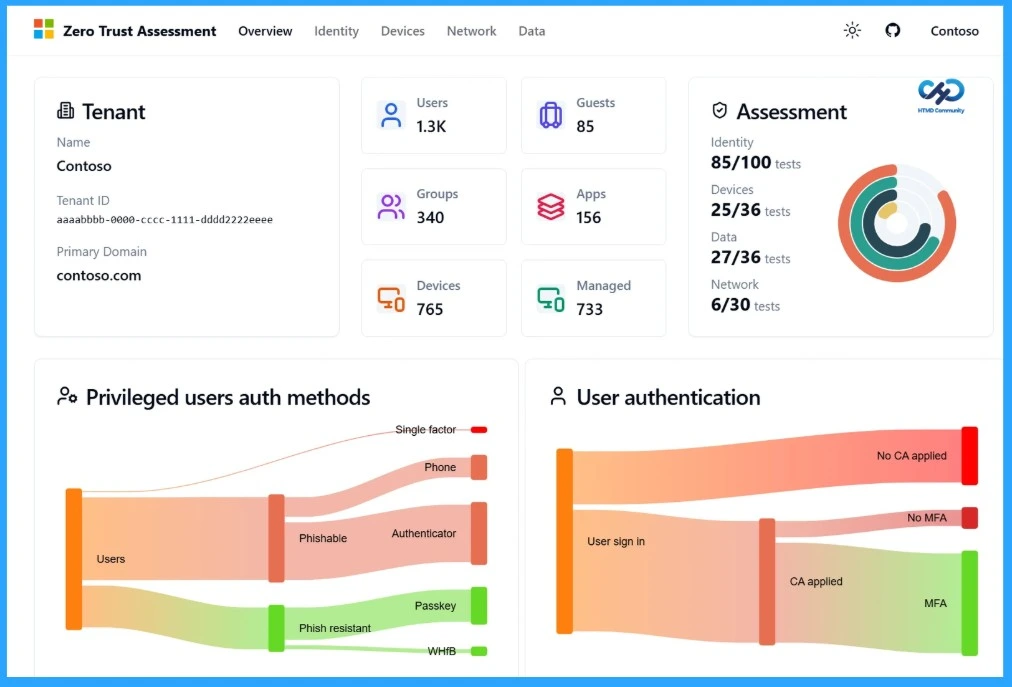
Zero Trust Assessment helps you to simplify security management which automates the review of hundreds of controls based on Zero Trust principles. It uses insights from Microsoft’s Secure Future Initiative (SFI) to give a clear view of your organization’s security posture.
The assessment now includes Data and Network as new pillars, alongside the existing Identity and Devices focus. This update helps organizations protect sensitive data, spot risky behaviors, and maintain a strong Zero Trust framework across all key areas.

| Pillar | More Details |
|---|---|
| Identity | Users and groups, access management – Ensure only authorized users have access |
| Devices | Endpoint security, device compliance – Protect devices and enforce policies |
| Data | Classification, labeling, governance, loss prevention – Safeguard sensitive information |
| Network | Monitoring, prompt injection prevention, blocking unauthorized access – Prevent network-based threats and data leaks |
Built on Trusted Standards and Expanding Towards AI Security
The Zero Trust Assessment is designed using proven industry standards and real-world insights to ensure accurate and reliable security evaluation. It combines guidance from leading security organizations, Microsoft’s internal learnings, and practical experience from customer environments.
- Industry standards from leading bodies:
- National Institute of Standards and Technology (NIST)
- Cybersecurity and Infrastructure Security Agency (CISA)
- Center for Internet Security (CIS)
- Microsoft insights:
- Learnings from the Secure Future Initiative (SFI)
- Real-world experience:
- Insights from thousands of customer security implementations
- Coming soon:
- AI pillar for Zero Trust Assessment (Expected Summer 2026)
Clear Insights and Actionable Guidance
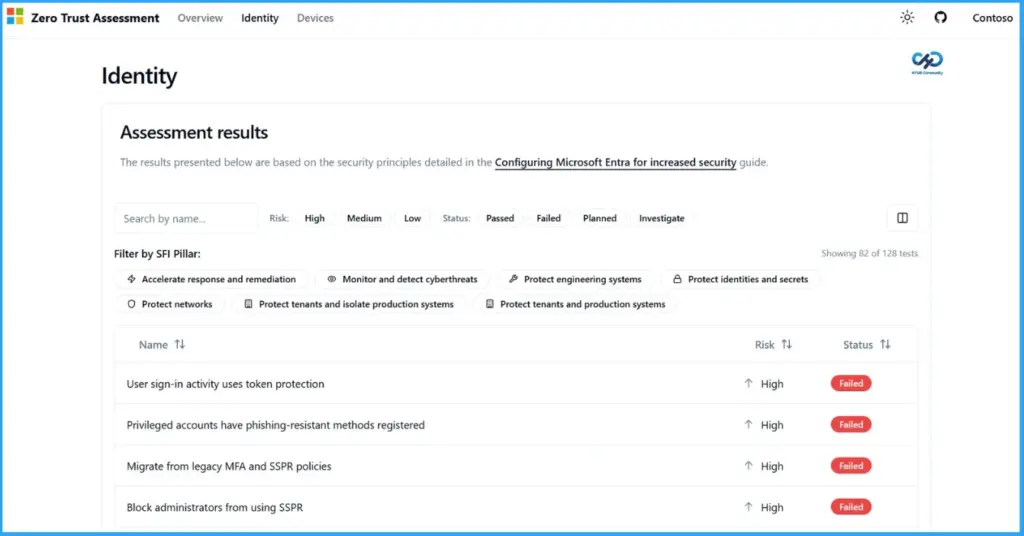
The redesigned experience makes it easier to understand your security status and take action. It shows simple views to quickly find strengths and gaps, connects well with workshop activities for better planning, and provides clear, prioritized recommendations. This helps teams make the right decisions and improve security step by step.
| Features | Details |
|---|---|
| Clearer Insights | Simplified views of security posture – Quickly identify strengths and gaps |
| Alignment with Workshop | Insights directly support workshop discussions and planning – Better decision-making and execution |
| Actionable Recommendations | Step-by-step guidance mapped to maturity levels – Plan and improve security over time |
Need Further Assistance or Have Technical Questions?
Join the LinkedIn Page and Telegram group to get the latest step-by-step guides and news updates. Join our Meetup Page to participate in User group meetings. Also, join the WhatsApp Community and the Whatsapp channel to get the latest news on Microsoft Technologies. We are there on Reddit as well.
Author
Anoop C Nair is a Workplace Technology solution architect with 25+ years of experience. Microsoft Certified Trainer. Microsoft MVP from 2015 onwards for consecutive 11+ years! He is a blogger, Speaker, and Founder of HTMD Community and HTMD Conference. His main focus is on Device Management technologies like Intune, Windows, and Cloud PC. He writes about technologies like Intune, SCCM, Windows, Cloud PC, Entra, and Microsoft Security.