

Key Takeaways:
- Device Health Attestation validates whether a device’s boot process is trustworthy
- DHA signals are used by Intune to enforce compliance policies
- Intune queries DHA data (like Secure Boot, BitLocker, and TPM status
- Automates trust validation, reduces reliance on manual audits
Let’s discuss about, Understanding Device Health Attestation Intune Device Compliance Check. In this post, I will discuss Device Health Attestation (DHA) and its role in the Intune device compliance check. Intune device compliance is a check mechanism for whether managed devices meet the specified security requirements as per the organization’s security policy. Based on a device’s compliance state, you can enforce an Entra ID Conditional Access policy to restrict access to sensitive data from that device.
Table of Contents
Table of Contents
Understanding Device Health Attestation Intune Device Compliance Check
Intune restriction policies are applied after the device completes boot and Windows is functional. Intune compliance is just an evaluation and not enforcement of the security requirements. Windows boot process itself is compromised due to a bootkit/rootkit. In this scenario, depending on the restrictions you have implied, the device compliance evaluation will return a positive report, and the device will be marked compliant, based on which, if you have CA policy enabled, it will allow access to protected data.
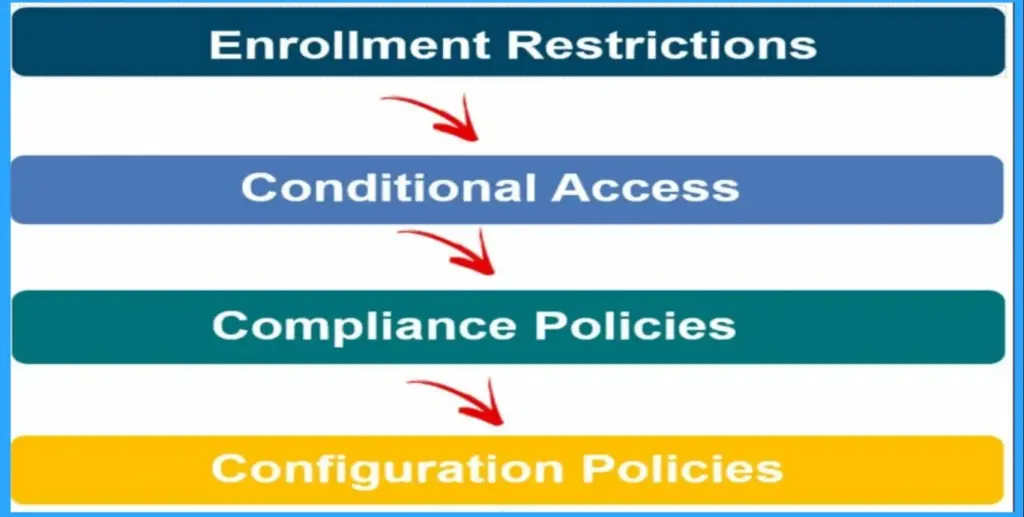
- Intune Device Health Attestation Report
- Show Hide Device Performance Health Report in Windows Security in Windows 11
- Enable Windows Devices Health Monitoring Profile Using Intune
Example Scenario of Intune Device Health Attestation
For example, say you have a compliance policy deployed that specifies the device must have a 6-digit PIN set to be termed complaint. If the device doesn’t meet the specified requirement, it will just be labelled non-compliant.
However, it won’t force the user to create it. If you want to enforce something to be implemented at the device level, you would require configuring the corresponding Device Configuration policy. Thus in other words, we can say that compliance is just an evaluation of the implementation of configuration policy at the device level. (Well, this is debatable!)

Device Health Attestation – What is it?
Here comes the rescue: the Windows Device Health Attestation (DHA), a feature released with the first version of Windows 10 (v1507 or codename TH1), ensures that the device boot phase is not compromised and that the device boots to a trusted state. DHA in itself does not secure the Windows boot process.
It is a reporting service that considers the OS boot’s conditions to prepare a report. A remote server then attests this report for trust. Based on this, a device management service like Intune can determine if the device is in the trusted state to be marked as compliant.
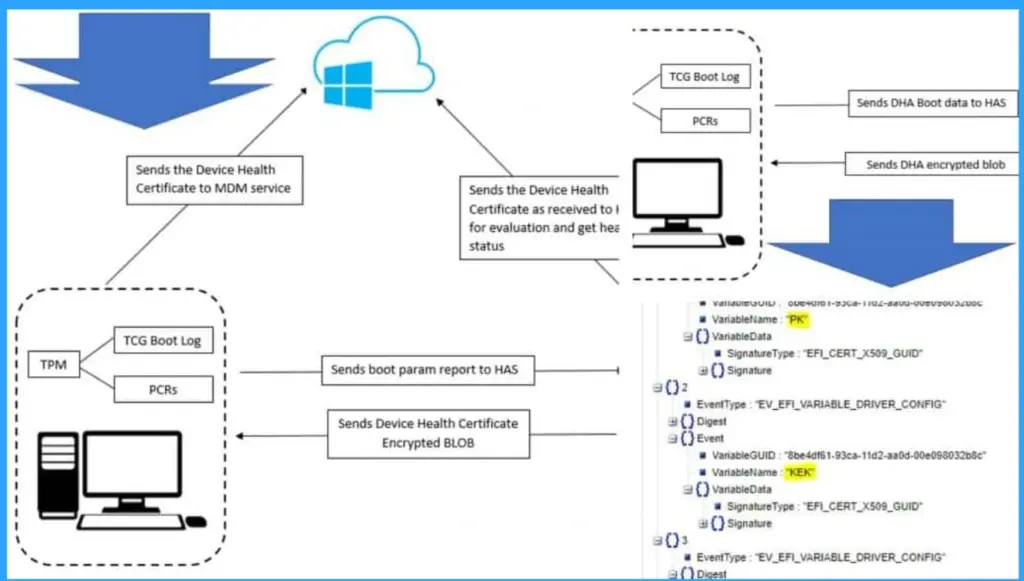
Device Health Attestation – Protocol and Implementation
DHA is a server-client protocol implemented at the device end in Windows 10 via the Device HealthAttestation-csp. It enables a device to submit the boot parameters information to a remote reporting service called Device Health Attestation Service (DHA-Service), the server-side implementation of DHA, to get an encrypted BLOB back that is cached to be made available to an MDM service provider.
The DHA protocol integrates with MS-MDM protocol framework and utilises the attestation capability of the device TPM chip. Below is an illustration of the protocol stack underlying the concept.
Windows Generalized Boot Flow – Understanding the Necessity for DHA
When we power on the device, it conducts a Power On Self-Test (POST) a diagnostic testing sequence initiated by the firmware to check its components and detect whether the system can continue to the next stage.
Based on POST evaluation, EFI initializes the hardware components. It next reads the boot information from CMOS and invokes the Windows Boot Manager, which reads the Boot Configuration Data to invoke the Windows Boot Loader. The Boot Loader, in turn, loads the OS kernel to the RAM, and the Kernel takes over from here.
- During initialization, the kernel loads all the system drivers, third-party drivers, and system files. At this point, Windows booting is complete. The in-built/third-party Anti-Malware service is started, and the Windows Login page is displayed.
- Studying the above flow lets you understand how insecure the Windows boot process is
- Due to the lack of any security measures in the above flow, it is very easy to modify the boot parameters and run malicious code during the system boot via rootkits/bootkits, which can make the system boot to an unstable state or compromise run-time security. This is a serious threat if we consider the impacts in corporate scenarios.
Device Health Attestation and Intune Compliance – Relation?
This is where Device Health Attestation and Intune integrate to offer a more secure device compliance evaluation. This provides you with the peace of mind that the devices in your organization are compliant with required security and running in a trusted device state.
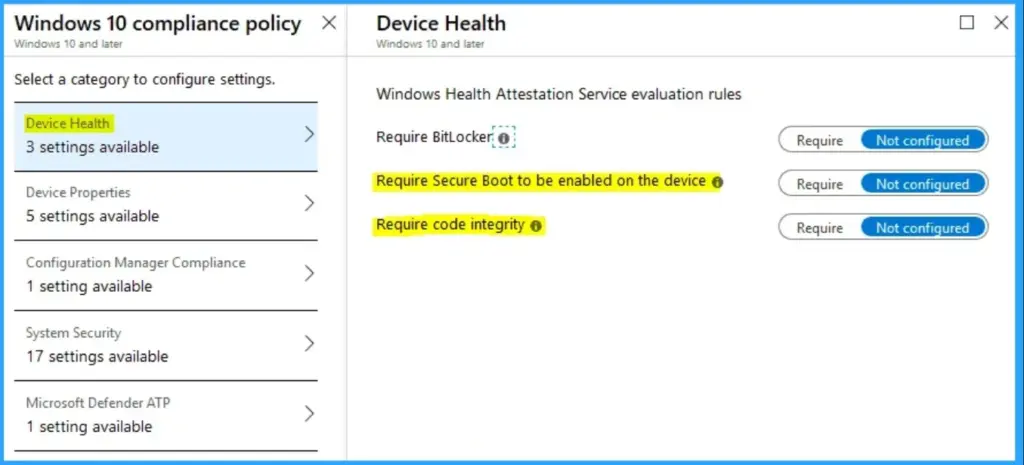
As you can see from the above snap reference, if your compliance policy requires any of the above parameters to be evaluated, this compliance evaluation will depend on the DHA service.
- Code Integrity depends on Secure Boot to work. As such, if you have only marked Code Integrity as Require but not Secure Boot at the device end, you would still need to enable the Secure Boot feature in UEFI for the device evaluation to report as a complaint.
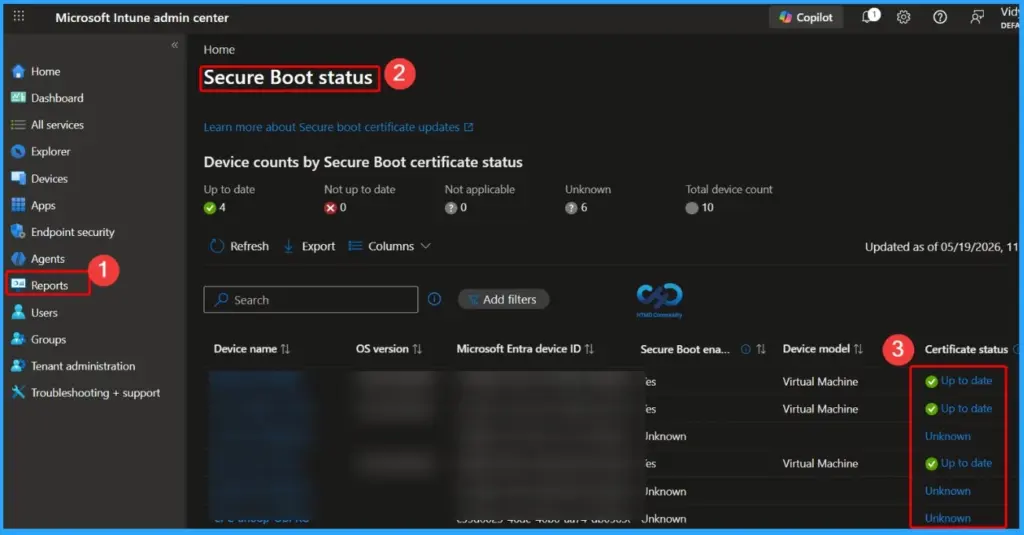
Device Health Attestation Dependency – Secure Boot?
Secure Boot is not a component of DHA, but a core dependency of it. Secure Boot is a Unified Extensible Firmware Interface (UEFI) 2.3.1 specification feature. By validating their digital signatures, it detects tampering with boot loaders, key operating system files, and unauthorized option ROMs. Detections are blocked from execution.
It is based on the Public Key Infrastructure (PKI). Through image authentication before execution, Secure Boot reduces the risk of pre-boot malware attacks such as rootkits and boot kits.
Device Health Attestation Dependency – TPM
A Trusted Platform Module (TPM) is a secure cryptoprocessor implemented in the device hardware as a discrete/integrated chip or as a firmware solution. However, from the security perspective, discrete TPM provides the highest security, which is what we refer to when we mention the TPM 1.2 or TPM 2.0 specification.
TPM contains Platform Configuration Register (PCR) banks, an essential feature that allows it to record (measure) software and hardware state cryptographically. Well, this deserves an explanation of its own…
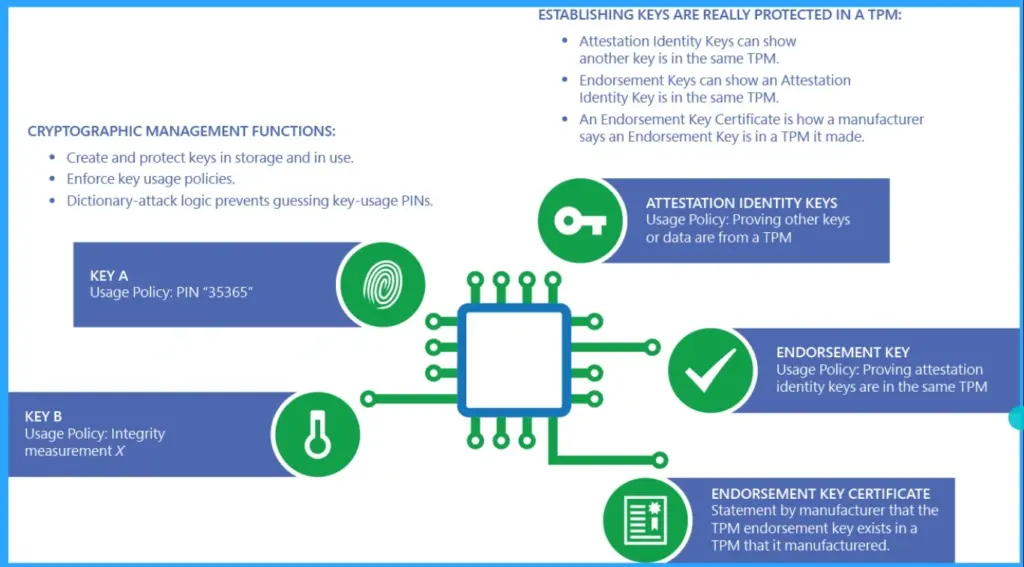
Device Health Attestation Dependency Example
Let’s say that there are three processes (code blocks) – A, B and C. This is like a trust building. C is trusted to be executed if B is trusted, and B is trusted to be executed if A is trusted. But A is the root, who will measure it for trust. Thus A becomes implicitly trusted to form the Root of Trust for Measurement (RTM).
For a device with TPM, the TPM code, usually the first code executed on the main processor, becomes the Core Root of Trust for Measurment (CRTM), implicitly trusted to bootstrap the process of building a measurement chain for subsequent attestation of other firmware and software executed on the computer system.
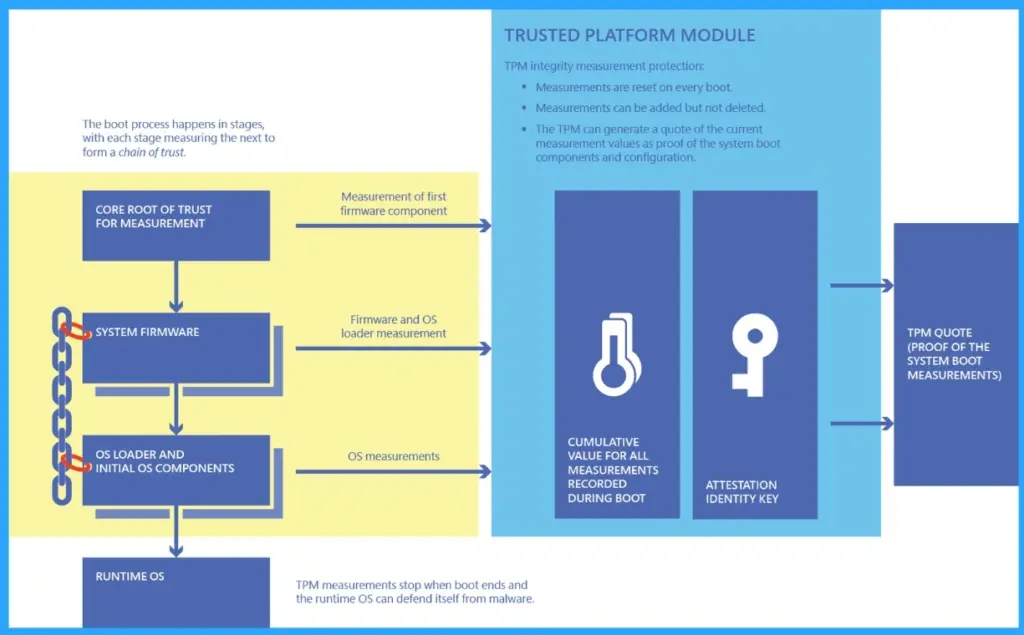
TPM Boot Measurement Process in a Nutshell
As we power on a system, CRTM initiates the measurement to measure a digitally signed module called ACM (Auth’ed Code Module) which is provided directly by the chipset manufacturer. The processor validates the signature and integrity of the signed module, and if it is valid, it starts executing it. The ACM then measures the first UEFI code module, which can make various additional measurements.
The ACM and BIOS code module measurements are extended to PCR 0. Then the BIOS measures additional components into PCRs, from PCR-0 to PCR-7, as per the TCG PC Client PCR Bank specification. Windows uses these PCR banks to measure boot parameters. The PCR 0- 7 banks have well defined values for the boot process against which the boot is measured.
- The PCR update calculation is a one-way hash. Cryptographically, a PCR value can be extended as below, but once extended can never be rolled back to the previous value.
- PCR new value = SHA Digest of (PCR old value || data to extend). Sample PCR7 contents as extracted from my system.
- These PCRs can then be read to report their state or can be signed to return a more secure report, called an attestation.
- The TPM never passes judgment on the measurements. Internally, it doesn’t know which measurements are good or bad, more or less secure.
- At the time of measurement, TPM PCRs just record values. Security or trust comes later, when a remote party asks for a signed attestation (quote) of the values and judges their trustworthiness.
- PCRs can also be used in an extended authorization policy to restrict the use of other objects. Well yes, this is going towards Bitlocker encryption as enforced from Intune.
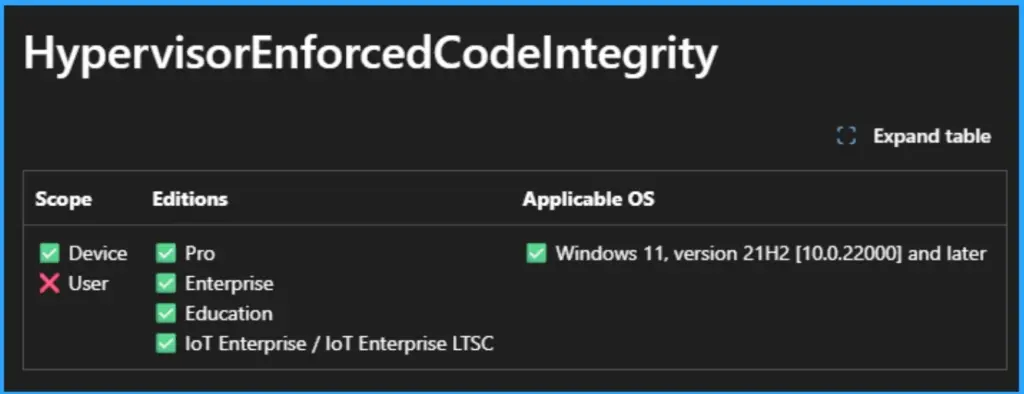
Device Health Attestation Dependency – Code Integrity
Code Integrity, implemented in Windows 10 via DeviceGuard-CSP, is the continuation of Secure Boot as it conitnues to measure driver images and any other software application as loaded by the OS kernel as the Boot phase moves from UEFI to Kernel Initialization.
It is a Virtualization-Based Security (VBS) Local Security Authority(LSA) function using Hypervisor Code Integrity (HVCI) drivers and compliant UEFI in conjunction with the Windows 10 Professional/Enterprise/Education Edition operating system.
With appropriate hardware, Device Guard can use the new virtualization-based security introduced with Windows 10 v1709 (available in Enterprise and Education desktop SKUs and in all Server SKUs) to isolate the Code Integrity service from the Microsoft Windows kernel itself. In this case, the Code Integrity service runs alongside the kernel in a Windows hypervisor-protected container.
The Device Health Attestation Service and Intune Schema Diagram
The above shows the High Level Schematic representation of the DHA service and Intune working in conjunction. Lets break it down to understand the flow in details below
| DHA Service Intune Compliance Evaluation |
|---|
| MDM service initiates the DHA Validation Session |
| DHA Service Intune Compliance Evaluation |
The MDM service sends get request to retrieve the DHA-Validation-Data |
| Device sends the requested data to MDM service |
The MDM service adds a “nonce” to the payload and forwards the DHA-Validation-Data as retrieved to Health Attestation Service |
The HAS evaluates the DHA-Validation-Data and sends DHA-Report back to MDM service |
If the device do not have the DHA-Validation-Data ready, it sends a Not Ready response to the MDM service alerting that the requested data is not available. |
| Synchronoulsy, it starts a session with the DHA service to get the data to be provided to the MDM service at later stage. |
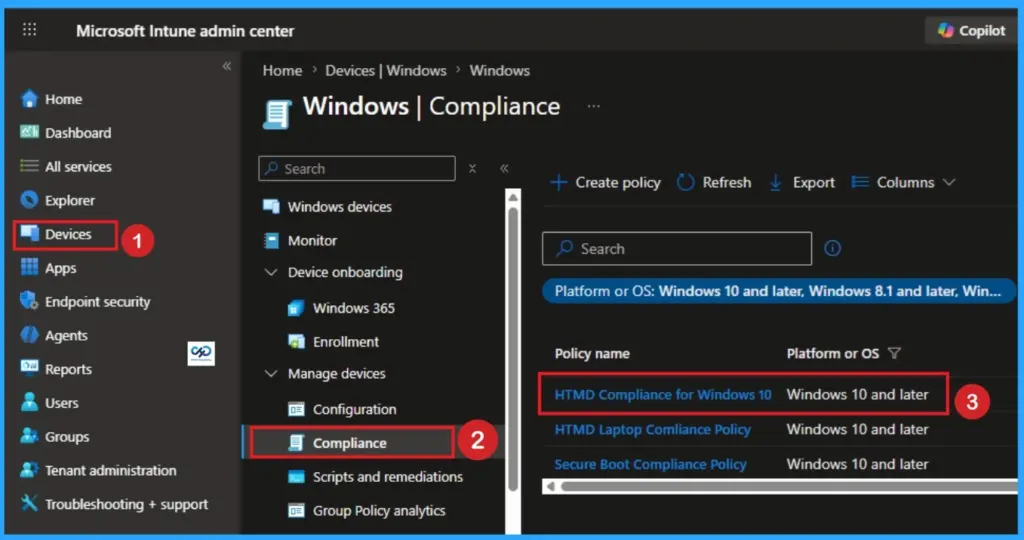
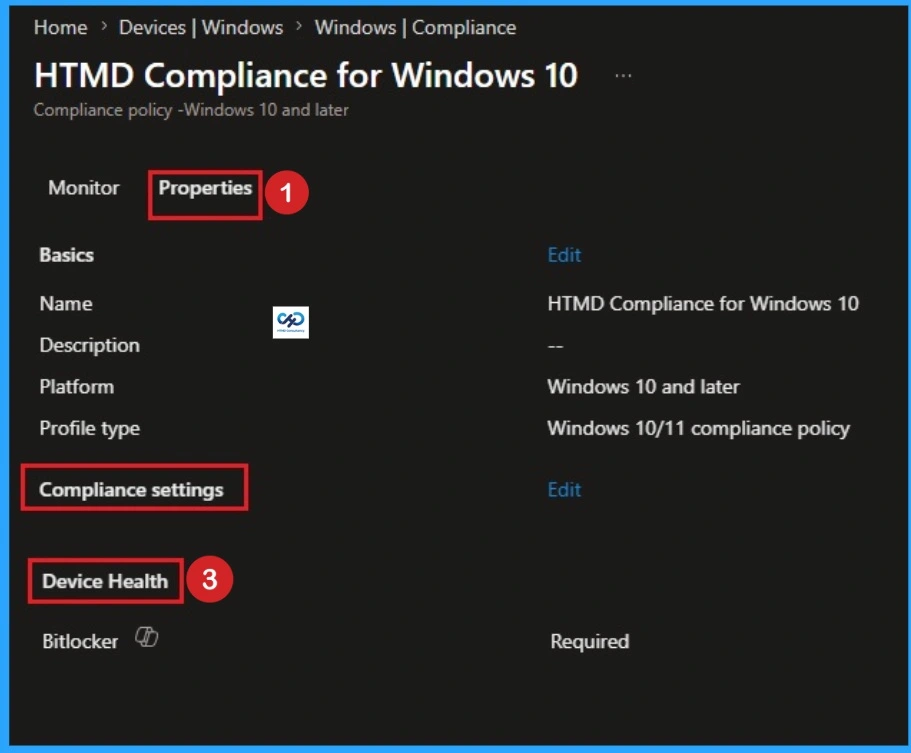
The below image shows the Compliance policy of Health Attestation in Intune. Here you can see the compliance Settings is Device Health. Look at the below screenshot.
Device – DHA Service Flow
Device sends DHA-Boot-Data to DHA Service when it boots or reboots. DHA Service returns an encrypted blob DHA-Validation-Data to the device. Note that, a device is deemed compliant by an MDM service based on the DHA-Report as obtained from DHA service. This DHA-Report is dependent on DHA-Validation-Data which the device obtains from the DHA service by sending the DHA-Boot-Data.
The DHA-Boot-Data is collected during the initial system boot. So any changes made to boot parameters post system boot won’t be captured to be sent to DHA service. As such, if any changes are made, especially when it comes to:
- Code Integrity
- Bitlocker
- Secure Boot
The end user needs to restart the system to initiate a new DHA-Boot-Data capture to be sent to the DHA Service.
DHA Report – What does it contain?
The report contains the state/status of the below device parameters. It includes AIK Present, Bit Locker Status, Boot Debugging Enabled, Boot Manager Rev List Version, Code Integrity Enabled, Code Integrity Rev List Version, DEP Policy, ELAM Driver Loaded, Issued At, Kernel Debugging Enabled, PCR, Reset Count.
And also includes Restart Count, Safe Mode Enabled, SBCP Hash, Secure Boot Enabled, Test Signing Enabled, VSM Enabled, WinPE Enabled.
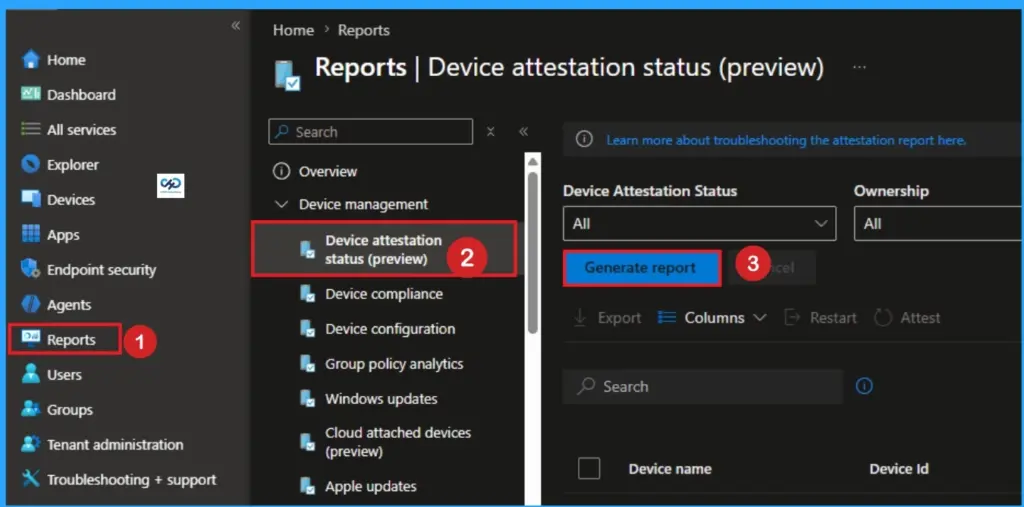
Conclusion – Understanding Device Health Attestation Intune Device Compliance Check
If you have read to this point, you should now have a better and clearer understanding of the Device Health Attestation service and its usage with Intune for compliance evaluation.
Resources
- Device Health Attestation (Microsoft Docs)
- Learn Intune Beginners Guide MDM MAM MIM
Need Further Assistance or Have Technical Questions?
Join the LinkedIn Page and Telegram group to get the latest step-by-step guides and news updates. Join our Meetup Page to participate in User group meetings. Also, join the WhatsApp Community and the Whatsapp channel to get the latest news on Microsoft Technologies. We are there on Reddit as well.l.
Author
Joymalya Basu Roy is an experienced professional in the IT services field with almost 5 years of experience working with Microsft Intune. He is currently working as a Senior Consultant – Architect with Atos India. He is an ex-MSFT where he worked as a Premiere Support Engineer for Microsoft Intune. He was also associated with Wipro and TCS in the early stages of his career. He is awarded the Microsoft MVP award for Enterprise Mobility in 2021. You can find all his latest posts on his own blog site MDM Tech Space at https://joymalya.com
Very well written !! Nice Article
Finally got time to go through it, not sure why the images are not visible but it’s itself so self-explanatory that virtual diagram can be created.
Thanks JBR.
Yes we are working on it. Thank you for the note
I have a ‘ Microsoft Corporation UEFI CA 2011 ‘ key in ‘ Authorized Signatures ‘ in the bios of a Lenovo Thinkcentre M720s desktop PC.
Would it be this which is preventing the successful Windows 10 1803 v3.0 PC build imaging?
I keep getting a task sequence error ‘ Set up BIOS ‘
The owner GUID is 77fa9abd-0359-4d32-bd60-28f4e78f784b and is a duplicate of the ‘ Microsoft Windows Production PCA 2011
Can you tell me if I can delete/ append the key safely. There is also an Export option to boot from USB.
Kind Regards
Hi Ian,
I am not an expert in OSD and Task Sequence but as I know, Windows 10 images are certified for UEFI secure boot so shouldn’t have a problem.
It may be other unsigned package which is causing you an issue, but again that will be my guess.
Can you please try to use https://forum.howtomanagedevices.com instead to get an answer.
hello, great article.
We do have a problem.
Our clients are reporting to the on prem system center server and we have set the option ‘use one premises health attestation services’ to no.
How do we change it to report to intune?
thank you
For Intune can you only get the data if a compliance policy is assigned to a device? You would run the compliance policy for a period to see what issues pop, then add the conditional access once you know what the blockers are? In a perfect world I assume you want to block first and fix later but, some clients need to be eased into things.
Hi,
I am seeing a potential issue with Secure Boot being measured by Intune with a client, so wanted to double check – is the DHA check & report done on boot, or on login please? Thanks!