
New Maintenance Windows in Intune Provide Deterministic User-Safe Update Control! IT teams face a constant challenge when managing updates. They need to keep devices secure by installing updates on time. At the same time, they must ensure that employees can work without interruptions.
If updates are installed as soon as they are released, the device becomes secure quickly, but it may restart or slow down while someone is working. If updates are delayed to avoid disturbing users, the device stays unpatched and becomes less secure.
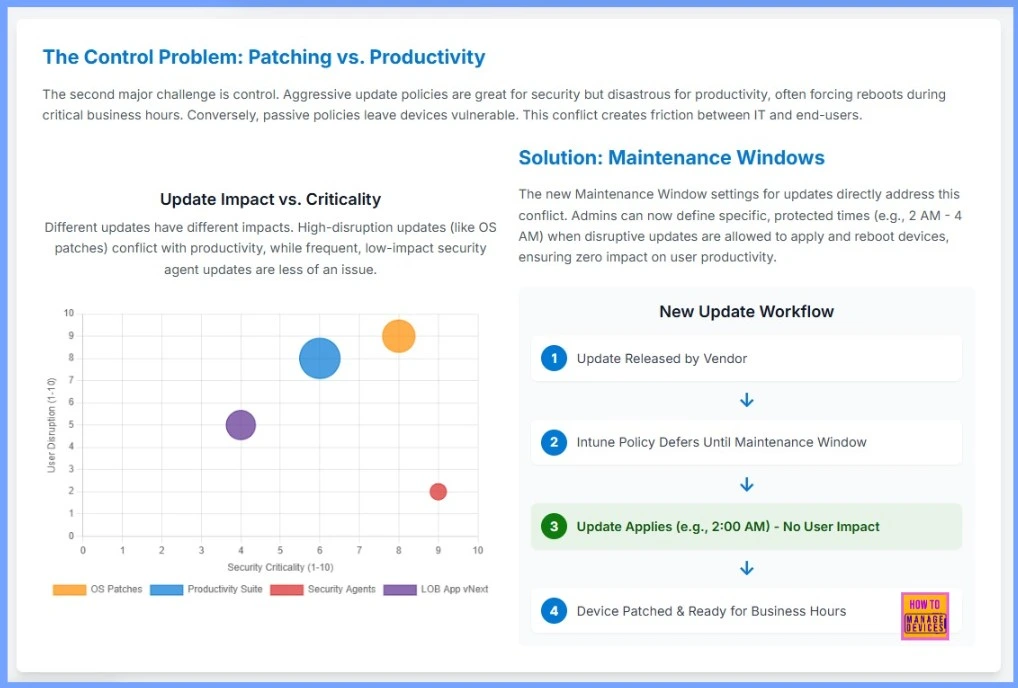
This creates an ongoing struggle between strong security and smooth user productivity. Not all updates affect users in the same way. Some updates, like operating system patches, are very important but also very disruptive. They often need a restart and can stop people from working.
Other updates, like security agent updates, are also important but do not disturb users much. Since each type of update behaves differently, IT teams cannot use one single schedule for all updates. They need a smarter and more controlled way to install them.

Table of Contents
Enable Maintenance Windows for Seamless and Secure Update Experience
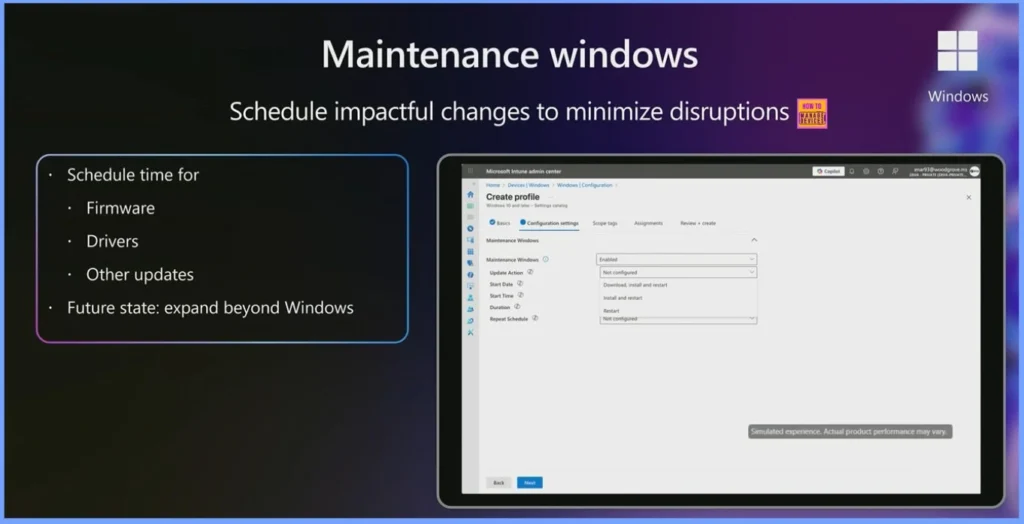
Maintenance Windows in Intune allow organizations to define a specific time during which software updates, firmware updates, and driver updates will install on devices. For example, admins can set a window between 1:00 AM and 3:00 AM, ensuring all updates are delivered during non-working hours. This helps IT maintain full control over when updates take place, avoiding surprise restarts during the workday.
By ensuring that updates run at night, IT teams prevent disruptions that would interrupt employee productivity. Users won’t have to pause their work for long waits or unexpected restarts, meaning fewer helpdesk tickets and a better overall experience. Devices remain updated without employees even noticing the process.
- Maintenance Windows also support compliance and Zero Trust requirements. Since updates are always installed on time, devices stay secure and compliant with company policies no postponement or delay.
- This balance ensures strong protection for the organization while also keeping users happy and operations smooth.
- Maintenance Windows – Schedule impactful changes to Minimize disruptions
- Future State – Expand Beyond Windows
| Schedule Time for |
|---|
| Firmware |
| Drivers |
| Other Updates |
New Maintenance Windows in Intune Provide Deterministic User-Safe Update Control
Maintenance Windows offer a simple and effective solution to the long-standing conflict between security and user productivity. With this feature, admins can set a fixed, safe time such as 2 AM to 4 AM when disruptive updates are allowed to install and reboot devices. By doing this, updates no longer interrupt users during working hours, and devices still receive important patches on time.
Intune now follows a predictable update workflow: once a vendor releases an update, Intune holds it until the next Maintenance Window, applies it automatically during the scheduled time, and ensures the device is fully patched and ready for use by the next business day. This approach gives IT teams full control and gives users a smooth, disruption-free experience.
| New Update Workflow |
|---|
| Update Released by Vendor |
| Intune Policy Defers Until Maintenance Window |
| Update Applies (e.g., 2:00 AM) – No User Impact |
| Device Patched & Ready for Business Hours |
- How Intune Inventory Gets Faster with Unified Instant App Visibility and No 7-Day Wait
- Microsoft Intune Device Inventory for Apple and Android Devices coming in April 2025
- How to use Intune Inventory to View Graphics Model Video RAM and Display Settings on Windows Devices
Projected Impact of Intune’s New Update and Inventory Improvements
Intune’s new update controls and enhanced app inventory features can significantly improve IT efficiency and device security. By removing unexpected reboots during work hours, help desk tickets related to update issues can drop dramatically, reducing user frustration and IT workload.
| Metric | Projected Impact | Description |
|---|---|---|
| Reduction in Update-Related Help Desk Tickets | 90% | Fewer forced reboots during work hours lead to lower user frustration and reduced support requests. |
| Improvement in App Security Compliance | 75% | Full app visibility allows IT to find and fix unmanaged or unpatched software, improving security posture. |

- Windows 11 Version Numbers Build Numbers Major Minor Build Rev
- Updated Windows 11 End-of-Life Dates
- Top 83 Windows 11 Desktop Admin Interview Questions
Intune Total App Inventory – Turning Unknown Shadow IT into Actionable Insights
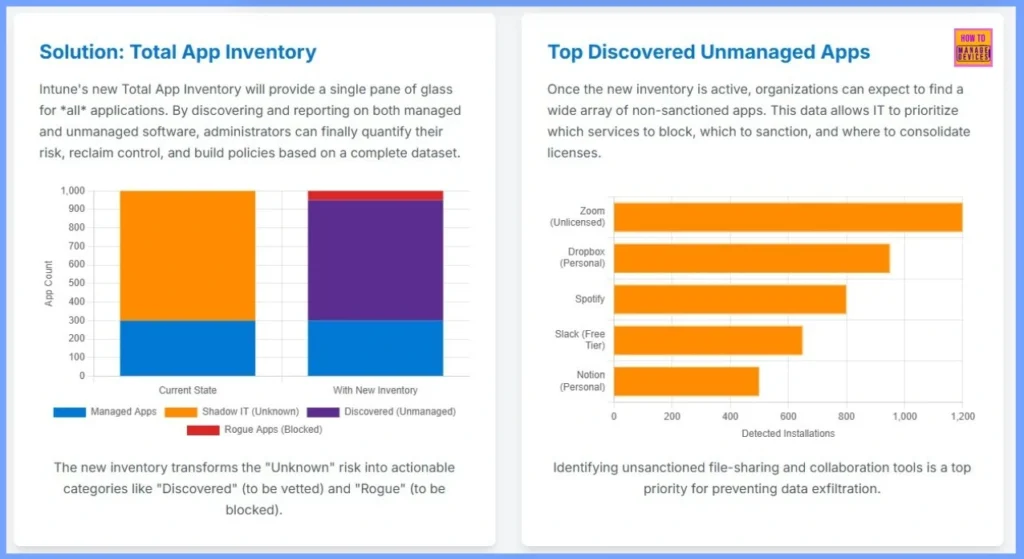
Intune’s new Total App Inventory gives IT teams a complete view of all applications managed, unmanaged, unknown, and rogue. By discovering non-sanctioned apps and categorizing them clearly, admins can assess risk, prioritize what to block or sanction, and build stronger compliance policies backed by accurate data.
| Category | Current Status | With New Inventory |
|---|---|---|
| Managed Apps | Visible | Visible |
| Shadow IT (Unknown) | High volume of unknown apps | Converted into Discovered and Rogue categories |
| Discovered (Unmanaged) | Not available | Clearly identified for vetting |
| Rogue Apps (Blocked) | Not available | Marked for blocking/quarantine |
Need Further Assistance or Have Technical Questions?
Join the LinkedIn Page and Telegram group to get the latest step-by-step guides and news updates. Join our Meetup Page to participate in User group meetings. Also, Join the WhatsApp Community to get the latest news on Microsoft Technologies. We are there on Reddit as well.
Author
Anoop C Nair has been Microsoft MVP from 2015 onwards for 10 consecutive years! He is a Workplace Solution Architect with more than 22+ years of experience in Workplace technologies. He is also a Blogger, Speaker, and Local User Group Community leader. His primary focus is on Device Management technologies like SCCM and Intune. He writes about technologies like Intune, SCCM, Windows, Cloud PC, Windows, Entra, Microsoft Security, Career, etc.