
Microsoft Entra Suite Continuous Verification and Least-Privilege Access to Protect Every Identity Across All Locations Platforms and Devices. Microsoft Entra Suite is a powerful and unified security platform designed to help organizations reach Zero Trust faster and with far less complexity.
Instead of managing multiple disconnected tools, Entra Suite brings identity, network access, and intelligence together so security decisions are consistent and automated across your environment. This gives you stronger protection with fewer gaps and less overhead.
Zero Trust is built on one main idea that never trust anything by default. Microsoft Entra Suite follows this rule by checking the identity of every person, device, or application before giving access. This means no one gets automatic entry, not even users inside the corporate network.
Entra Suite checks identities continuously, not just at the moment of login. For example, if a user logs in from a trusted location but later their behavior looks risky, Entra can block or limit access immediately. This ongoing verification makes it harder for attackers to misuse stolen credentials.

Table of Contents
Microsoft Entra Suite Continuous Verification and Least-Privilege Access to Protect Every Identity Across All Locations Platforms and Devices
The same verification applies to non-human identities like service principals and AI agents. These automated identities also access applications, APIs, and data. Entra makes sure they follow the same Zero Trust rules as human users, preventing attackers from exploiting unattended or misconfigured service accounts.
After verifying identity and checking risk signals, Entra gives only the minimum level of access required to do the job. This “least privilege” approach reduces damage even if an account is compromised. By continuously authenticating, evaluating risk, and minimizing access, Entra Suite provides a strong, consistent Zero Trust foundation across all environments.
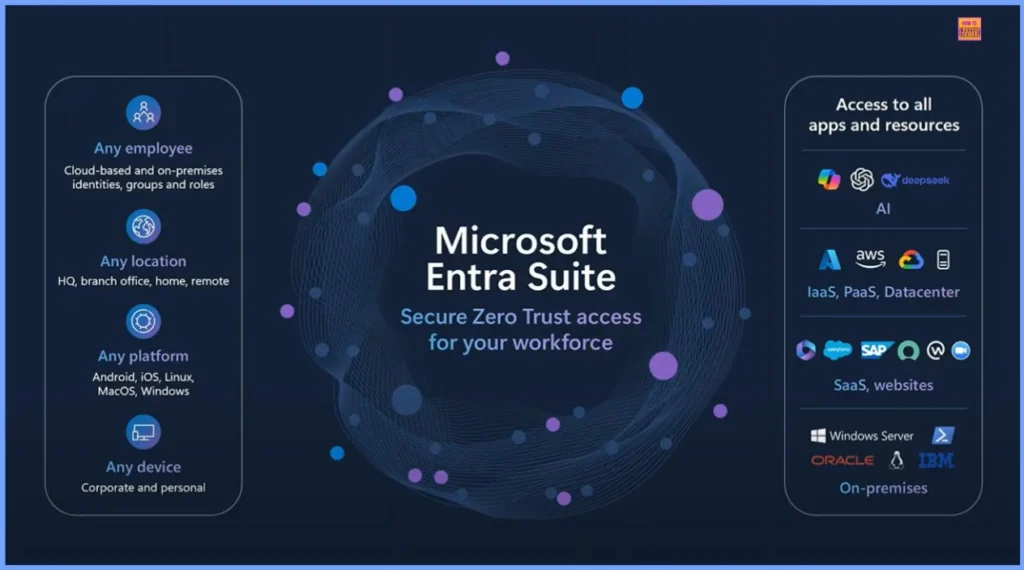
| Any Employee | Any Location | Any Platform | Any Device |
|---|---|---|---|
| Cloud-based and on-premises identities, groups and roles | HQ, branch office, home, remote | Android, iOS, Linux, MacOS, Windows | Corporate and personal |
- How Microsoft Entra ID Account Recovery Supports Users Who Lose All Authentication Methods
- Non-Human Identities and Agent Identities Gain Access Package Support with Entra Identity Governance for AI Agents
- Understanding Entra Agentic AI in Security From Manual Work to Fully Autonomous Agents
Unified Zero Trust Protection for All Apps Services and AI Tools
One of the biggest strengths of Microsoft Entra Suite is its ability to secure access to every kind of resource your organization uses SaaS applications, internal web apps, APIs, cloud workloads, and even modern AI tools. It doesn’t matter where these resources are hosted or where the user is connecting from.
Whether someone is inside the corporate network or accessing services from the public internet, Entra Suite applies the exact same Zero Trust checks, policies, and protections. This consistent enforcement ensures there are no security gaps, no weak spots, and no different rules based on location. Everything and everyone is verified and secured the same way, everywhere.
Entra Suite Combines Identity, Network, and AI to Minimize Attack Surface
By unifying identity controls, network protection, and AI-driven risk intelligence into a single platform, Microsoft Entra Suite significantly reduces the overall attack surface. Instead of relying on multiple separate tools that create gaps and inconsistencies, Entra brings everything together access governance, application security, and secure connectivity into one integrated solution.
This end-to-end simplicity helps organizations adopt Zero Trust much faster while ensuring that every access request is evaluated, verified, and secured by design. The result is stronger protection with less complexity and fewer risks.
Need Further Assistance or Have Technical Questions?
Join the LinkedIn Page and Telegram group to get the latest step-by-step guides and news updates. Join our Meetup Page to participate in User group meetings. Also, Join the WhatsApp Community to get the latest news on Microsoft Technologies. We are there on Reddit as well.
Author
Anoop C Nair has been Microsoft MVP from 2015 onwards for 10 consecutive years! He is a Workplace Solution Architect with more than 22+ years of experience in Workplace technologies. He is also a Blogger, Speaker, and Local User Group Community leader. His primary focus is on Device Management technologies like SCCM and Intune. He writes about technologies like Intune, SCCM, Windows, Cloud PC, Windows, Entra, Microsoft Security, Career, etc.