
Key Takeaways
- New Entra Device Access Profile in MS Global Secure Access
- Enables private access to selected destinations before users sign in to Windows.
- Supports first-time sign-in and authentication with credentials that are not cached on the device.
- Enables password change and reset workflows that require connectivity to a domain controller.
- Provides connectivity to domain controllers during sign-in for authentication, NTP time synchronisation, and Group Policy processing.
- Allows Windows devices to contact on-premises management services such as SCCM and WSUS during startup.
Microsoft Global Secure Access (GSA) introduces Device Access, enabling private access connectivity to selected destinations before users sign in to Windows. This lets users sign in with credentials not cached on the device, including first-time sign-ins and after password changes or resets.
Table of Content
Table of Contents
New Entra Device Access Profile in MS Global Secure Access Enables Private Connectivity Before Windows Sign-In
Device Access also supports password change and reset workflows that require connectivity to domain controllers. It allows devices to reach domain controllers during sign-in for authentication, NTP time synchronisation, and Group Policy processing. Devices can also connect to on-premises management services such as SCCM and WSUS during startup.
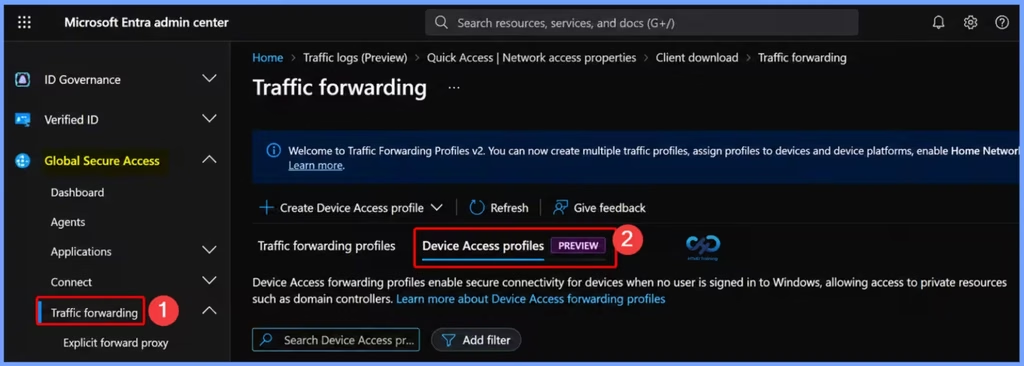
- Device Access forwarding profiles enable secure connectivity for devices when no user is signed in to Windows, allowing access to private resources such as domain controllers
- Device Access Support: Version 2.35.136 (Preview) introduces support for Device Access in pre-logon scenarios.
| Steps |
|---|
| Sign in to the Microsoft Entra admin center |
| Navigate to Global Secure Access. |
| Expand Connect. |
| Select Traffic forwarding. |
| Open the Device Access profiles tab. |
- Microsoft Entra Global Secure Access Adds BYOD Support Using Entra Registered Devices
- Expansion of Entra Global Secure Access Advanced Threat Protection
- Entra Source IP Anchoring with Global Secure Access to Improve the Security Management of SaaS Apps
- Microsoft Entra Enhances Security with New AI face Check Feature
Need Further Assistance or Have Technical Questions?
Join the LinkedIn Page and Telegram group to get the latest step-by-step guides and news updates. Join our Meetup Page to participate in User group meetings. Also, join the WhatsApp Community and the Whatsapp channel to get the latest news on Microsoft Technologies. We are there on Reddit as well.
Author
Anoop C Nair is Workplace Technology solution architect with 25+ years of experience in global enterprise organizations such as JP Morgan, Capgemini, etc. He is Microsoft Certified Trainer. Microsoft MVP from 2015 onwards for consecutive 11 years! He also conducts Intune and modern workplace tech training for enterprise organizations. He is Blogger, Speaker, and Founder of HTMD Community and HTMD Conference. His focus is on Device Management technologies such as Intune, Windows, Cloud PC. He writes about technologies like Intune, SCCM, Windows, Cloud PC, Windows, Entra, Microsoft Security.