
Enable Continuous Access Evaluation CAE and Intelligent Controls Feature for MS Entra Suite Conditional Access! Microsoft is advancing Conditional Access by integrating Continuous Access Evaluation (CAE) and expanding security controls across every user, location, platform, and device.
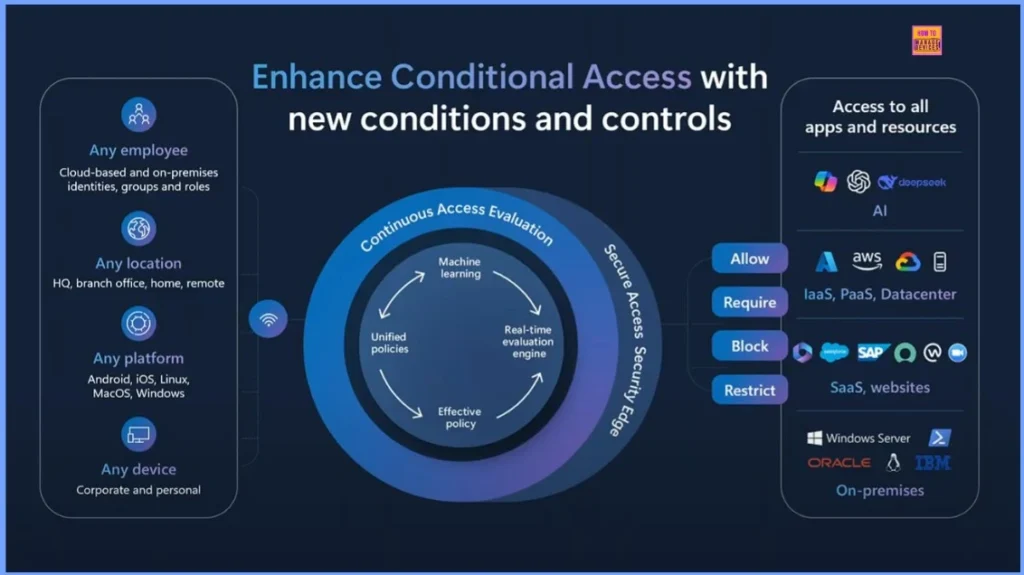
CAE uses machine learning, unified policies, and a real-time evaluation engine to ensure secure, uninterrupted access while instantly responding to risk signals. With the Secure Access Security Edge, organizations can apply dynamic controls Allow, Require, Block, or Restrictacross AI apps, SaaS, IaaS, PaaS, data centers, and on-premises environments.
This unified approach removes security gaps, simplifies policy management, and delivers end-to-end protection for the modern workforce. Microsoft Entra Suite brings identity protection and conditional access into a single unified system.
Traditionally, once a user authenticates, their token remains valid for long periods even an hour or more. This becomes dangerous in real-world scenarios. If something changes (user risk spikes, device becomes unsafe, or location changes), the token still works. CAE solves this by re-evaluating access continuously so risks are caught instantly. Continuous Access Evaluation (CAE) is a security capability in Microsoft Entra that ensures user access is evaluated continuously, not just at sign-in.

Table of Contents
MS Entra Suite Enhances Conditional Access with Continuous Access Evaluation CAE and Intelligent New Controls
A key advantage of Entra Suite is the unified policy engine. Instead of having multiple tools with different policies, teams get a single pane of glass to manage identity, access, and network controls. This removes fragmentation, simplifies operations, and ensures consistent enforcement across the entire organization.
Ultimately, Entra Suite delivers stronger security and higher assurance for every employee. With continuous verification, risk-based decisions, and real-time policy enforcement, your workforce can access resources securely from any device or location. The result is safer operations with reduced risk powered by always-on identity intelligence.
- Universal Coverage
- Any employee
- Any location
- Any platform
- Any device
- Continuous Access Evaluation (CAE) Components
- Machine learning-driven risk analysis
- Real-time policy evaluation
- Unified policies
- Effective policy execution
- Security Controls
- Allow access
- Require MFA/compliant device
- Block unsafe access
- Restrict session behavior
- Supported Resources
- AI applications
- Azure, AWS, GCP (IaaS, PaaS, Datacenter)
- SaaS apps like Salesforce, ServiceNow, SAP
- Websites
- On-premises servers (Windows Server, Oracle, IBM)
| Category | Details |
|---|---|
| User Scope | Any employee – cloud or on-prem identities, groups, roles |
| Location Scope | HQ, branch office, home, remote |
| Platform Support | Android, iOS, Linux, macOS, Windows |
| Device Support | Corporate and personal devices |
| Core Engine | Machine learning, real-time evaluation engine, unified policies, effective policy enforcement |
| Security Model | Continuous Access Evaluation + Secure Access Security Edge |
| Access Decisions | Allow, Require, Block, Restrict |
| Protected Workloads | AI, IaaS, PaaS, Datacenter, SaaS apps, websites, on-premises workloads |
- 3 Layers of Protection in Entra Internet Access Network Identity and AI Security
- Non-Human Identities and Agent Identities Gain Access Package Support with Entra Identity Governance for AI Agents
- Setup Risk-Based Conditional Access for Entra Agents to Automatically Protect against Compromised Agents
- How to Manage Agents through Microsoft Entra Agent ID Interface for Security and Zero Trust Enforcement
Need Further Assistance or Have Technical Questions?
Join the LinkedIn Page and Telegram group to get the latest step-by-step guides and news updates. Join our Meetup Page to participate in User group meetings. Also, Join the WhatsApp Community to get the latest news on Microsoft Technologies. We are there on Reddit as well.
Author
Anoop C Nair has been Microsoft MVP from 2015 onwards for 10 consecutive years! He is a Workplace Solution Architect with more than 22+ years of experience in Workplace technologies. He is also a Blogger, Speaker, and Local User Group Community leader. His primary focus is on Device Management technologies like SCCM and Intune. He writes about technologies like Intune, SCCM, Windows, Cloud PC, Windows, Entra, Microsoft Security, Career, etc.