
Key Takeaways:
- Biggest Opportunity Areas for AI Impact
- AI-driven phased deployments and maintenance
- AI Reduces manual effort, shortens resolution time
- Smarter packaging, pilot feedback analysis with AI workflows
Let’s discuss How AI Workflows in Intune Reduce Risks in Update Management Caused by Deployment and Compliance Challenges. With qualitative research of Microsoft o how IT admins view AI in endpoint management, they identified four workflows where AI can make the biggest impact.
Table of Contents
Table of Contents
How AI Workflows in Intune Reduce Risks in Update Management Caused by Deployment and Compliance Challenges
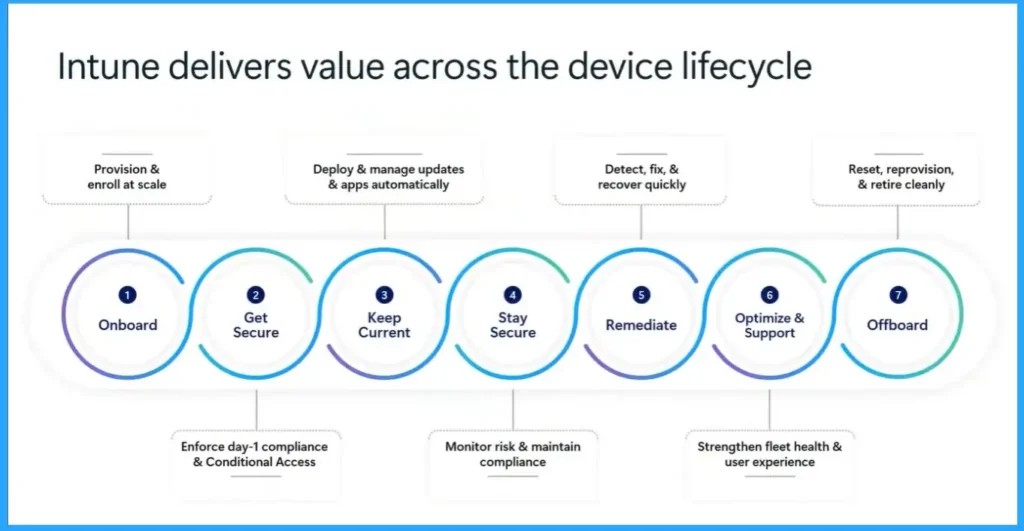
This is the fleet management lifecycle at Microsoft Ignite and how Intune delivers value acroos the platform. The research used in this lifecycle is to frame the various workflows and explore their pain points during research process. This include staying current workflow for managing OS updates, firmware updates and driver updates.
As well as the workflow of deployning an application from the start to finish. Policy management as the workflow to get and stay compliant and troubleshooting an incident response to optimize and support end users is the workflow when the device issue is reported from the moment you here about it to the resolution.
- Simplifying Windows Update Management Integration of Intune and Autopatch
- 3 Categories of Enterprise Windows Update Management Capabilities | Autopatch Reports WUfB and Tenant Mgmt
- Copilot Enhances Troubleshooting using Intune and Device Query to Resolve Missing Patches
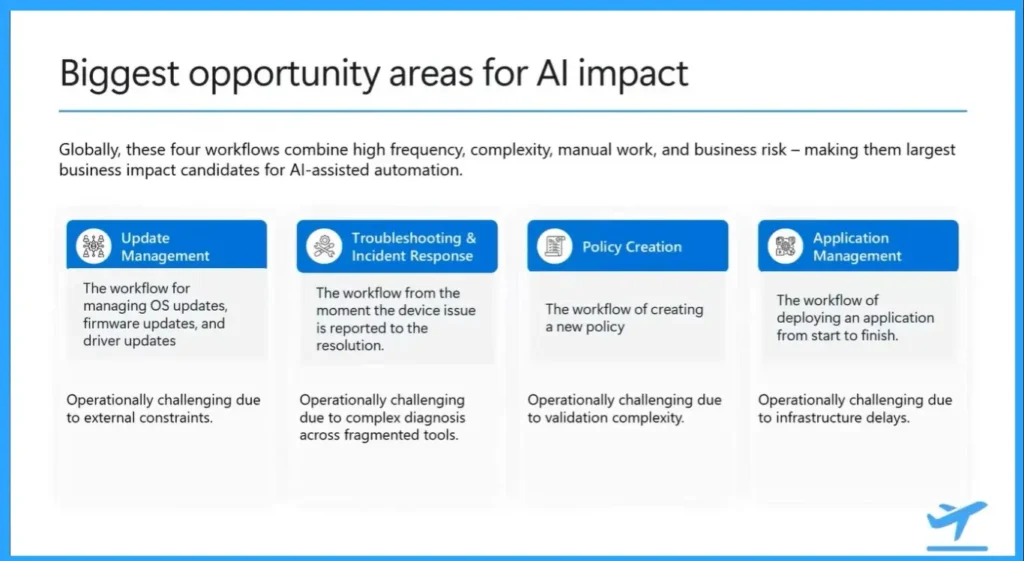
As per the research, Microsoft realised that, admins don’t want “AI-first” hype they want fewer manual steps, faster resolution, and reduced risk. These are the Admins most open to AI help. They have the strongest AI pull because they have frequent risky, manual and complex. The 4 AI Workflows are shown on the below table.

| 4 AI Workflows in Intune |
|---|
| Update management |
| Troubleshooting |
| Policy management |
| App deployment |
Update Management
Among thoseUpdate Management came through as the biggest opportunity beacuse it is frequent, high risk, and still require manual work. The workflow for managing OS updates, firmware updates, and driver updates. Operationally challenging due to external constraints.
Troubleshooting
The workflow from the moment the device issue is reported to the resolution. Operationally challenging due to complex diagnosis across fragmented tools.
Policy Management
The workflow of creating a new policy. Operationally challenging due to validation complexity. Policy Management Ensure devices remain compliant, secure, and aligned with organizational standards.
App Deployment
The workflow of deploying an application from start to finish. Operationally challenging due to infrastructure delays. With this workflow Deliver business-critical apps reliably to end users.
Need Further Assistance or Have Technical Questions?
Join the LinkedIn Page and Telegram group to get the latest step-by-step guides and news updates. Join our Meetup Page to participate in User group meetings. Also, join the WhatsApp Community and the Whatsapp channel to get the latest news on Microsoft Technologies. We are there on Reddit as well.
Author
Anoop C Nair has been Microsoft MVP for 10 consecutive years from 2015 onwards. He is a Workplace Solution Architect with more than 22+ years of experience in Workplace technologies. He is a Blogger, Speaker, and Local User Group Community leader. His primary focus is on Device Management technologies like SCCM and Intune. He writes about technologies like Intune, SCCM, Windows, Cloud PC, Windows, Entra, Microsoft Security, Career, etc.
We have an Android Glass device which showing compliance in Intune, however, when users access the application via Chrome. User access block due to non-compliance.
Glass devices have limited access to installing apps. Can you suggest steps or any KB glass deivces