
Key Takeaways
- The report shows all devices, their enrollment status, and update methods in one place.
- It helps identify missing or unmanaged devices to keep device counts accurate.
- Readiness checks detect and resolve update blockers before deployment.
- Early issue detection ensures smoother and more reliable updates.
Hey, let’s discuss about Windows Autopatch Management Status Report and Update Readiness Checkup.
The Windows Autopatch management status report provides a comprehensive, tenant-wide view of all devices managed through Intune, including their enrollment status and update management methods.
Table of Contents
Table of Contents
Windows Autopatch Management Status Report and Update Readiness Checkup
By consolidating this information into a single, unified report, it eliminates confusion around device counts and helps organizations identify any missing or unmanaged machines. This centralized visibility gives administrators a reliable single source of truth, reducing compliance risks and finally resolving the common question of how many devices are actually in the environment.
- Microsoft Expands Windows Autopatch with Quick Machine Recovery Controls
- How Windows Autopatch Adds Reader and Administrator RBAC Roles in Intune
- Guided Scenario Wizards Removed from MS Intune only Windows 365 Boot Remains Active
Update Readiness Checkup
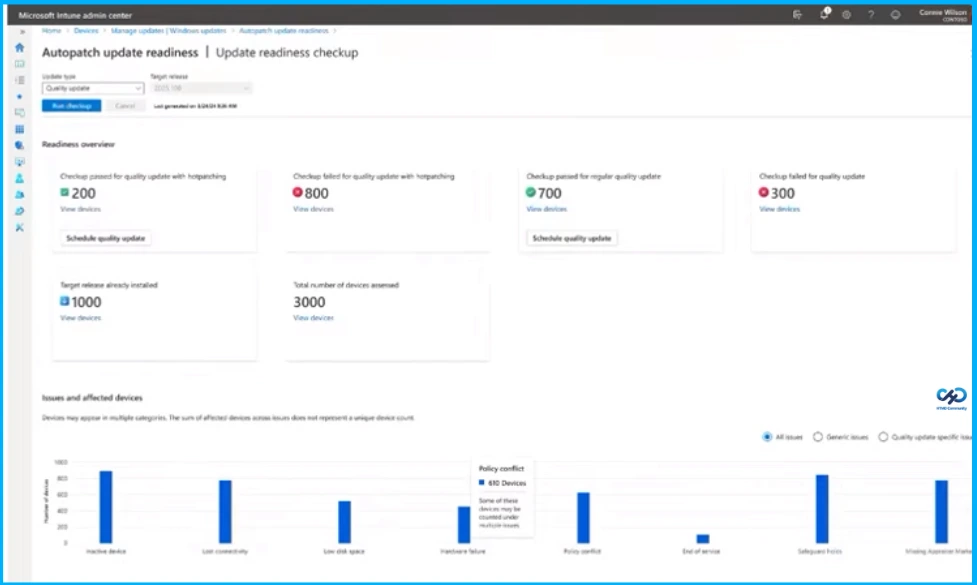
The Update Readiness checkup helps organizations address update failures caused by hidden prerequisites by running readiness checks across all devices. It provides clear pass or fail insights, highlights the reasons behind issues, and allows admins to export lists for remediation before deployment. By identifying and resolving blockers early, these checks reduce user disruption and eliminate repetitive troubleshooting work, ensuring a smoother and more reliable update rollout.
Quality Update Journey
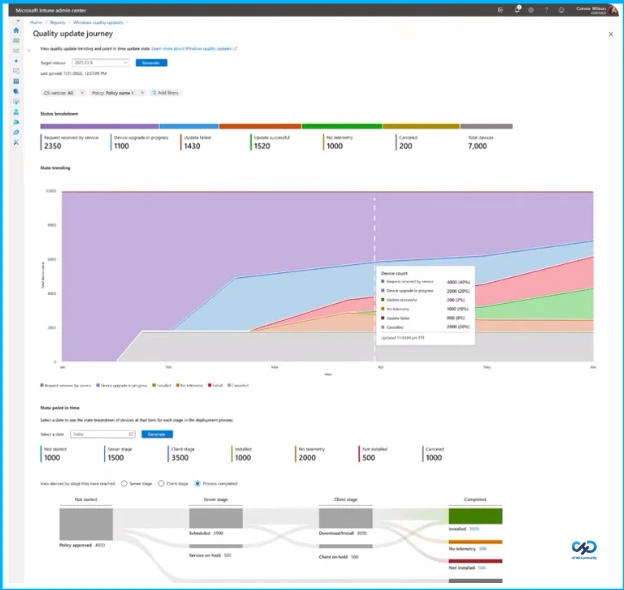
The Quality update journey helps administrators understand why some devices get stuck and where updates stall by providing granular journey states and per-device timelines. This detailed visibility pinpoints the exact step where each device encounters issues, enabling targeted and efficient fixes. By offering clear status insights and device-specific timelines, it empowers admins to quickly diagnose and resolve problems, reducing troubleshooting time from days to just minutes.

Update Readiness Delivers
Update readiness helps ensure updates run smoothly by identifying issues early, showing exactly where devices are in the process, and providing clear alerts to fix problems quickly.
| Feature | Description |
|---|---|
| Proactive issue prevention | Readiness checks and device journey mapping catch blockers before rollout, so updates succeed the first time |
| Full transparency | See exactly where devices are in the update process, what’s blocking them, and what actions are needed. No more guesswork |
| Actionable alerts | Targeted, prioritized notifications guide IT to resolve issues quickly, with built-in remediation flows for common blockers |
| Seamless integration | All features are additive to Windows Autopatch, with no changes needed to your existing workflows |
Need Further Assistance or Have Technical Questions?
Join the LinkedIn Page and Telegram group to get the latest step-by-step guides and news updates. Join our Meetup Page to participate in User group meetings. Also, join the WhatsApp Community and the Whatsapp channel to get the latest news on Microsoft Technologies. We are there on Reddit as well.
Author
Anoop C Nair is a Workplace Technology solution architect with 25+ years of experience. Microsoft Certified Trainer. Microsoft MVP from 2015 onwards for consecutive 11+ years! He is a blogger, Speaker, and Founder of HTMD Community and HTMD Conference. His main focus is on Device Management technologies like Intune, Windows, and Cloud PC. He writes about technologies like Intune, SCCM, Windows, Cloud PC, Entra, and Microsoft Security.