
Key Takeaways
- Windows 11 23H2 Enterprise and Education editions will reach the end of updates.
- The November 2026 Windows security update will be the last update for these editions.
- After the end-of-updates date, these devices will no longer receive monthly security updates to protect against the latest threats.
- Microsoft recommends upgrading eligible devices to a supported version of Windows 11.
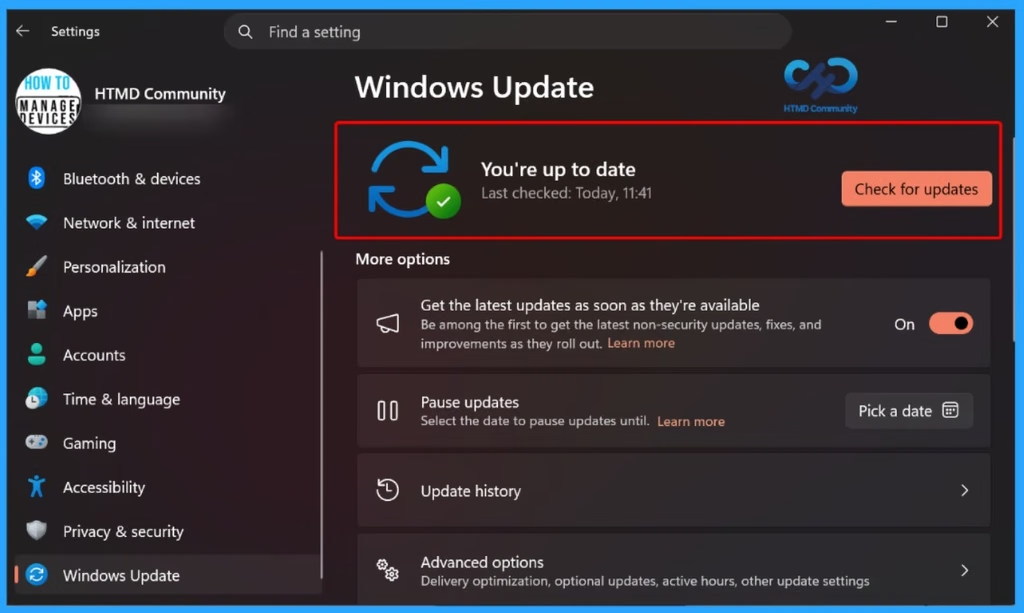
- Go to Settings > Windows Update > Check for updates. If an upgrade is available, select Download and install.
Windows 11, version 23H2 Enterprise and Education editions will reach end of updates on November 10, 2026. The November 2026 security update will be the final monthly security update available for these editions. After this date, devices running Windows 11 23H2 will no longer receive monthly security updates to protect against the latest security threats.
Table of Content
Table of Contents
Windows 11 23H2 Enterprise and Education | End of Security Updates and Upgrade Recommendations
Microsoft recommends upgrading eligible devices to a supported version of Windows 11 to maintain security and compliance. IT administrators should assess the devices currently running Windows 11 23H2, plan the upgrade process, and ensure that devices are migrated to a supported version before the end-of-updates deadline. If you have an eligible device, you can check if an update to a supported version of Windows is available by selecting the following.
| Steps |
|---|
| Go to Settings > Windows Update. |
| Select Check for updates to see if an update is available. |
| If your device is eligible and the update is available, select Download and install. |
- How to Check Your Windows 11 Edition
- Easy Methods to Know the Version of Installed Apps in Windows 11
Windows 11 Versions and Support End Dates
Microsoft provides different support timelines for each Windows 11 version. The table shows the start and end dates for versions 21H2 through 26H2. IT administrators should check their organization’s Windows version and plan upgrades before the support end date to maintain security and receive updates.
Read More – Updated Windows 11 Version Numbers Build Numbers Major Minor Build Rev

| Version | Start Date | End Date |
|---|---|---|
| Version 26H2 | Sep 28, 2026 | Oct 8, 2029 |
| Version 26H1 | Feb 9, 2026 | Mar 13, 2029 |
| Version 25H2 | Sep 29, 2025 | Oct 10, 2028 |
| Version 24H2 | Sep 30, 2024 | Oct 12, 2027 |
| Version 23H2 | Oct 30, 2023 | Nov 10, 2026 |
| Version 22H2 | Sep 19, 2022 | Oct 14, 2025 |
| Version 21H2 | Oct 3, 2021 | Oct 8, 2024 |
Recommended Upgrade Path for Windows 11 23H2
Microsoft recommends upgrading eligible Windows 11 23H2 Enterprise and Education devices to Windows 11 version 25H2 before support ends. Windows 11 25H2 Enterprise and Education editions are scheduled to receive updates until October 11, 2028. Although newer versions are available, administrators should follow Microsoft’s specific upgrade guidance and check device compatibility before planning the rollout.
Resources
Windows 11 – release information | Microsoft Learn
Windows 11 Enterprise and Education – Microsoft Lifecycle | Microsoft Learn
Need Further Assistance or Have Technical Questions?
Join the LinkedIn Page and Telegram group to get the latest step-by-step guides and news updates. Join our Meetup Page to participate in User group meetings. Also, join the WhatsApp Community and the Whatsapp channel to get the latest news on Microsoft Technologies. We are there on Reddit as well.
Author
Anoop C Nair is Workplace Technology solution architect with 25+ years of experience in global enterprise organizations such as JP Morgan, Capgemini, etc. He is Microsoft Certified Trainer. Microsoft MVP from 2015 onwards for consecutive 11 years! He also conducts Intune and modern workplace tech training for enterprise organizations. He is Blogger, Speaker, and Founder of HTMD Community and HTMD Conference. His focus is on Device Management technologies such as Intune, Windows, Cloud PC. He writes about technologies like Intune, SCCM, Windows, Cloud PC, Windows, Entra, Microsoft Security.