

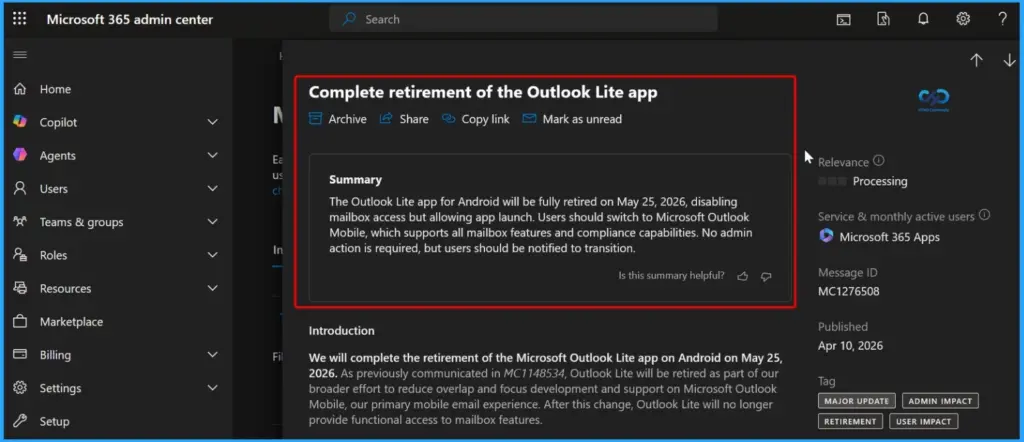
- Outlook Lite will be officially retired on May 25, 2026.
- After retirement, users can no longer access email, calendar, or attachments in the Lite app.
- Microsoft discontinued new downloads back in October 2025.
- Users must switch to the full Microsoft Outlook app to continue using services.
Microsoft Retires Outlook Lite for Android by May 2026! Organisations using Outlook Lite on Android will be affected after May 25, 2026. Users can still open the app, but they cannot access their mailbox, and the app will not work properly. This change will not delete user accounts, and all emails, calendar items, and attachments will still be safe. Users can access everything by signing in to the full Microsoft Outlook app. There is also no impact on tenant settings, policies, or services.
Table of Content
Table of Contents
Will this Change Affect My Data?
Yes. You can’t access data in Outlook Lite anymore, but all your emails and files are safe and available in Microsoft Outlook.
What about Purview Features?
Outlook Lite doesn’t support them, but Microsoft Outlook Mobile does.
Can Users Still Manage their Personal Data?
Yes. You can access and manage your data using Microsoft Outlook Mobile.

Can Admins Still Control Access?
Yes. Admins can manage users using Microsoft Entra ID and policies.
Can Users Install or Remove the App?
Yes. Users can install or uninstall Microsoft Outlook Mobile anytime from the Play Store.
Microsoft Retires Outlook Lite for Android by May 2026
No admin action is needed. Just inform users who are using Outlook Lite that it will be retired soon. Ask them to install and sign in to Microsoft Outlook from the Play Store. Also, update any internal documents if they mention Outlook Lite.
| Outlook Lite for Android | Details |
|---|---|
| Retirement Date | Outlook Lite will be retired on May 25, 2026 |
| App Behavior | Users can open the app, but mailbox access will be disabled |
| User Action | Users should switch to Microsoft Outlook |
| Features Support | Outlook Mobile supports full mailbox and compliance features |
| Message ID | MC1276508 |
- New MAM Security Rules in Microsoft Intune Impact Outlook and Teams Access
- 5 Days Pass to Use Microsoft 365 Apps Outlook Word Excel PowerPoint
- How to Manage Outlook Out of Office Settings using Microsoft Graph API and PowerShell- A Complete Automation Guide
- Best way to Fix Classic Outlook Crashes using Intune PowerShell Remediation Script
Resources
Outlook for iOS and Android Quick Start | Microsoft Support
Outlook for iOS & Android FAQ | Microsoft Support
Need Further Assistance or Have Technical Questions?
Join the LinkedIn Page and Telegram group to get the latest step-by-step guides and news updates. Join our Meetup Page to participate in User group meetings. Also, Join the WhatsApp Community and WhatsApp Channel to get the latest news on Microsoft Technologies. We are there on Reddit as well.
Author
Anoop C Nair has been Microsoft MVP from 2015 onwards for 10 consecutive years! He is a Workplace Solution Architect with more than 22+ years of experience in Workplace technologies. He is also a Blogger, Speaker, and Local User Group Community leader. His primary focus is on Device Management technologies like SCCM and Intune. He writes about technologies like Intune, SCCM, Windows, Cloud PC, Windows, Entra, Microsoft Security, Career, etc