
Key Takeaways:
- Bulk eSIM Activation and Removal for Corporate-Owned Android Devices
- Activate eSIMs on up to 100 selected devices running Android 15 or Later
- Prerequisites of Bulk eSIM Activation
- Remove an eSIM from one device
Let’s discuss about Microsoft Intune Introduces Bulk eSIM Activation and Removal for Corporate-Owned Android Devices. Microsoft brings the support of ulk eSIM actions for corporate-owned Android Enterprise devices in Intune. With this feature you can activate eSIMs on up to 100 selected devices running Android 15 or later by using a carrier activation server URL.
Table of Contents
Table of Contents
Microsoft Intune Introduces Bulk eSIM Activation and Removal for Corporate-Owned Android Devices
Microsoft Intune allows IT administrators to remotely activate, manage, and provision cellular data plans via Bulk eSIM activation for multiple corporate-owned Android devices simultaneously, without needing physical SIM cards.
As you know that, traditionally setting up cellular connectivity on enterprise mobiles required inserting physical plastic SIM cards into each device or manually configuring them one by one. With native eSIM support integrated into Microsoft Intune and Android Enterprise, administrators can handle cellular deployment at scale directly from the cloud admin center.
- Evolution of Android Management for Enterprise Use | Deep Dive with Joy
- Understanding Android Management with Intune | Android Enterprise
- Outlook for iOS and Android to Enhanced Email Signatures with OneDrive Image Support
Bulk eSIM Activation
Bulk activation of eSIM is available only in the updated bulk device actions experience. When you bulk wipe supported devices, Intune preserves eSIM data plans by default. You can select the option to remove eSIMs when the wipe should also remove the data plans. Personally owned Android Enterprise work profile devices aren’t supported. The following are the applied devices of this feature.

- Android Enterprise corporate-owned fully managed devices (COBO)
- Android Enterprise corporate-owned dedicated devices (COSU)
- Android Enterprise corporate-owned devices with a work profile (COPE)
Prerequisites of Bulk eSIM Activation
This is possible by meeting some Prerequisites. Android Enterprise eSIM actions support corporate-owned devices only. Personally owned devices with a work profile (BYOD) aren’t supported. The following are some Prerequisites of Bulk eSIM Activation.
| Action | Corporate-owned fully managed (COBO) | Corporate-owned dedicated (COSU) | Corporate-owned work profile (COPE) |
|---|---|---|---|
| Activate an eSIM on one device | Android 15 or later | Android 15 or later | Android 15 or later |
| Activate eSIMs on multiple devices | Android 15 or later | Android 15 or later | Android 15 or later |
| Remove an eSIM from one device | Android 15 or later | Android 15 or later | Android 17 or later |
Bulk eSIM Activation on one Android Enterprise Device
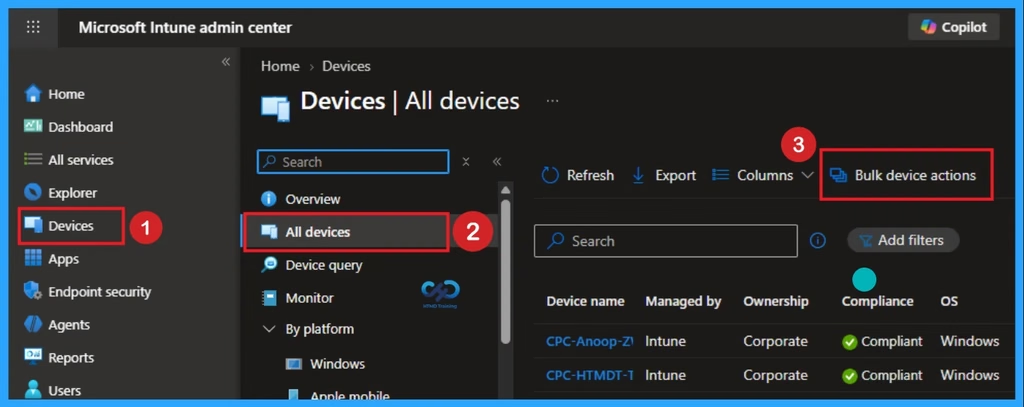
In the Microsoft Intune admin center, select Devices > All devices. Then go to Bulk action you can activate eSIMs on up to 100 selected devices running Android 15 or later. Look at the below action.
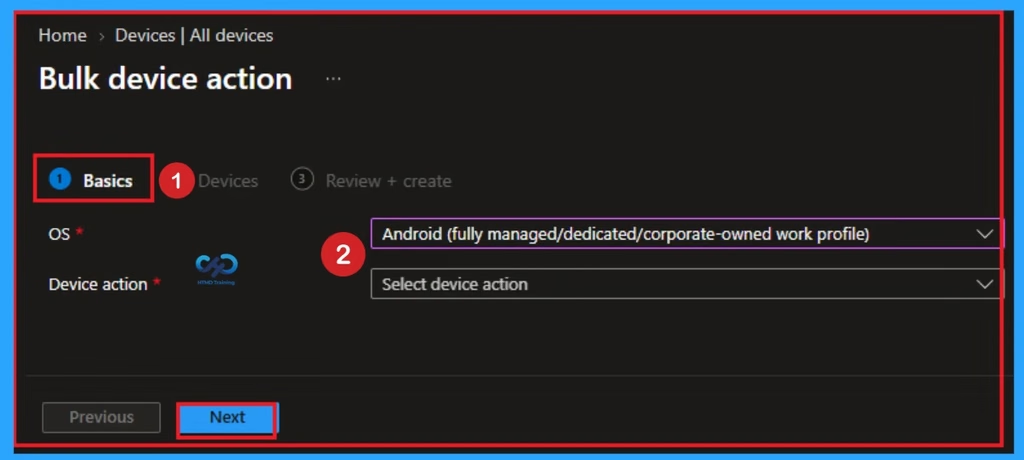
Set Preview new device view to On, and then select a supported Android Enterprise device. At the top of the device overview pane, select Activate eSIM. Enter the carrier-provided activation code, and confirm the action.
Need Further Assistance or Have Technical Questions?
Join the LinkedIn Page and Telegram group to get the latest step-by-step guides and news updates. Join our Meetup Page to participate in User group meetings. Also, join the WhatsApp Community and the WhatsApp channel to get the latest news on Microsoft Technologies. We are there on Reddit as well.
Author
Anoop C Nair is Workplace Technology solution architect with 25+ years of experience in global enterprise organizations such as JP Morgan, Capgemini, etc. He is Microsoft Certified Trainer. Microsoft MVP from 2015 onwards for consecutive 11 years! He also conducts Intune and modern workplace tech training for enterprise organizations. He is Blogger, Speaker, and Founder of HTMD Community and HTMD Conference. His focus is on Device Management technologies such as Intune, Windows, Cloud PC. He writes about technologies like Intune, SCCM, Windows, Cloud PC, Windows, Entra, Microsoft Security.