

Key Takeaways
- Microsoft Intune Properties Catalog now supports Application Inventory information.
- IT administrators can gain deeper visibility into installed applications and software versions.
- The feature helps improve compliance, security monitoring, and asset management.
- Organizations can simplify endpoint management with centralized application reporting.
In this post, we are discussing Microsoft Intune Enhances Properties Catalog with Application Inventory Support. As we all know that Microsoft continues to improve endpoint management capabilities in Microsoft Intune with a new enhancement to the Properties Catalog. Administrators are now to update their Intune Properties Catalog to include Application Inventory information, offering better visibility into managed applications across devices.
Table of Contents
Table of Contents
Microsoft Intune Enhances Properties Catalog with Application Inventory Support
According to this latest update IT administrators ’can monitor, manage, and report installed applications within enterprise environments. By enabling Application Inventory details in the Properties Catalog, organizations can gain deeper insights into software deployments, application versions, and device compliance from a centralized management experience.
- How To Disable Promotional Apps In Windows Share Sheet Using Intune
- Require Password when Computer Wakes on Battery using Intune
- How to Collect Physical and Virtual Memory Information using Intune Properties Catalog
- Configure Cloud PC RDP Properties using Intune Settings Catalog
What’s New in the Intune Properties Catalog
The latest update introduces Application Inventory information support within the Intune Properties Catalog. This enhancement allows administrators to collect and display more detailed application-related data from managed devices. The new inventory capability helps organizations better understand which applications are installed, their versions, and how software is distributed across devices.
- This can improve asset management, troubleshooting, and compliance reporting.
| Property | Description |
|---|---|
| App Name | Displays the installed application name |
| App Version | Shows the installed application version |
| Architectures | Identifies the application architecture such as x86, x64, or ARM |
| Estimated Size | Shows the estimated application size in bytes |
| Install Date and Time | Displays the application installation date and time. |
| Install Location | Shows the installation path of the application |
| Install Scope | Shows whether the app is installed per-user or device-wide |
| Install Scope Platform User Id | Displays the platform-specific user identifier (SID) |
| Install Scope User Id | Shows the associated Microsoft Entra user ID |
| Install Scope User Name | Displays the username linked to the application installation |
| Languages | Shows the supported application languages |
| Modify Command | Displays the command used to modify or repair the application |
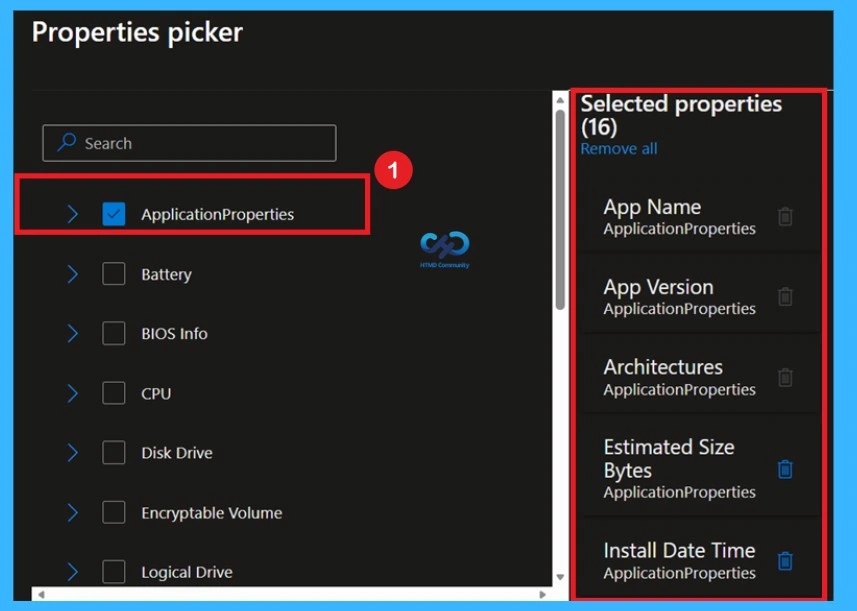
Application Properties Brings Better Application Inventory Visibility
The new Application Properties section in Microsoft Intune Properties Picker provides administrators with enhanced visibility into application inventory information collected from managed Windows devices. This improvement allows organizations to monitor important software related details directly from the Intune Properties Catalog interface.

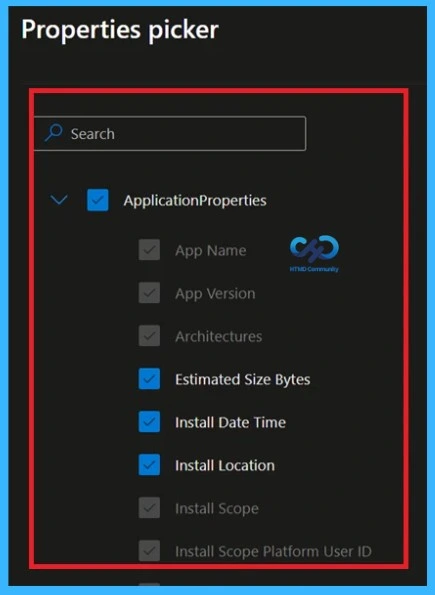
The available inventory properties include App Name, App Version, Architectures, Estimated Size Bytes, Install Date Time, Install Location, Install Scope, and Install Scope Platform User ID. These details help administrators track application deployments, installation methods, software versions, storage usage, and device level application information more efficiently.
- In the Properties Picker interface, the properties highlighted in blue represent the options currently selected or enabled by the administrator.
- In this example, Estimated Size Bytes, Install Date Time, and Install Location are actively selected for inventory reporting and visibility.
- The greyed-out properties remain available within the Application Properties category but are not selected in the current configuration.
Need Further Assistance or Have Technical Questions?
Join the LinkedIn Page and Telegram group to get the latest step-by-step guides and news updates. Join our Meetup Page to participate in User group meetings. Also, join the WhatsApp Community and the WhatsApp channel to get the latest news on Microsoft Technologies. We are there on Reddit as well.
Author
Anoop C Nair is a Workplace Technology solution architect with 25+ years of experience. Microsoft Certified Trainer. Microsoft MVP from 2015 onwards for consecutive 11+ years! He is a blogger, Speaker, and Founder of HTMD Community and HTMD Conference. His main focus is on Device Management technologies like Intune, Windows, and Cloud PC. He writes about technologies like Intune, SCCM, Windows, Cloud PC, Entra, and Microsoft Security.