
Key Takeaways:
- Entra Writeback for Cloud-Managed Remote Mailboxes is now in Public Preview
- No remaining dependency on their last Exchange Server
- Decommissioning your Last Exchange Server
- How Writeback uses Microsoft Entra Cloud Sync works
Let’s discuss about Microsoft Unlocks Entra Writeback for Cloud-Managed Remote Mailboxes to Help Remove Last Exchange Server. For customers with no remaining dependency on their last Exchange Server, a guide for decommissioning your last Exchange Server. Microsoft announced the Public Preview of Cloud-Managed Remote Mailboxes. Microsoft is excited to share these two new milestones in their journey.
Table of Contents
Table of Contents
Microsoft Enables Entra Writeback for Cloud-Managed Remote Mailboxes to Help Remove Last Exchange Server
Allowing Exchange Online attribute changes (e.g., proxy addresses, custom attributes) to sync back to on‑premises Active Directory via Entra Cloud Sync. This closes the gap for organizations whose line‑of‑business apps still rely on AD attributes, ensuring consistency even after Source of Authority (SOA) moves to the cloud.
Organisations can retire Exchange servers maintained solely for directory sync. Writeback for Cloud-Managed Remote Mailboxes Simplifies infrastructure, reduces patching/maintenance, and fully embraces cloud‑based management.
- Azure Files Goes Cloud-Native with Entra-Only Identities and Managed Identities
- Microsoft Entra Global Secure Access Blocks Sensitive File Uploads to ChatGPT and Gmail
- Microsoft Entra ID Increases Conditional Access Policy Limit from 195 to 244 for Complex Security Environments
How Writeback Works
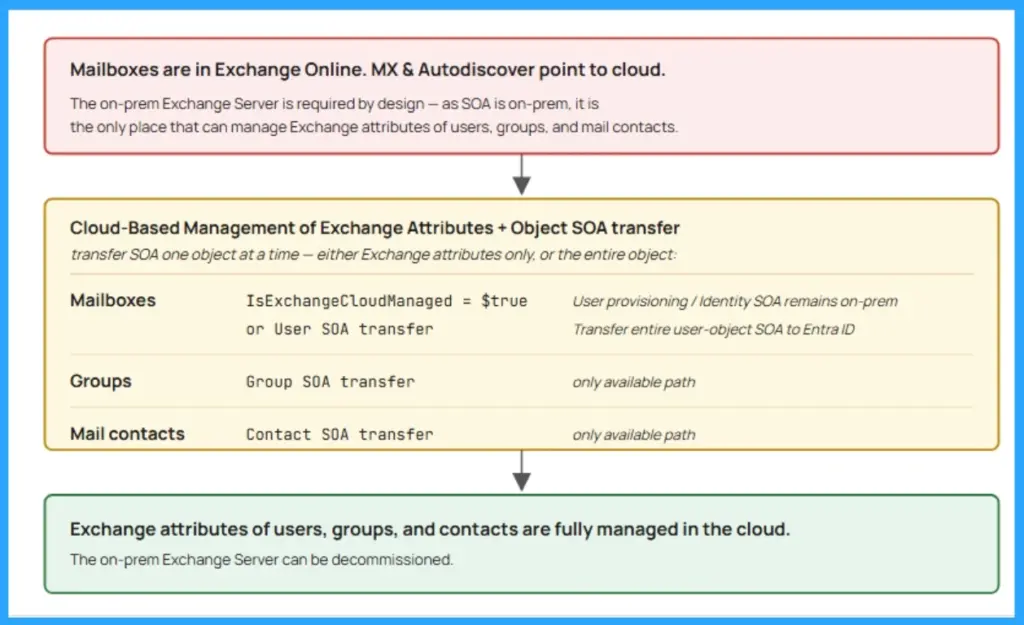
When IsExchangeCloudManaged=True, Exchange-related attributes (e.g., proxy addresses, custom attributes) move to the cloud, while identity attributes remain in AD. Previously, cloud-side edits didn’t flow back to AD, causing sync issues for apps relying on AD attributes. Writeback uses Microsoft Entra Cloud Sync to push changes back to AD, running alongside Entra Connect Sync without disruption

Preview Details
Public Preview supports tenants with <200,000 mailboxes; GA will raise this limit by the end of June 2026. Documentation lists supported attributes for writeback.
Decommissioning the Last Exchange Server
Historically, organisations kept at least one Exchange Server on‑premises to manage mailbox attributes in Active Directory. With cloud‑managed remote mailboxes and writeback support, this dependency is finally removed.
| Key Steps in the Decommissioning Guide | Details |
|---|---|
| Prerequisites | Ensure mailboxes are cloud‑managed (IsExchangeCloudManaged=True).Confirm Microsoft Entra Cloud Sync is in place for attribute writeback. |
| Verification | Validate that mailbox attributes (proxy addresses, custom attributes, etc.) sync correctly between Exchange Online and AD. |
| Hybrid Cleanup | Remove hybrid connectors and dependencies once cloud sync is stable. |
| Uninstall Process | Decommission the last Exchange Server following Microsoft Learn’s step‑by‑step instructions. Includes uninstalling Exchange binaries and cleaning up AD references. |
| Post‑Uninstall Cleanup | Confirm no lingering Exchange objects remain in AD. Ensure all management tasks are now performed in the cloud. |
Join the LinkedIn Page and Telegram group to get the latest step-by-step guides and news updates. Join our Meetup Page to participate in User group meetings. Also, Join the WhatsApp Community to get the latest news on Microsoft Technologies. We are there on Reddit as well.
Author
Anoop C Nair has been a Microsoft MVP from 2015 onwards for 10 consecutive years! He is a Workplace Solution Architect with more than 22+ years of experience in Workplace technologies. He is also a Blogger, Speaker, and Local User Group Community leader. His primary focus is on Device Management technologies like SCCM and Intune. He writes about technologies like Intune, SCCM, Windows, Cloud PC, Windows Entra, Microsoft Security, Career, etc.