
Key Takeaways
- Microsoft Intune now supports unlimited licenses for eligible Apple VPP apps.
- Administrators can manage apps purchased through Apple Business Manager and Apple School Manager.
- The update reduces the need to manage fixed license quantities for supported apps.
- The feature helps simplify application deployment across organizational devices.
In this post we are discussing Microsoft Intune Adds Unlimited Apple VPP App Licenses to Simplify App Deployment. Microsoft recently announced a new update for Microsoft Intune in October 2026, and this applies to iOS/iPadOS and macOS. This update brings an improvement to app management for organizations using Apple devices. Microsoft Intune helps administrators manage applications and deploy them to company-owned and personal devices. App management is an important part of maintaining a smooth device management experience.
Table of Contents
Microsoft Intune Adds Unlimited Apple VPP App Licenses to Simplify App Deployment
Organizations using Apple devices can manage applications through Apple Business Manager and Apple School Manager. These services help organizations manage apps for their users and devices. The latest update makes Apple app management easier for IT administrators. It helps simplify the process of deploying supported applications across the organization. Apple Business Manager and Apple School Manager help organizations acquire and manage applications for their environments. When these apps are managed through Intune, administrators can handle application deployment.
- Revoke App Licenses for Apple VPP App using Intune
- How To Schedule IOS Automatic Updates Using Intune Policies
- Configure Intune Enrollment Setup for iOS macOS Devices
What’s New in Microsoft Intune
Microsoft Intune now supports unlimited licenses for Apple Volume Purchase Program (VPP) apps acquired through Apple Business Manager and Apple School Manager. Previously, administrators needed to manage available license quantities when distributing VPP applications. With this update eligible apps can display an unlimited license quantity in the Intune admin center and making it easier to manage app deployment without tracking a fixed number of licenses.
Unlimited licenses for Apple VPP Apps
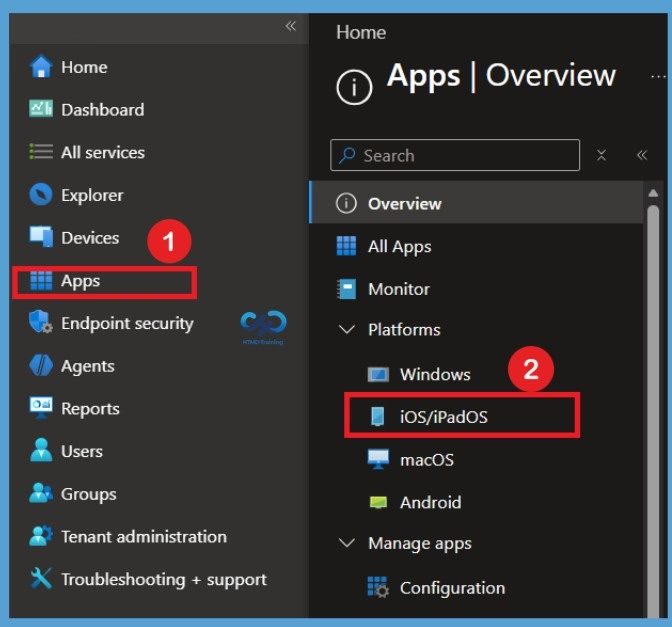
Sign in to the Microsoft Intune admin center using your administrator credentials. From the left navigation pane, select the Apps option to access application management settings. After selecting Apps, you will get into the Apps overview page, where you can find the available application management options. Under the Platforms section, you can see different operating systems, including Windows, iOS/iPadOS, macOS, and Android. Here, select iOS/iPadOS to open the iOS/iPadOS app management section.

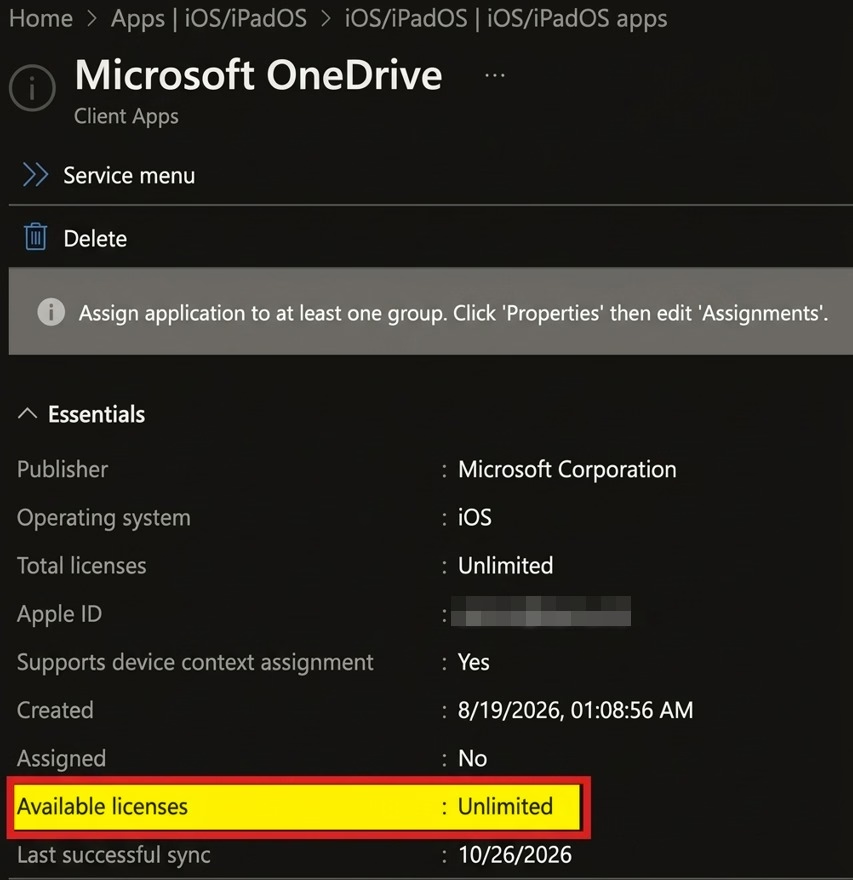
- In the iOS/iPadOS apps list select the Microsoft OneDrive.
Here, you can see the Microsoft OneDrive application details page in the Intune admin center. Under the details section, you can find the Total licenses field. The Total licenses field displays Unlimited for the Microsoft OneDrive application. You can also see that the Available licenses field displays Unlimited, indicating that unlimited licenses are available for this app.
| Details | Information |
|---|---|
| Publisher | Microsoft Corporation |
| Operating system | ios |
| Total licenses | Unlimited |
| Supports device context assignment | yes |
| Assigned | No |
| Available licenses | Unlimited |
| Last successful sync | : 10/25/2026 |
Need Further Assistance or Have Technical Questions?
Join the LinkedIn Page and Telegram group to get the latest step-by-step guides and news updates. Join our Meetup Page to participate in User group meetings. Also, join the WhatsApp Community and the Whatsapp channel to get the latest news on Microsoft Technologies. We are there on Reddit as well.
Author
Anoop C Nair is Workplace Technology solution architect with 25+ years of experience in global enterprise organizations such as JP Morgan, Capgemini, etc. He is Microsoft Certified Trainer. Microsoft MVP from 2015 onwards for consecutive 11 years! He also conducts Intune and modern workplace tech training for enterprise organizations. He is Blogger, Speaker, and Founder of HTMD Community and HTMD Conference. His focus is on Device Management technologies such as Intune, Windows, Cloud PC. He writes about technologies like Intune, SCCM, Windows, Cloud PC, Windows, Entra, Microsoft Security.