
Key Takeaways
- Microsoft introduced new guidance for Windows 365 deployments.
- The guidance follows Cloud-Native and Zero Trust principles.
- Cloud-based services help reduce infrastructure requirements and simplify provisioning.
- Organizations can use these recommendations to choose the most suitable deployment approach for their requirements.
In this post we are discussing New Windows 365 Cloud-Native Deployment Guidance | Simplifying Security and Device Management with Zero Trust. Microsoft has introduced new deployment guidance for Windows 365 to help organizations deploy and manage Cloud PCs more easily, securely, and efficiently. The guidance recommends a cloud-native approach aligned with Zero Trust security principles to improve deployment speed, reliability, and supportability. The new guidance helps IT administrators make important decisions about Windows 365 deployment, including identity, networking, images, updates, management, user data, clients, and supportability.
Table of Contents
Table of Contents
New Windows 365 Cloud-Native Deployment Guidance | Simplifying Security and Device Management with Zero Trust
Microsoft recommends using cloud-based identity, Microsoft Hosted Network, Microsoft Intune for device management, and cloud-based data storage to reduce dependencies on on-premises infrastructure. This approach can simplify configuration, reduce operational complexity, and help organizations provision Cloud PCs faster.
- Bulk Reprovisioning of Windows 365 Cloud PCs in Grace Period using Intune
- How to Create Windows 11 Enterprise Developer Configuration Windows 365 Cloud PC using Intune
- Seamless Provisioning of Windows 365 Cloud PCs for External Identities with Intune
What’s New in Windows 365 Deployment Guidance
In October Microsoft announced new Windows 365 Cloud-Native and Zero Trust Deployment Guidance to help organizations deploy and manage Cloud PCs more easily, securely, and efficiently. The guidance provides recommended approaches for key areas such as identity, networking, images, updates, management, user data, clients, and supportability. It recommends cloud-based solutions, Microsoft Hosted Network, and Microsoft Intune management to reduce on-premises dependencies, simplify configuration, and improve deployment speed, reliability, and security.
Comparing Recommended and Traditional Deployment Methods
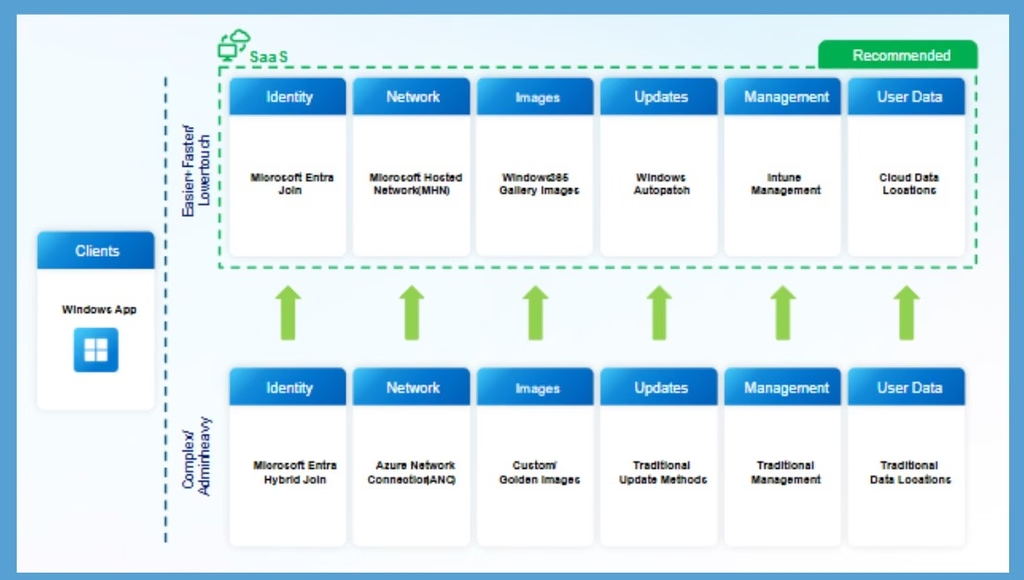
Microsoft explains the recommended and traditional ways to deploy Windows 365 Cloud PCs. The recommended approach uses cloud-based services such as Microsoft Entra Join, Microsoft Hosted Network, and Microsoft Intune to set up and manage Cloud PCs. This approach requires less configuration and reduces the need for additional infrastructure at the organization’s office.

- As a result, IT teams can set up Cloud PCs faster and manage them more easily.
- Microsoft also explains how organizations can gradually move from traditional methods to the recommended approach based on their needs.
| Deployment Pillar | Recommended Option |
|---|---|
| Identity and device join | Microsoft Entra Join |
| Network | Microsoft Hosted Network (MHN) |
| Images | Gallery Images |
| Updates | Windows Autopatch |
| Management | Intune Management |
| User Data | Cloud Data (OneDrive, Teams, SharePoint, Edge Profiles) |
Cloud-Native and Zero Trust Principles
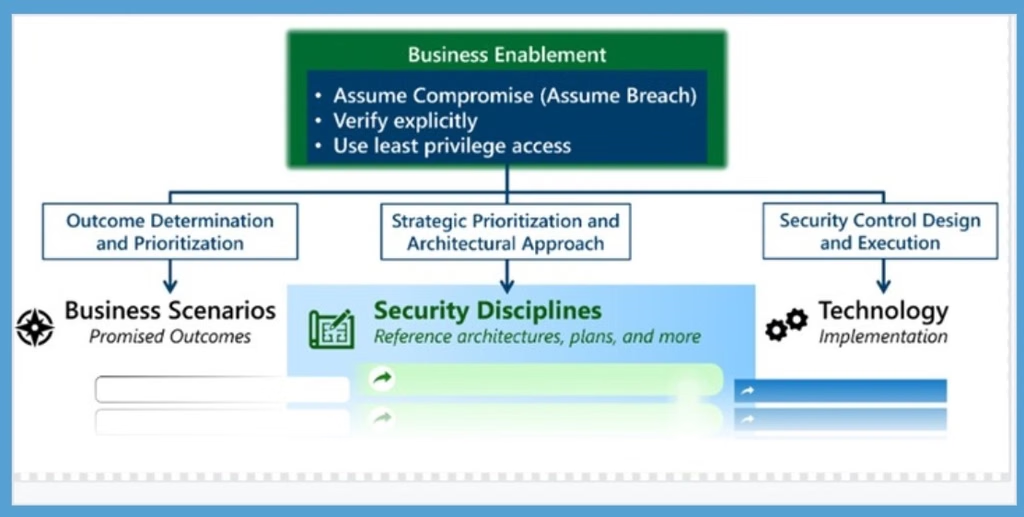
Zero Trust is a security strategy built on three core principles: verify explicitly, use least-privilege access, and assume breach. Instead of trusting users based on network location, it continuously validates identity, device health, application access, and data protection to reduce security risk. Zero Trust adoption happens over time. Focus on three simple areas.
- Business Scenarios – Help organizations identify and focus on their most important security needs and risks.
- Security Disciplines- Help teams plan and create security strategies, processes, and controls.
- Technology Pillars- Focus on protecting key areas such as user identities, devices, and data.
Need Further Assistance or Have Technical Questions?
Join the LinkedIn Page and Telegram group to get the latest step-by-step guides and news updates. Join our Meetup Page to participate in User group meetings. Also, join the WhatsApp Community and the Whatsapp channel to get the latest news on Microsoft Technologies. We are there on Reddit as well.
Author
Anoop C Nair is Workplace Technology solution architect with 25+ years of experience in global enterprise organizations such as JP Morgan, Capgemini, etc. He is Microsoft Certified Trainer. Microsoft MVP from 2015 onwards for consecutive 11 years! He also conducts Intune and modern workplace tech training for enterprise organizations. He is Blogger, Speaker, and Founder of HTMD Community and HTMD Conference. His focus is on Device Management technologies such as Intune, Windows, Cloud PC. He writes about technologies like Intune, SCCM, Windows, Cloud PC, Windows, Entra, Microsoft Security.