
Key Takeaways
- QR code authentication allows secure device registration without USB keys.
- Only authorized users in the AutopilotRegistrators group can approve registrations.
- Teams notifications and Azure logs provide real-time alerts and full audit tracking.
- Automated Entra setup and a hosted approval page simplify deployment and user experience.
Hey, let’s discuss about Autopilot Registration Tool v2.0 Eliminates Credentials with Secure QR Authentication. Autopilot Registration Tool v2.0.0 introduces a more modern and streamlined approach to hardware hash registration, shaped by valuable community feedback. It addresses scenarios where devices are not pre-registered by OEMs, making it especially useful for remote offices, smaller vendors, and field staff who need to handle registrations directly on-site.
Table of Contents
Table of Contents
Autopilot Registration Tool v2.0 Eliminates Credentials with Secure QR Authentication
This updated version brings significant improvements, including a structured Entra ID approval flow, comprehensive audit logging, and real-time Teams notifications. The entire setup can be deployed effortlessly using the Builder wizard, allowing everything to be configured in just a few simple clicks.
- Troubleshoot and Fix Issue in Duplicate Device Records in Entra ID During Autopilot Hybrid Join
- How to Resolve Error 0x80070017 on Autopilot Device Setup in Intune
- Next Generation Windows Autopilot Deep Dive Troubleshooting Guide
Secure and Controlled Registration
QR Code Authentication allows technicians to scan a QR code, sign in with Entra ID on a hosted approval page, and approve the registration without using static keys on a USB. Entra Security Group Gating ensures that only members of the AutopilotRegistrators group can approve registrations, with support for Entra ID Governance and Entitlement Management for self-service and time-limited access.
Real Time Visibility and Auditing
Teams Webhook Notifications send adaptive card alerts to a Teams channel for every registration event, including success, duplicate, or failure, along with key details. The Audit Log records every registration in Azure Table Storage, making it easy to track who registered a device, when it happened, and search by serial number.

Improved Experience and Automated Setup
The Hosted Approval Page provides a mobile-friendly, dark-themed Entra ID sign-in experience directly from the Azure Function. The Redesigned UI includes a darker theme, resizable windows, and improved visuals, while Automated Entra Setup enables the Builder to create the app registration, security group, assign Graph permissions, and apply admin consent automatically.
How it Works
Legacy Mode (v1) uses a USB API key through the Azure Function and Graph API to register devices in Autopilot. QR Auth Mode (v2) shows a QR code on the OOBE device, which is scanned by the technician on their phone to sign in with Entra ID and approve the registration, after which the device receives a token and uploads the hash through the Azure Function and Graph API to Autopilot.
Security Model
The attacker cannot read Intune data, modify policies, access the Graph API directly, or extract credentials in either mode. QR Auth security is enforced through multiple layers, including Entra ID authentication with MFA and Conditional Access, security group membership checks, a 15-minute session TTL, and single-use tokens that are consumed after upload. It also uses RSA signature verification on Entra tokens and HS256 signed session JWTs for added protection.
Quick Start
The Builder wizard then deploys the Azure Function backend, configures Graph API permissions, sets up QR authentication including App Registration, security group, and admin consent if enabled, and also configures branding and group tags before generating the field tool for USB deployment.
- Boot device to OOBE
- Press
Shift + F1 - Run:
d:\start.cmd - If QR auth is enabled: scan the QR code with your phone and approve
- Device registers in Autopilot
API Endpoints
The Core API includes three endpoints: a POST /api/upload to upload hardware hash using a function key or session token, a GET /api/status/{id} to check import status using a function key, and a GET /api/health endpoint that is anonymous and used for health check and feature status. QR Auth (enabled via ENABLE_QR_AUTH):
| Endpoint | Auth | Purpose |
|---|---|---|
POST /api/session | Anonymous | Create approval session |
GET /api/session/{id}/status | Anonymous | Poll session state |
POST /api/session/{id}/approve | Entra ID token | Approve a session |
GET /api/approve | Anonymous | Approval page (HTML) |
Optional Features
The optional features are disabled by default and can be enabled through Function App settings. They include QR Authentication using Entra ID session-based authentication, Audit Log which stores registration history in Table Storage, Teams Notifications that send Adaptive Card alerts to Microsoft Teams via a webhook URL, and Security Group which restricts approvals to specific group members using a group ID.
API Permissions
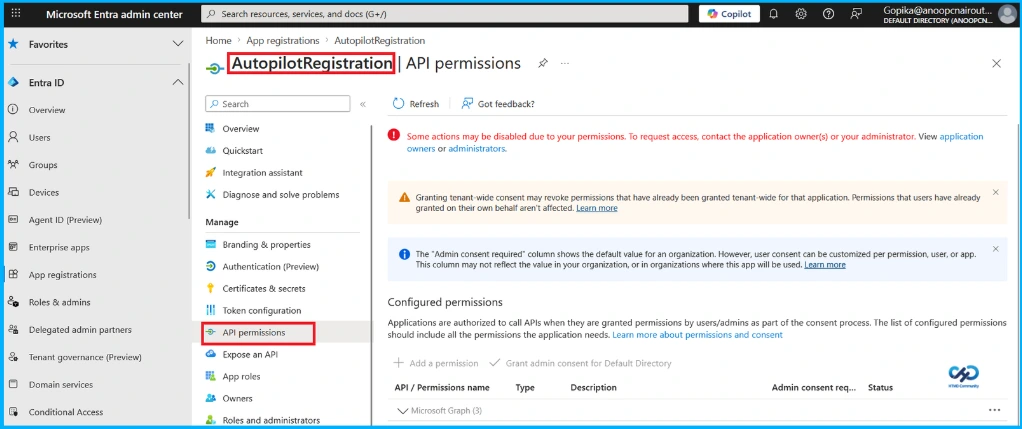
The Function App’s managed identity is granted DeviceManagementServiceConfig.ReadWrite.All always required for Autopilot hash upload, along with GroupMember.Read.All and User.Read.All for QR authentication to check security group membership and perform user lookups.
Need Further Assistance or Have Technical Questions?
Join the LinkedIn Page and Telegram group to get the latest step-by-step guides and news updates. Join our Meetup Page to participate in User group meetings. Also, Join the WhatsApp Community and WhatsApp Channel to get the latest news on Microsoft Technologies. We are there on Reddit as well.
Author
Anoop C Nair has been Microsoft MVP from 2015 onwards for 10 consecutive years! He is a Workplace Solution Architect with more than 22+ years of experience in Workplace technologies. He is also a Blogger, Speaker, and Local User Group Community leader. His primary focus is on Device Management technologies like SCCM and Intune. He writes about technologies like Intune, SCCM, Windows, Cloud PC, Windows, Entra, Microsoft Security, Career, etc