

Key Takeaways
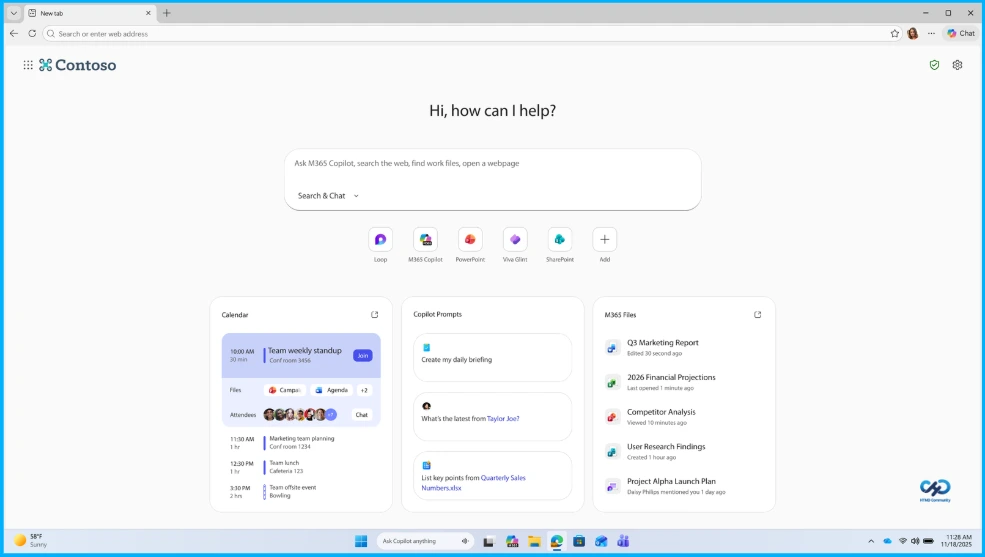
- The Copilot-inspired new tab page unifies search and chat in a single intelligent interface for a streamlined experience.
- Combines search, chat, files, and apps in one place
- Uses Copilot to understand context and work data
- Provides quick access to calendar, files, and prompts
Hey, let’s discuss about Edge for Business Presents a Secure Enterprise AI Browser Built for Modern Work. You deserve a browser that truly understands the demands of your business. As the market fills with new AI browsers promising productivity gains, many fall short of addressing organizational needs and even overlook the fundamentals of threat protection forcing a choice between safety and productivity. Whether you’re an IT, security, or business leader, you want technology that helps your team shine without putting security on the line, delivering powerful AI, trusted protection, and controls built for business.
Edge for Business Presents a Secure Enterprise AI Browser Built for Modern Work
Copilot Mode that consumers can already experience is now available in the work browser powered by Microsoft 365 Copilot and built with the safety foundations, security, and controls that IT teams expect. Early adopters of Copilot Mode quickly started asking if there is a work version available, excited by the potential yet wary of risking work data. Copilot Mode in Edge for Business is a collection of agentic, proactive, and contextual features powered by Microsoft 365 Copilot, where IT and security teams can enable advanced AI when they’re ready, transforming the browser into an intelligent partner that works with your teams context, anticipates needs, and accelerates workflows.
Organizations are adopting AI at different rates, and even within a single organization, teams may move at different speeds. Copilot Mode is designed to meet you where you are, offering an explicit toggle to turn on advanced AI browsing when ready. This means you only need one browser to get it all advanced AI and secure browsing for the enterprise so you can start AI browsing when your organization is ready.
- How Edge for Business Protects Users Across Every Device and Workplace
- Watermarking and Advanced AI Security in Edge for Business Available for Fully Managed and MAM Only BYOD Devices
- How to Protect Contractor Browsing with Intune and Edge for Business
Agent Mode
Agent Mode streamlines tedious work by automating multi-step workflows, allowing time-consuming tasks to be handed off so employees can stay focused on what matters. Copilot Mode is not enabled automatically, and Agent Mode must be set up separately by turning it on and defining a list of approved sites where it can operate. It is limited to these sites, provides clear visual cues when active, and allows users to interrupt the process at any time, with a recommendation to start with a short list of approved sites.

Copilot-Inspired New Tab Page
The Copilot-inspired new tab page brings search and chat together in one intelligent box, with quick access to files, calendar, and personalized prompts.
| Feature | Description |
|---|---|
| Search and chat | Unified intelligent box for searching and chatting |
| Productivity shortcuts | Fast access to files, calendar, and personalized prompts |
| Daily Briefing | Curated overview of meetings, tasks, and priorities |
| Context source | Uses browsing tabs and the graph |
Need Further Assistance or Have Technical Questions?
Join the LinkedIn Page and Telegram group to get the latest step-by-step guides and news updates. Join our Meetup Page to participate in User group meetings. Also, join the WhatsApp Community and the Whatsapp channel to get the latest news on Microsoft Technologies. We are there on Reddit as well
Author
Anoop C Nair is a Workplace Technology solution architect with 25+ years of experience. Microsoft Certified Trainer. Microsoft MVP from 2015 onwards for consecutive 11+ years! He is a blogger, Speaker, and Founder of HTMD Community and HTMD Conference. His main focus is on Device Management technologies like Intune, Windows, and Cloud PC. He writes about technologies like Intune, SCCM, Windows, Cloud PC, Entra, and Microsoft Security.