
Key Takeaways
- Governance relationships are established to provide least-privilege administrative access across tenants.
- The organization discovers and inventories related tenants to identify which ones need governance.
- Configuration baselines are defined and monitored to maintain security and compliance consistently.
- New tenants are securely created with governance applied from day one and linked to the organization’s billing.
Hey, let’s discuss about Microsoft Entra Tenant Governance for Secure Multi-Tenant Environments at Scale. Managing identity across multiple tenants is a growing challenge for organizations of all sizes. Mergers, acquisitions, and the rise of shadow IT often lead to a fragmented tenant landscape creating security and compliance blind spots that attackers are quick to exploit. Even a single poorly secured tenant can put your entire organization at risk.
Table of Contents
Table of Contents
Microsoft Entra Tenant Governance for Secure Multi-Tenant Environments at Scale
Many of these shadow tenants may lack critical controls like MFA, Conditional Access, or privileged role protections. Recent high-profile incidents have reinforced an important reality: attackers can move laterally from an unmanaged tenant into production environments, bypassing controls organizations assumed were in place. Microsoft Entra Tenant Governance addresses this challenge by providing a centralized, risk-informed way to discover, govern, and continuously secure all related tenants without relying on custom scripts or fragmented administrative models.
- Microsoft Entra License Usage Insights Tenant-Level Entitlement and Feature Utilization Analysis
- 5 Easy Steps to Secure your Microsoft 365 or Entra Tenant
- Difference between Single Tenant vs Multi-Tenant Apps in Microsoft Entra
Tenant Governance
Built on Microsoft’s experience securing large and complex tenant environments, Entra Tenant Governance is designed to improve visibility into tenant relationships, enforce governance, and continuously verify security posture at scale. It offers a centralized approach to managing multiple tenants with varying workloads, security needs, and operational ownership, allowing organizations to maintain consistent governance across tenants without applying a one-size-fits-all model.
| Feature | Description |
|---|---|
| Tenant Discovery and Inventory | Including production, non-production, and employee-created tenants. |
| Establish governance relationships | For least-privilege cross-tenant access. |
| Monitor and enforce consistent tenant policies | To maintain a strong security and compliance posture. |
| Securely create new tenants | Securely create new tenants with governance applied from day one. |
Discovering Related Tenants
An organization wants to reduce tenant-to-tenant risk in a growing identity environment shaped by mergers, acquisitions, and shadow IT. The security team starts by identifying which tenants are connected to their production tenant and the risks those connections may create.

The Related Tenants experience automatically provides an updated list of tenants with observable connections. It is not a full inventory, but a risk-based view to highlight tenants that may need governance. The system keeps this list current by detecting connections through signals like B2B access, multi-tenant applications, and Microsoft billing. In practice, most tenants that need attention leave detectable traces, making it easier to identify and prioritize them without manual tracking.

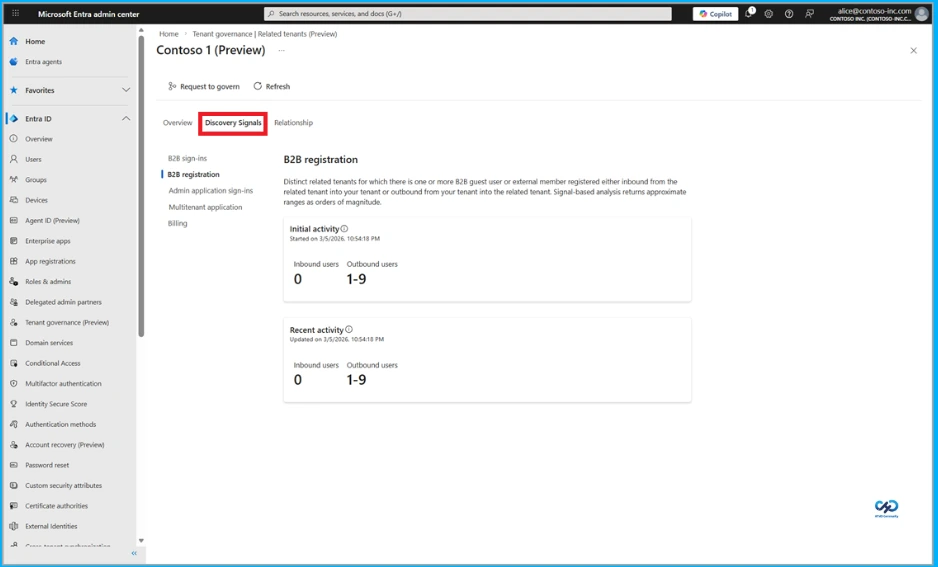
Discovery Signals
The organization uses metrics from each discovery signal to prioritize related tenants and identify any immediate security risks. By reviewing these signals in a unified view, the team can understand how a tenant is connected and what risks it may introduce. For example, indicators such as B2B access to administrative experiences, Microsoft billing relationships, or multi-tenant applications accessing organizational data help determine whether a tenant should be governed. These insights allow the team to validate connections and strengthen security controls to reduce potential data exposure.
Governance Tenant
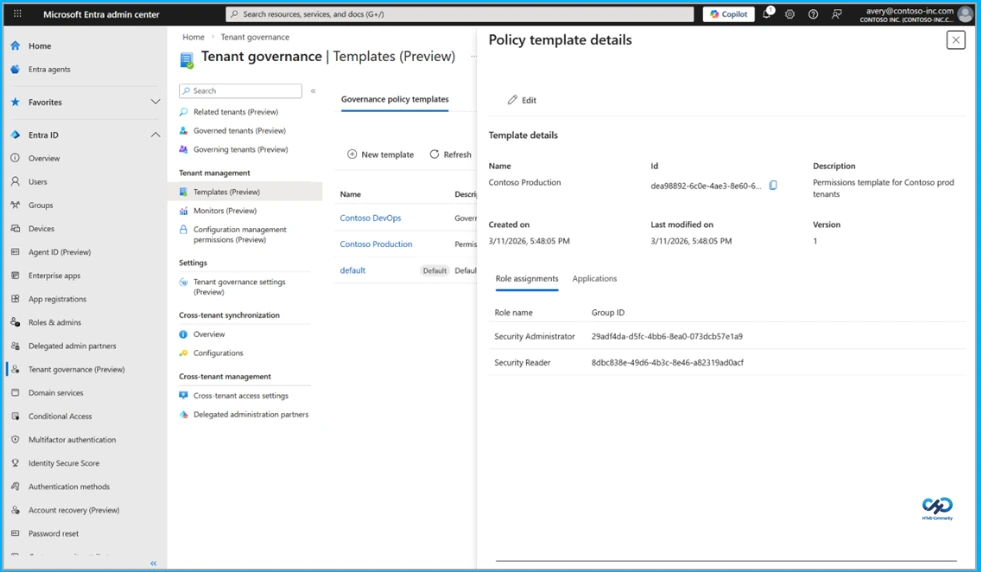
After identifying tenants that require governance, the organization needs reliable administrative access across those tenants without the overhead of managing separate local admin accounts or B2B permissions in each tenant. Using Microsoft Entra Tenant Governance, the organization establishes governance relationships between a central governing tenant and each governed tenant through a request and approval workflow. This defines which tenant governs, which is governed, and the level of access provided, allowing the approach to scale as the tenant landscape grows and supporting different security, compliance, and organizational requirements.
Once relationships are established, the organization assigns least-privilege delegated administration by mapping security groups in the governing tenant to built-in Entra roles in governed tenants. Administrators can manage resources across tenants from the governing tenant without needing separate accounts, creating a consistent admin experience. Centralized access also allows the organization to view, audit, and manage permissions in one place and keep access aligned with job changes by updating group membership.
Tenant Configuration Management
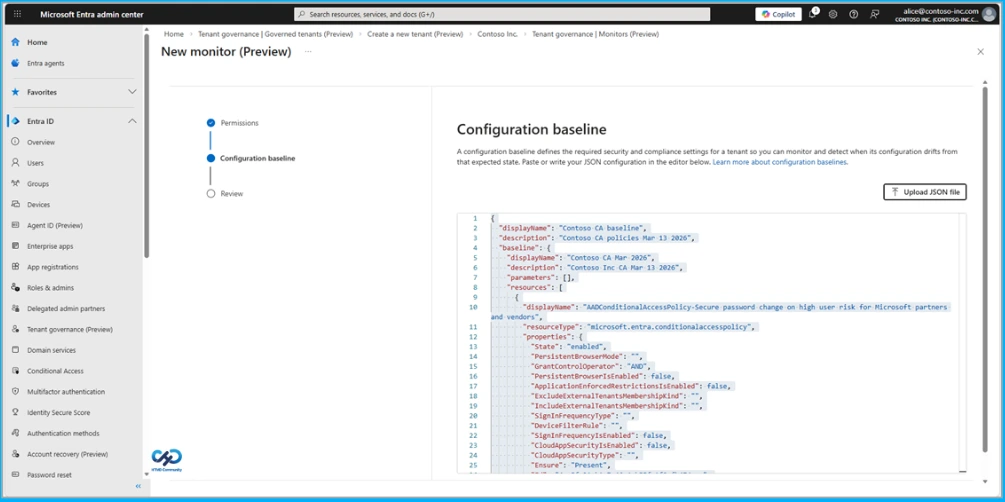
An organization that has established administrative access across its tenants focuses on keeping them aligned with security and compliance requirements. Using tenant configuration management, it defines a configuration baseline in a standard .json format that represents the desired state of tenant resources. The baseline can cover more than 200 resource types across Microsoft services, including Conditional Access policies in Entra, transport rules in Exchange, and supported resources in Intune, Defender, Purview, and Teams, with different baselines used depending on tenant requirements.
Configuration Snapshots and Monitoring
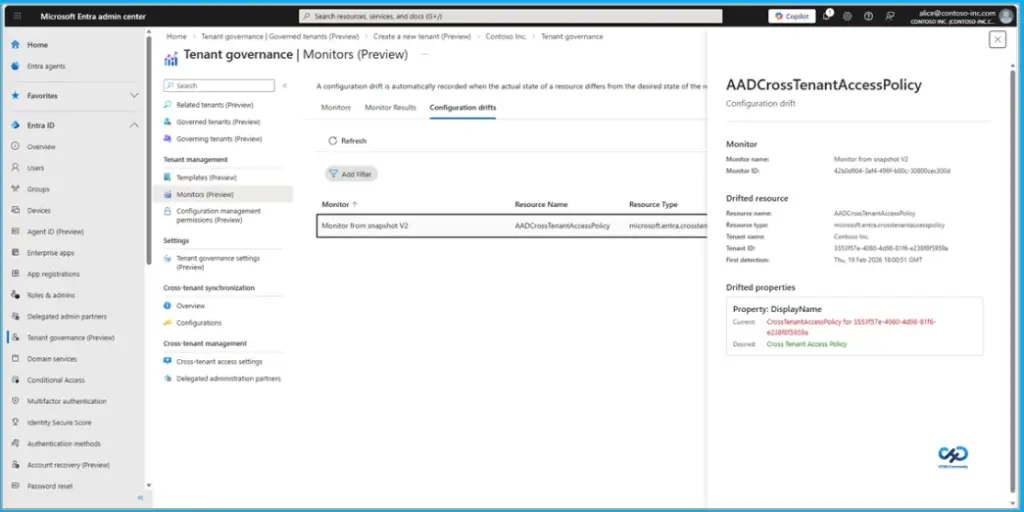
The organization accelerates adoption by using configuration snapshots to capture settings from a known good tenant and use them as a starting point for the baseline. Configuration monitors are then set up to run automatically on a schedule, validating the actual state of resources against the baseline. The results include recent run summaries, and a configuration drift report highlights differences from the desired state, helping teams prioritize remediation.
Secure Tenant Creation
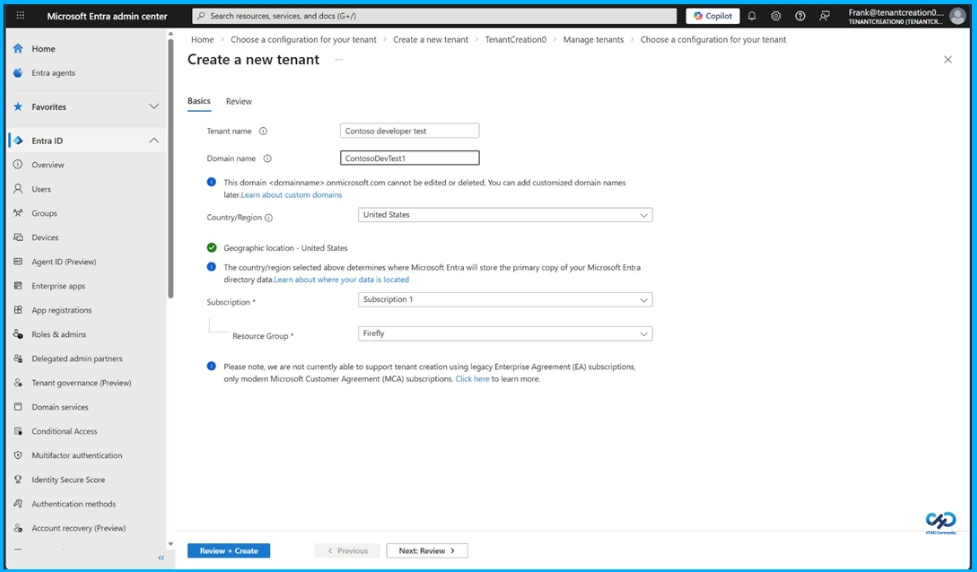
Once the organization has discovered its related tenants and brought them under governance, the next priority is ensuring new tenants follow the same governed pattern from day one. Using secure tenant creation, approved users in the engineering group can create add-on tenants for testing, and each new tenant is configured with a built-in governance relationship to the organization’s governing tenant. This ensures cross-tenant administrative access for ongoing management, while linking the tenant to the organization’s Microsoft billing account to establish ownership and reduce operational risk, helping streamline recovery if access is lost.
Need Further Assistance or Have Technical Questions?
Join the LinkedIn Page and Telegram group to get the latest step-by-step guides and news updates. Join our Meetup Page to participate in User group meetings. Also, join the WhatsApp Community and the Whatsapp channel to get the latest news on Microsoft Technologies. We are there on Reddit as well.
Author
Anoop C Nair is a Workplace Technology solution architect with 25+ years of experience. Microsoft Certified Trainer. Microsoft MVP from 2015 onwards for consecutive 11+ years! He is a blogger, Speaker, and Founder of HTMD Community and HTMD Conference. His main focus is on Device Management technologies like Intune, Windows, and Cloud PC. He writes about technologies like Intune, SCCM, Windows, Cloud PC, Entra, and Microsoft Security.