
Key Takeaways
- Intune Policies Causing Reboot During Windows OOBE
- Device based security policies can cause a restart during Autopilot setup
- You can check event logs to find which policy caused the restart
- Assigning policies to users instead of devices may reduce this issue
- Reviewing all active security profiles is important
Let’s discuss how to fix Intune Policies Causing Reboot During Windows OOBE. Recently, some admins raised a concern that unexpected restarts occurred during setup using Windows Autopilot. Many say that devices restart in the middle of the Out of Box Experience or while the Enrollment Status Page is still loading policies.
Table of Contents
Table of Contents
How to Fix Intune Policies Causing Reboot During Windows OOBE
Because of this restart, users may have to sign in again or repeat part of the setup process. Admins believe the issue is related to certain security settings applied to devices too early in the setup process. Some security features need a system restart to fully turn on. When these settings are assigned to device groups, Windows forces a restart during setup, which interrupts the smooth flow of Autopilot.
- Install Required Apps in Windows Autopilot Enrollment Status Page
- How to Resolve Error 0x80070017 on Autopilot Device Setup in Intune
- Beginners Guide Setup Windows Autopilot Deployment
- Free Entra Training Videos | Start Learning Entra ID Azure AD
What is the Cause of this Issue
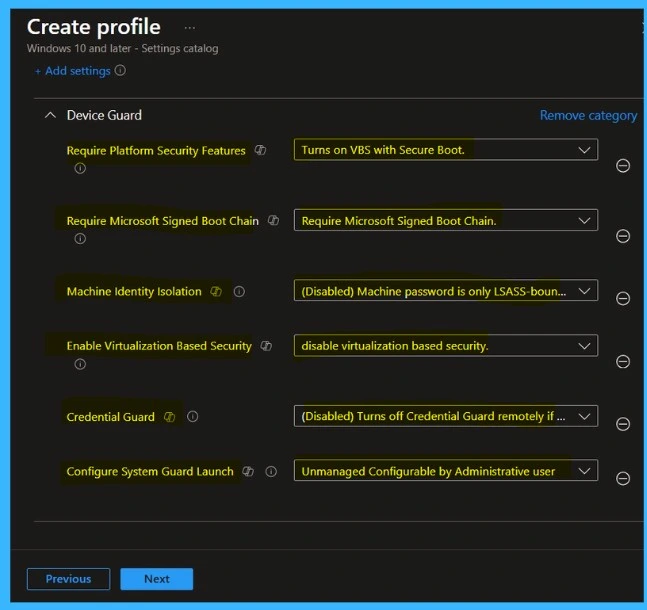
The real reason for the unexpected restarts during Windows Autopilot setup is how some security settings are applied. According to sources, it happens because of certain security features, like Device Guard and Virtualisation Based Security, that need a restart after they are turned on. When these settings are assigned to device groups, they are applied very early during the setup process, especially during the Enrollment Status Page.
- Since these settings require a restart to finish, Windows restarts the device in the middle of setup.
| These settings causing the reboot: |
|---|
| DeviceGuard/LsaCfqFlags |
| DeviceGuard/ConfigureSystemGuardLaunch DeviceGuard/EnableVirtualizationBasedSecurity |
| DeviceGuard/RequirePlatformSecurityFeatures |
| DmaGuard/DeviceEnumerationPolicy |
See related post related Enrollment Status page: Intune Enrollment Status Page Troubleshooting


Workarounds
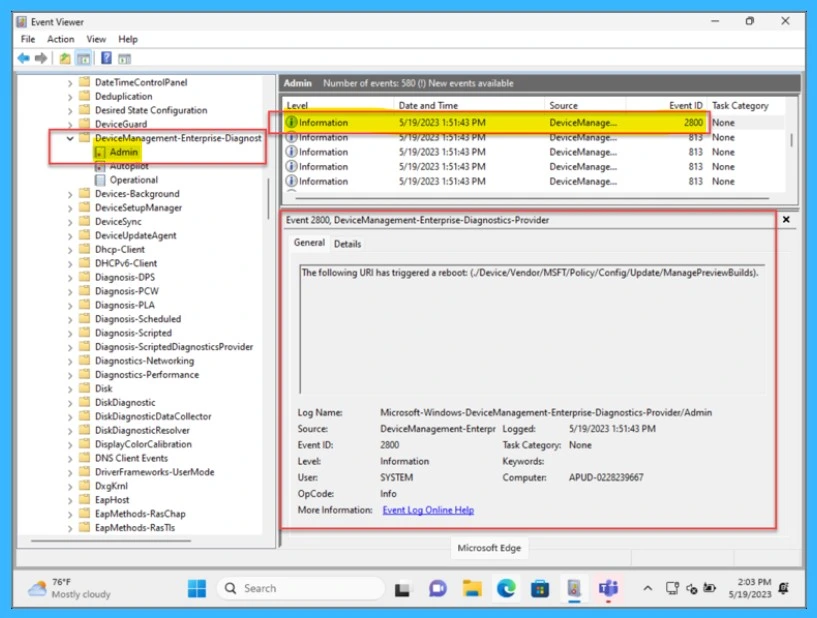
There is effective workaround still now, but you can try to find the actual cause from the event viewer details. If a device reboots unexpectedly during Windows Autopilot and the cause is not clear, use Event Viewer to identify the cause of the restart. On the affected device, open Event Viewer and navigate to Microsoft > Windows >DeviceManagement-Enterprise-Diagnostics-Provider > Admin. Search for events related to Reboot or Event ID 2800, which indicates a coalesced reboot.
Delay Device Guard and Credential Guard Policies During Autopilot
Some Device Guard, Credential Guard, and Virtualisation-Based Security (VBS) settings can trigger a coalesced reboot when they are applied during the device phase of Windows Autopilot. To avoid unexpected reboots, do not assign these policies to devices during Autopilot provisioning. Also not disable these security settings completely, since they are part of important hardware-based security protection.
Control Application Reboots Using Win32 App Packaging
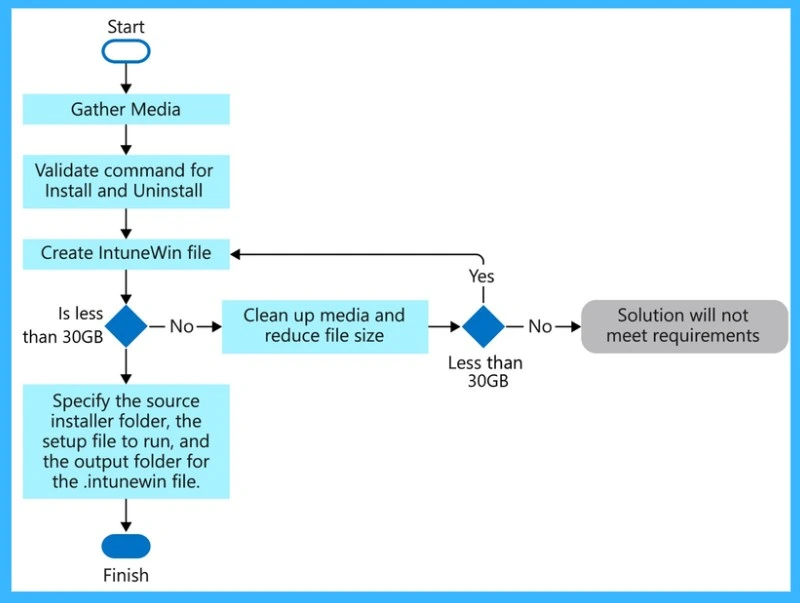
If an application requires a reboot during Windows Autopilot, package the app as a Win32 app using the Win32 Content Prep Tool and configure the correct return codes so that the Intune Management Extension (IME) can perform the reboot. This allows Intune to control the restart in a supported way during the device setup phase and prevents unexpected reboots that interrupt the Autopilot process.
Stop Applications from Forcing Reboots
If the application does not really need a restart to work. Add the correct no-restart option to the app’s install command so the app does not reboot the device by itself. This helps prevent unexpected restarts and allows the Windows Autopilot setup to continue smoothly without interruption.
Need Further Assistance or Have Technical Questions?
Join the LinkedIn Page and Telegram group to get the step-by-step guides and news updates. Join our Meetup Page to participate in User group meetings. Also, Join the WhatsApp Community and WhatsApp Channel to get the latest news on Microsoft Technologies. We are there on Reddit as well.
Author
Anoop C Nair has been a Microsoft MVP for 10 consecutive years from 2015 onwards. He is a Workplace Solution Architect with more than 22+ years of experience in Workplace technologies. He is a Blogger, Speaker, and Local User Group Community leader. His primary focus is on Device Management technologies like SCCM and Intune. He writes about technologies like Intune, SCCM, Windows, Cloud PC, Windows, Entra, Microsoft Security, Career, etc.