
Key Takeaways
- Microsoft Entra ID uses a layered authentication process, not just username and password.
- Zero Trust ensures every sign-in is verified before accessing apps like Teams, SharePoint, or Exchange.
- Authentication architecture is essential for Microsoft 365 administrators, security engineers.
- Login request is verified through several layers of checks
Hey, let’s discuss Microsoft Entra ID Authentication Architecture and User Sign-In Security. Authentication is the process of verifying a person’s identity before granting access to a resource, application, service, device, or network. It ensures that when users attempt to sign in, the system can confirm they are who they claim to be before allowing access.
Table of Contents
Table of Contents
Microsoft Entra ID Authentication Architecture and User Sign-In Security
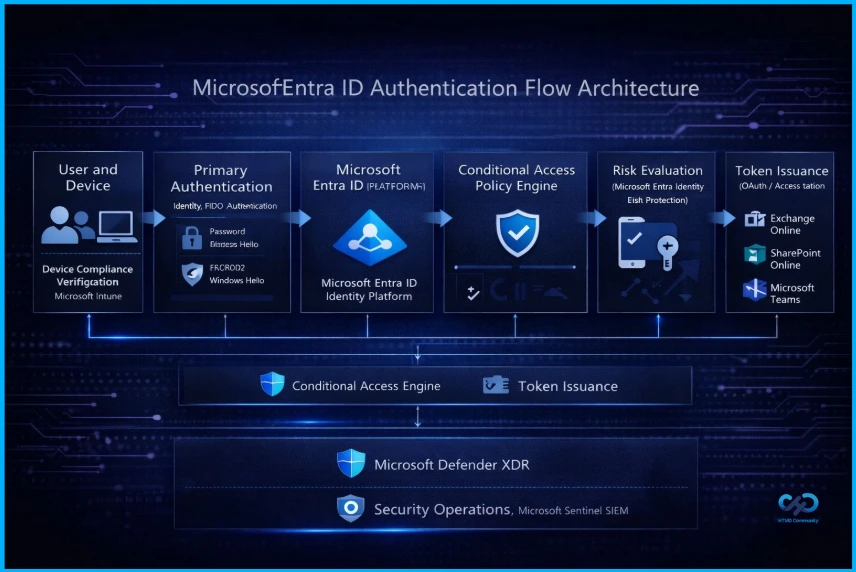
Lokesh M has shared this on their LinkedIn page. Most administrators think authentication is simple: User> Password > Login, but in Microsoft 365, it is actually a complete security pipeline. When a user signs in, multiple systems evaluate access before allowing entry, ensuring that every login request is verified through several layers of checks rather than a single step.
| Authentication Flow Components |
|---|
| Device compliance |
| Conditional Access policies |
| Identity risk signals |
| Multi-Factor Authentication |
| Token issuance |
| Security monitoring |
- How QR Code and PIN Authentication Simplifies Sign-In for Frontline Workers in Microsoft Entra ID
- Microsoft Moves Per-User Multifactor Authentication to Entra ID for Easier Management
- Native Authentication for Microsoft Entra External ID | Complete Control Over Login Experience
- Manage Microsoft Cloud Authentication Settings for Google Chrome using Intune
Authentication Architecture
All before the user even opens Exchange, SharePoint, or Teams. This identity flow is what makes Zero Trust possible in Microsoft 365. Understanding the authentication architecture is essential for Microsoft 365 administrators, security engineers, MS-102 certification candidates, and identity architects.
Need Further Assistance or Have Technical Questions?
Join the LinkedIn Page and Telegram group to get the latest step-by-step guides and news updates. Join our Meetup Page to participate in User group meetings. Also, Join the WhatsApp Community and WhatsApp Channel to get the latest news on Microsoft Technologies. We are there on Reddit as well.

Author
Anoop C Nair has been Microsoft MVP from 2015 onwards for 10 consecutive years! He is a Workplace Solution Architect with more than 22+ years of experience in Workplace technologies. He is also a Blogger, Speaker, and Local User Group Community leader. His primary focus is on Device Management technologies like SCCM and Intune. He writes about technologies like Intune, SCCM, Windows, Cloud PC, Windows, Entra, Microsoft Security, Career, etc