
Key Takeaways
- Simple and centralized monitoring experience
- Faster issue detection and troubleshooting
- No need for manual data exports
- Better visibility into system performance and configuration
In this post, we are discussing Microsoft Introduces New Windows 365 Monitoring Platform in Public Preview. Microsoft introduced a new monitoring and reporting platform for Windows 365, which is now available in public preview. This new feature is built directly into the Microsoft Intune admin center, making it easier for organizations to monitor their Cloud PCs in one place.
Table of Contents
Table of Contents
Unified Windows 365 Monitoring and Reporting Experience in Microsoft Intune
Now, everything is available in a single dashboard, making the process quicker and easier. Microsoft introduced this update with a focus on improving usability and making monitoring more user-friendly. With simple dashboards and ready made reports, even support teams with less experience can easily identify issues and take action faster.
- Create Custom Dashboards Alerts and 30-Day Compliance Trends using MS Intune and Azure Log Analytics
- Intune Device Compliance Reports | Endpoint Manager
- Easiest Method to Enable MFA for Admins using Azure AD Conditional Access
- Managing Windows Bitlocker Compliance Policy Using Intune | MS Graph | Grace Period
What’s New
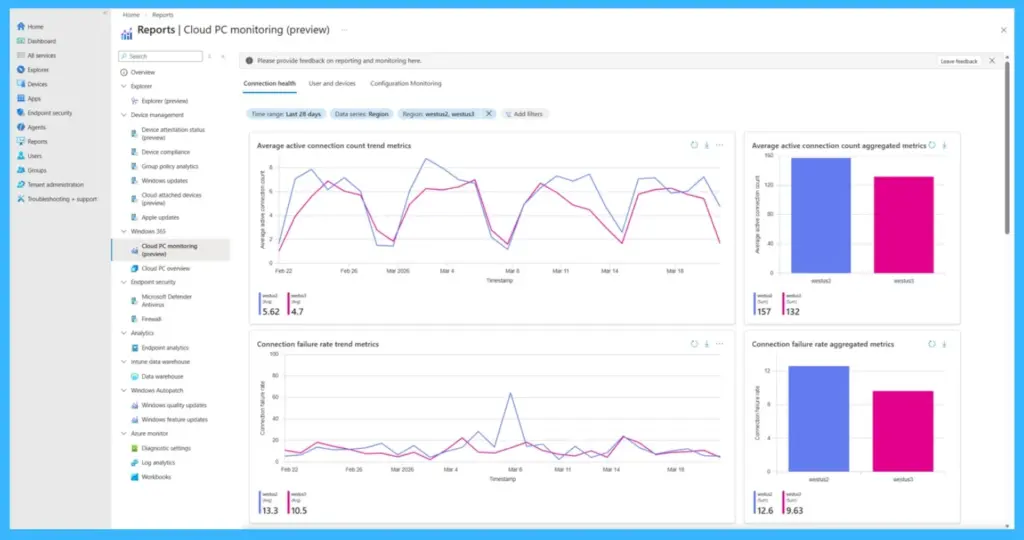
The new update to Windows 365 introduces a unified monitoring and reporting platform within the Microsoft Intune admin center. It brings together Cloud PC health, performance, and configuration data into a single dashboard, making it easier for administrators to monitor everything in one place. The platform includes tenant-level connection health views, detailed user and device insights, and visual configuration trends.
- It also introduces outlier detection to highlight unusual issues and provides interactive charts and reports for easier analysis
| Current Challenges | New Platform Capabilities |
|---|---|
| Tenant-level Connection Health dashboards | Early visibility into reliability, performance, and device health trends; proactive issue detection before helpdesk calls |
| User and Device insights | Consolidated view of connection performance, error trends, and usage history; faster frontline troubleshooting and fewer escalations |
| Configuration visuals and trends | End-to-end environment visuals with historical context; ability to correlate configuration changes (including BYOD endpoints) with outcomes |
| Outlier detection | Automatic surfacing of anomalous metrics; helps identify emerging issues earlier and reduce escalation |
| Actionable charts and data tables | Drill-down analysis without manual exports or external tools; lowers complexity and supports admins of varied skill levels |
| The bottom line | Many organizations resort to exporting, processing and analyzing Cloud PC data, which can increase the complexity and total cost of ownership of Windows 365. The new platform helps reduce reliance on data exports and external tooling. Try the new monitoring a |
How to Access
The feature is available for Windows 365 Enterprise users in the Microsoft Intune admin center. Users can go to the Reporting section and explore the monitoring dashboards like Connection Health, User and Devices, and Configuration.

- Navigate through Microsoft Intune Admin center > Reports> Cloud PC monitoring (preview)
Need Further Assistance or Have Technical Questions?
Join the LinkedIn Page and Telegram group to get the latest step-by-step guides and news updates. Join our Meetup Page to participate in User group meetings. Also, join the WhatsApp Community and the Whatsapp channel to get the latest news on Microsoft Technologies. We are there on Reddit as well
Author
Anoop C Nair is a Workplace Technology solution architect with 25+ years of experience. Microsoft Certified Trainer. Microsoft MVP from 2015 onwards for consecutive 11+ years! He is a blogger, Speaker, and Founder of HTMD Community and HTMD Conference. His main focus is on Device Management technologies like Intune, Windows, and Cloud PC. He writes about technologies like Intune, SCCM, Windows, Cloud PC, Entra, and Microsoft Security.