
Key Takeaways
- Windows has a bug that affects security warning pop-ups when opening .rdp files.
- The warning text and buttons may appear broken or hard to read.
- It mainly happens on setups with multiple monitors using different display scaling.
- These warnings are important because they help protect users from unsafe Remote Desktop files.
Hey, let’s discuss about MS Confirms Windows Issue Causing Incorrect Security Warnings When Opening Remote Desktop RDP Files. Microsoft has confirmed a new issue where Windows security warnings do not display correctly when opening Remote Desktop(.rdp) files. This problem affects all supported Windows versions, including recent updates for Windows 11, Windows 10, and Windows Server.
Table of Contents
Table of Contents
MS Confirms Windows Issue Causing Incorrect Security Warnings When Opening Remote Desktop RDP Files
On affected systems, the warning text can be hard to read, and the buttons may appear misplaced, making it difficult or impossible to interact with the dialog. Microsoft says this issue may happen when using multiple monitors with different display scaling settings, such as one at 100% and another at 125%.
- Controlling LPT Port Redirection in Remote Desktop using Intune
- Disable Mapping of Client Drive Redirection in Remote Desktop Services Sessions using Intune
- Prevent Supported Plug and Play Device Redirection in Remote Desktop Services Sessions using Intune
RDP Security Warning Display Issue
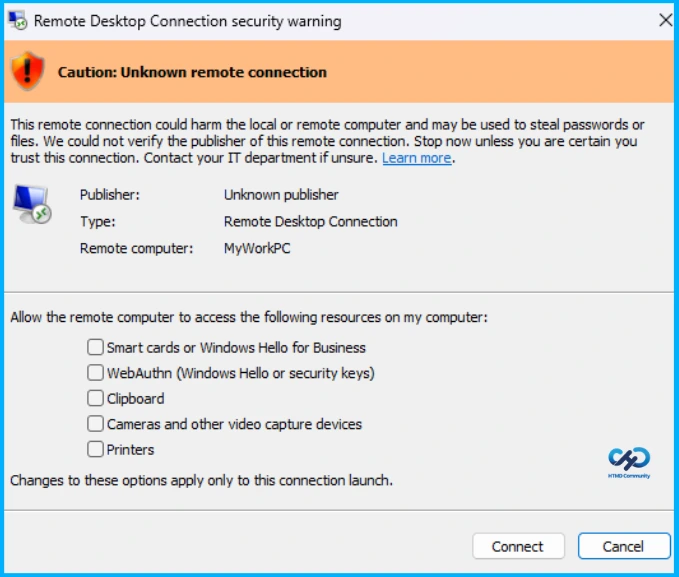
When this issue occurs, the warning window may show overlapping text or partially hidden buttons, making it difficult to read or interact with. Microsoft introduced these protections in the April 2026 updates to help prevent malicious RDP files, including a one-time prompt that warns users about potential risks when opening an RDP file for the first time.
Note: An unsigned RDP file can be created by anyone. Always handle it with extreme caution, especially if it is received via email or downloaded from the internet, as it may pose a security risk.

Remote Desktop Protocol (RDP) Files
When you open an RDP file, Windows shows a security message before connecting. It displays details like the publisher, the remote computer’s address, and any resources that could be shared, such as drives or clipboard. All sharing options are turned off by default. If the file is not signed, it shows an unknown publisher warning, and if it is signed, it shows the publisher but still asks you to confirm it is safe.
RDP files are often used in companies to connect to remote systems because they can be pre-set for easy access and controlled sharing. However, they can also be misused in phishing attacks to trick users and steal sensitive information.
| Remote Desktop Protocol |
|---|
| Security warning appears before connection |
| Shows publisher and remote system address |
| Resource sharing options are listed but disabled by default |
| Can be used for remote access or abused in phishing attacks |
Need Further Assistance or Have Technical Questions?
Join the LinkedIn Page and Telegram group to get the latest step-by-step guides and news updates. Join our Meetup Page to participate in User group meetings. Also, join the WhatsApp Community and the Whatsapp channel to get the latest news on Microsoft Technologies. We are there on Reddit as well.
Author
Anoop C Nair is a Workplace Technology solution architect with 25+ years of experience. Microsoft Certified Trainer. Microsoft MVP from 2015 onwards for consecutive 11+ years! He is a blogger, Speaker, and Founder of HTMD Community and HTMD Conference. His main focus is on Device Management technologies like Intune, Windows, and Cloud PC. He writes about technologies like Intune, SCCM, Windows, Cloud PC, Entra, and Microsoft Security.