
Key Takeaways
- A Primary Refresh Token (PRT) is a crucial authentication artefact in Microsoft Entra ID.
- PRT is used on Windows 10/11, iOS, Android, and macOS.
- Primary Refresh Tokens (PRT) to enable Single Sign-On (SSO) across applications.
- PRTs are issued during user sign-in on Microsoft Entra-joined or registered devices.
This article will explain what a Primary Refresh Token is in Microsoft Entra and how PRT will help in deep troubleshooting of Intune-entrolled, or Entra-managed devices. I hope you are already familiar with device management in Microsoft Entra ID.
Table of Contents
Table of Contents
What is Primary Refresh Token (PRT)?
A Primary Refresh Token (PRT) is a secure artefact specially issued to Microsoft first-party token brokers to enable single sign-on (SSO) across the applications used on those devices. The Primary Refresh Token (PRT) acts as the backbone of single sign-on in Microsoft Entra ID.
Functioning as a token broker, the PRT works with the device’s authentication components, such as CloudAP on Windows, to silently request access and refresh tokens for applications. There are two distinct types of Primary Refresh Token (PRT) artefacts. The first is the registered device PRT, which is bound to a device that has an associated Microsoft Entra identity. This type of PRT ensures that authentication is tied directly to the device’s identity within Entra, enabling secure and seamless access to organisational resources.
The second type is the unregistered device PRT, which applies to devices without a Microsoft Entra identity. Instead, it is associated with an on‑device cryptographic key pair generated by the client. This design allows the device to participate in authentication. Importantly, the PRT is device-bound, meaning it is tied to the device’s state (whether Azure AD-joined, Hybrid-joined, or registered) and is typically safeguarded by the Trusted Platform Module (TPM), ensuring secure storage and protection against misuse.

- How to Change the Region Name and Geography of Microsoft 365 Cloud PCs using Microsoft Graph API
- How to Fix Windows 365 Inactive Azure Network Connection in Intune
- Easy way to Enable Windows Backup using Microsoft Intune Configuration
- How to Resolve Windows 365 Provisioning Policy Unsupported Image Status in Intune
What is the use of PRT?
When a user signs in to their device, the Primary Refresh Token (PRT) enables seamless access to Microsoft 365, Azure, and other cloud applications through Single Sign-On (SSO). Applications such as Office, Microsoft Edge, and Teams rely on the PRT, working through a broker service, to silently authenticate users. This eliminates repeated credential prompts, streamlines the sign-in process, and enhances productivity. Thanks to microsoft for the below image.
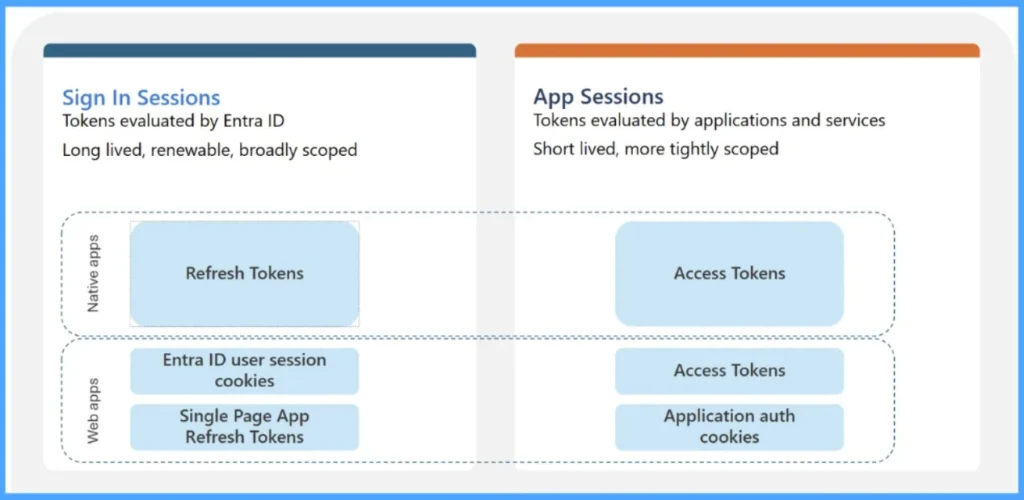
Beyond SSO, the PRT also facilitates the secure issuance of access and refresh tokens for services like Outlook, Teams, and SharePoint. On Windows, this process is managed by the Web Account Manager (WAM), while other platforms use broker plug-ins. The PRT carries both user and device claims, which Microsoft Entra ID evaluates to enforce Conditional Access policies, ensuring that access remains compliant with organisational security requirements.
- Fix Azure AD PRT Primary Refresh Token Issue with Windows 10 21H2 or KB5006738
- HTMD Community Free Python Intune Tool | HTMD – Microsoft Intune Reports Export Tool v1.0
- Best way to deploy Shell Scripts using Intune
NOTE! A Primary Refresh Token (PRT) remains valid for up to 90 days and is seamlessly renewed in the background, provided the user continues to actively sign in and use the device.Compliant in Intune, Yet Blocked by Conditional Access – What’s Going On?
Your enrolled device Is Compliant in Intune, but Conditional Access Still Blocks It – Why? This is a common issue many administrators encounter. Intune may report that a device is fully compliant and healthy: the agent is functioning correctly, syncs are occurring, and applications are installing as expected. Despite this, Conditional Access policies may still deny access, often with prompts stating that the device is not compliant.
- How to Configure Sign-In Frequency Every Time and Periodic Reauthentication Policies in Microsoft Entra
- Top 40 Microsoft Entra Interview Questions and Answers: Modern Identity and Access Management Solution
- Enhancing OAuth App Security And Governance With Microsoft Defender For Cloud Apps
The key reason lies in how Entra ID evaluates trust. Intune compliance alone does not determine Conditional Access outcomes. Instead, Conditional Access relies on the presence of a valid Primary Refresh Token (PRT). Without a valid PRT, compliance signals from Intune are insufficient to satisfy policy requirements.
If the PRT is missing, expired, or corrupted, Entra ID cannot establish device trust- even if Intune reports the device as compliant. This dependency explains why a device may appear healthy in Intune but still be blocked by Conditional Access. Ultimately, Conditional Access evaluates authentication and trust through PRT, not Intune compliance status.
How to Troubleshoot Primary Refresh Token (PRT) Issues
In some cases, the PRT may have expired or corrupted, requiring the user to re‑sign in or rejoin the device to restore trust. Clock synchronisation problems can also interfere with token validation, so ensuring the system time is correctly synced with an NTP source is essential.
- Best Guide to Install Microsoft Graph PowerShell Modules
- Best Guide to Run Intune Device Query with Microsoft Graph API
Troubleshooting Primary Refresh Token (PRT) issues in Microsoft Entra ID requires checking both device state and token health. The steps below will help you to troubleshoot PRT Issues quickly.
Verify Device Join State
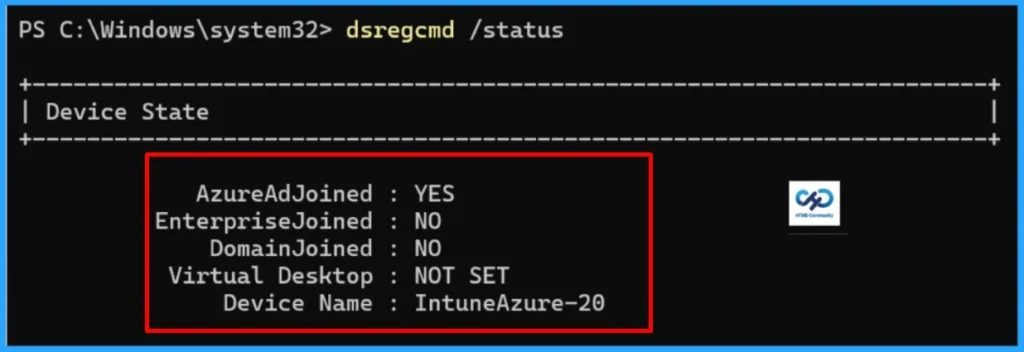
First step, let’s confirm the enrolled device is Entra ID joined, or Hybrid joined. It can be simply done by running dsregcmd /status in PowerShell:
- Open PowerShell as an administrator
- Run
dsregcmd /status. - Look under Device State –
AzureAdJoinedorDomainJoined.
- Check SSO State
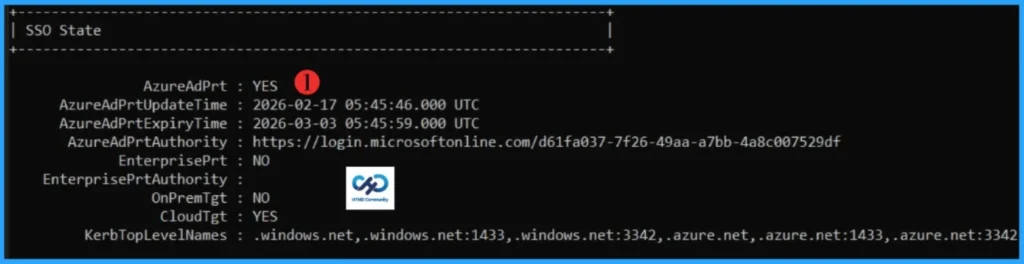
- AzureAdPrt should be YES if a valid PRT exists. If it shows NO, the device does not currently hold a valid PRT.
Check Primary Refresh Token Validity
The PRT remains valid for up to 90 days and is seamlessly renewed in the background, provided the user continues to sign in and use the device actively. However, you can check the PRT validity in the dsregcmd /status output.
- Look for PRT Status and Expiry.
- If expired, the device must reauthenticate or rejoin the device.
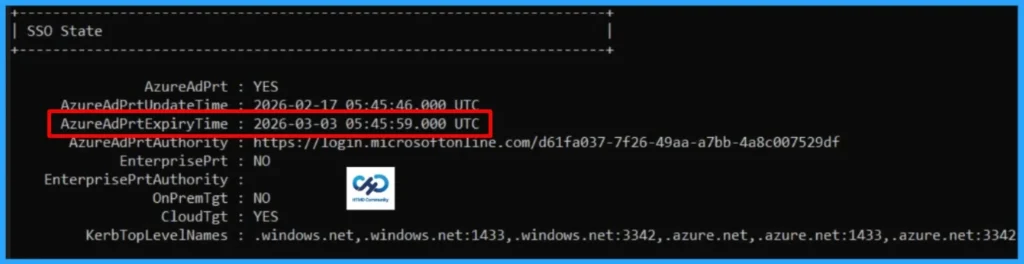
Primary Refresh Tokens Status Table
When reviewing the SSO State, you will notice several fields that provide important details about device authentication and token status. I have created a table to help you clearly understand what each of these fields represents.
| Field | Description | Notes |
|---|---|---|
| AzureAdPrt | Indicates whether the device currently holds a valid Azure AD Primary Refresh Token (PRT). | YES → Device has a valid PRT.NO → Device does not have a valid PRT. |
| AzureAdPrtUpdateTime | Timestamp of the last successful PRT update. | Shows when the token was last refreshed. |
| AzureAdPrtExpiryTime | Timestamp when the current PRT will expire. | If expired, the device must reauthenticate |
| AzureAdPrtAuthority | The authority (URL) used to issue and validate the PRT. | Usually points to https://login.microsoftonline.com/. Confirms the tenant issuing the token. |
| EnterprisePrt | Indicates whether an Enterprise PRT is present. | YES → Enterprise PRT available.NO → Not present, common in cloud-only joined devices. |
| EnterprisePrtAuthority | Authority for Enterprise PRT issuance. | Blank if Enterprise PRT is not configured or not applicable |
| OnPremTgt | Shows if an on-premises Kerberos Ticket Granting Ticket (TGT) is available. | YES → Device has a valid on-prem Kerberos TGT.NO → No on-prem TGT, common in cloud-only devices. |
| CloudTgt | Indicates if a cloud-based Kerberos TGT is available. | YES → Device can use cloud Kerberos authentication.NO → Not available. |
| KerbTopLevelNames | Lists the top-level domain names used for Kerberos authentication. | Includes domains like .windows.net or .azure.net with ports. Helps validate Kerberos realm configuration |
- How Entra Agent IDs and UEBA Updates Improve Threat Detection in Microsoft Defender
- Understanding Entra Agentic AI in Security From Manual Work to Fully Autonomous Agents
- AI Agent Tool that Brings the Power of Microsoft Graph and MS Entra
I trust that this article will significantly benefit you and your organisation. I appreciate your patience in reading this post. I look forward to seeing you in the next post. Keep supporting the HTMD Community.
Need Further Assistance or Have Technical Questions?
Join the LinkedIn Page and Telegram group to get the latest step-by-step guides and news updates. Join our Meetup Page to participate in User group meetings. Also, Join the WhatsApp Community to get the latest news on Microsoft Technologies. We are there on Reddit as well.Author
About the Author: Sujin Nelladath, a Microsoft Graph MVP with over 11 years of experience in SCCM device management and Automation solutions, writes and shares his experiences with Microsoft device management technologies, Azure, DevOps and PowerShell automation.