
Key Takeaways
- In the February 2025 Patch Tuesday release, Microsoft delivered important updates focused on strengthening security, improving system stability, and optimizing overall performance.
- Agent in Settings – Expanded language support improves accessibility for global users
- Fixed an issue where joining the Windows Insider Program from Settings > Windows Update could get stuck.
- Fixed an issue where shutdown warning messages were cut off in the Start menu when other users were signed in.
Windows 11 KB5077181 KB5075941 February 2026 Patch and 6 Zero Day Vulnerabilities and 58 Flaws! In the February 2026 Patch Tuesday update, Microsoft added two useful improvements. First, the Settings Agent now supports more languages, making it easier for users around the world to use Settings in their own language. Second, Cross-Device Resume was expanded, letting you continue what you were doing on your Android phone, such as listening to Spotify, working in Word, Excel, or PowerPoint, or browsing the web—directly on your PC.
Table of Content
Table of Contents
6 Zero Day Security Vulnerabilities for February 2026
Several critical vulnerabilities have been identified in the February patch. CVE-2026-21510 affects the Windows Shell and allows a security feature bypass, potentially exposing users to attacks. Similarly, CVE-2026-21513 targets the MSHTML framework, and CVE-2026-21514 impacts Microsoft Word, both enabling attackers to bypass security features.
CVE-2026-21519 involves the Desktop Window Manager and could allow elevation of privilege. CVE-2026-21525 affects the Windows Remote Access Connection Manager, leading to a possible denial of service, while CVE-2026-21533 targets Windows Remote Desktop Services, allowing elevation of privilege. These vulnerabilities highlight the importance of applying security updates promptly to mitigate potential risks.
- Elevation of Privilege vulnerabilities: 25
- Security Feature Bypass vulnerabilities: 5
- Remote Code Execution (RCE) vulnerabilities: 12
- Information Disclosure vulnerabilities: 6
- Denial of Service (DoS) vulnerabilities: 3
- Spoofing vulnerabilities: 7
| Release Date | CVE Number | CVE Title | Publicly disclosed | Exploitability assessment | Exploited |
|---|---|---|---|---|---|
| Feb 10, 2026 | CVE-2026-21533 | Windows Remote Desktop Services Elevation of Privilege Vulnerability | No | Exploitation Detected | Yes |
| Feb 10, 2026 | CVE-2026-21525 | Windows Remote Access Connection Manager Denial of Service Vulnerability | No | Exploitation Detected | Yes |
| Feb 10, 2026 | CVE-2026-21519 | Desktop Window Manager Elevation of Privilege Vulnerability | No | Exploitation Detected | Yes |
| Feb 10, 2026 | CVE-2026-21514 | Microsoft Word Security Feature Bypass Vulnerability | Yes | Exploitation Detected | Yes |
| Feb 10, 2026 | CVE-2026-21513 | MSHTML Framework Security Feature Bypass Vulnerability | Yes | Exploitation Detected | Yes |
| Feb 10, 2026 | CVE-2026-21510 | Windows Shell Security Feature Bypass Vulnerability | Yes | Exploitation Detected | Yes |

- Windows 11 Version Numbers Build Numbers Major Minor Build Rev
- Updated Windows 11 End-of-Life Dates
- Top 83 Windows 11 Desktop Admin Interview Questions
Windows 11 KB5077181 KB5075941 February 2026 Patch and 6 Zero Day Vulnerabilities and 58 Flaws
In this patch, Microsoft added a new Device card to the Settings home page. The card shows basic PC details like key specifications and usage information, and you can click it to quickly open Settings > System > About for more details. The Device card appears when you sign in with your Microsoft account, and its rollout has resumed after being paused during the August 2025 release.

| Windows 11 25H2 and 24H2 | Windows 11 23H2 |
|---|---|
| KB5077181 | KB5075941 |
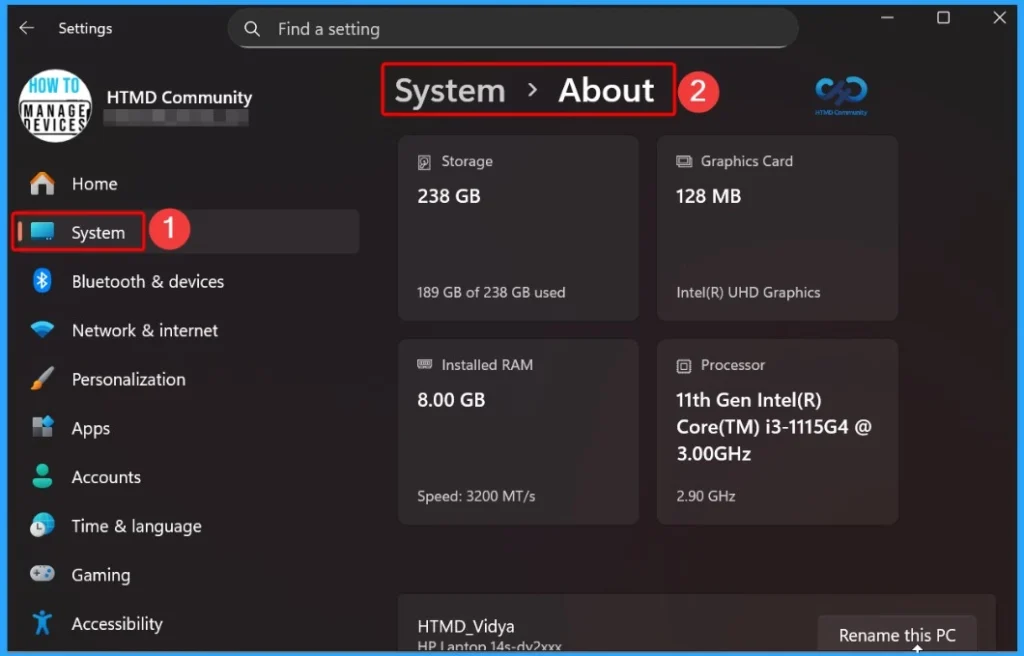
Updated Version of Windows 11 after Installing KB5077181 KB5075941 February 2025 Patch
In this patch update, Windows Hello Enhanced Sign-in Security (ESS) now supports external fingerprint readers. Now you can use secure fingerprint sign-in not only on devices with built-in sensors, but also on desktops and other Windows 11 PCs, including Copilot+ PCs.
- To set it up, connect a supported fingerprint reader, go to Settings > Accounts > Sign-in options, and follow the on-screen steps.
- Windows 11 version 25H2 and 24H2 – KB5077181 (OS Builds 26200.7840 and 26100.7840)
- Windows 11 Version 23H2 – KB5075941 (OS Build 22631.6649)
- More Details on Windows 11 version Numbers: Windows 11 Version Numbers Build Numbers Major Minor Build Rev.
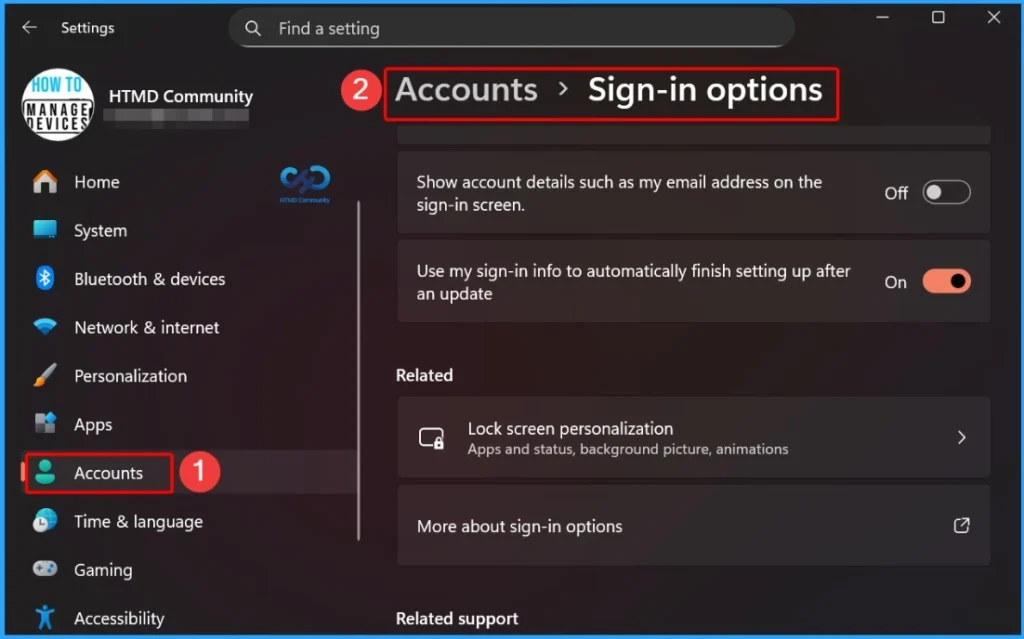
Windows 11 Features and New Improvements – KB5077181 KB5075941
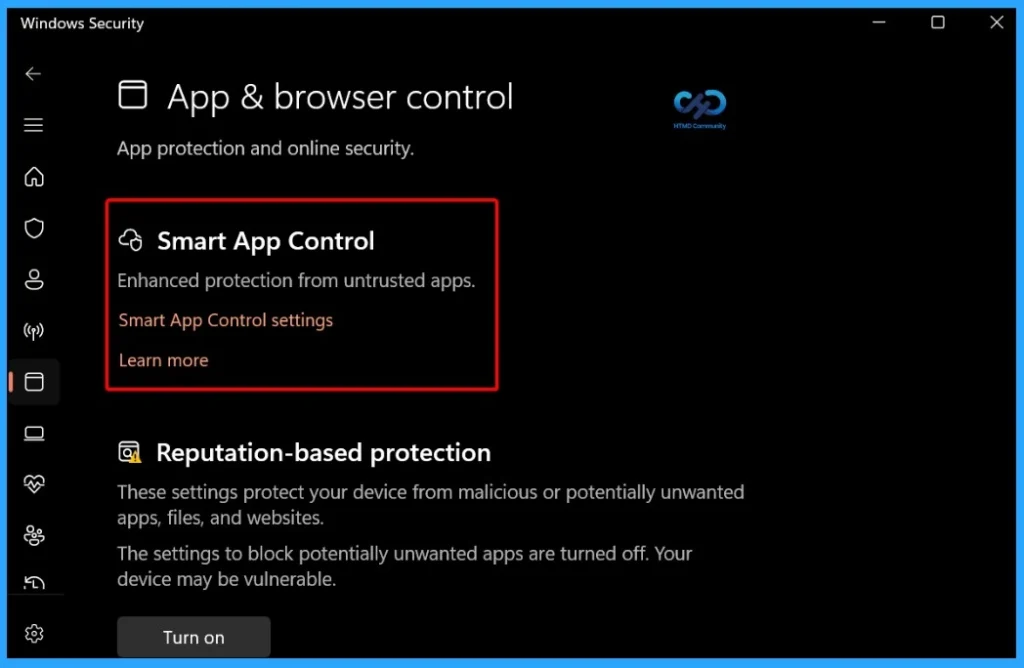
Smart App Control (SAC) can now be turned on or off without reinstalling Windows. You can manage this setting from Windows Security > App & Browser Control > Smart App Control. When enabled, Smart App Control helps block untrusted or potentially harmful apps, improving overall device security.
| New Improvements | Details |
|---|---|
| Agent in Settings | The Settings Agent on Copilot+ PCs now supports more languages, including German, Portuguese, Spanish, Korean, Japanese, Hindi, Italian, and Simplified Chinese, improving accessibility and user experience for global users. |
| Cross-Device Resume | Enhances Cross-Device Resume (introduced in May 2025 – KB5058499), allowing users to continue activities from their Android phone on a PC. |
| Vivo Browser Support | Vivo Android phone users can continue browsing from Vivo Browser directly on their PC. |
| Windows MIDI Services | Enhances MIDI on Windows with improved MIDI 1.0 and MIDI 2.0 support, including full WinMM and WinRT MIDI 1.0 compatibility with built-in translation, shared MIDI ports across apps, custom port names, loopback and app-to-app MIDI, plus performance improvements and bug fixes for a better musician experience. |
| Narrator | You can now choose what Narrator reads on the screen and in what order. This reduces extra talking and makes it easier to follow. |
| Settings – Device Card | A new Device card appears on the Settings home page. It shows basic PC details and lets you quickly open System > About for more info. It appears when you sign in with a Microsoft account. |
| Smart App Control | You can now turn Smart App Control on or off without reinstalling Windows. When on, it helps block unsafe apps. To make changes, go to Windows Security > App & Browser Control > Smart App Control settings. |
| Voice Access | The setup is now simpler and faster. You can easily download the language model, choose your microphone, and learn how Voice Access works. |
| Voice Typing | A new Wait time before acting setting lets you control how long Windows waits before running a voice command, helping improve accuracy. |
| Windows Hello | Enhanced Sign-in Security now supports external fingerprint readers, allowing more PCs (including desktops and Copilot+ PCs) to use secure fingerprint sign-in. |
Issues Fixed with Windows 11 February Patch 2026 – KB5077181 KB5075941
Microsoft fixed Start menu issues where the shutdown warning message could be cut off when other users were signed in. It also resolves a problem where the Start menu opened on the wrong side of the screen when using Arabic or Hebrew display languages with non-centered taskbar icons.
| Issues Fixed with Windows 11 February Patches | Description |
|---|---|
| Shutdown warning message cut off | Fixed an issue where the shutdown warning message could be partially hidden when other users were signed in. |
| Start menu opens on wrong side | Fixed an issue where the Start menu opened on the wrong side of the screen when using Arabic or Hebrew display languages with non-centered taskbar icons. |
| Kiosk mode | Removed an error message that could appear after signing in to multi-app kiosk mode. The message incorrectly said the operation was cancelled due to computer restrictions. |
| Windows Update | Fixed an issue where joining the Windows Insider Program from Settings > Windows Update could get stuck. |
| Lock screen | Improved reliability with background changes that help prevent the lock screen from becoming unresponsive. |
| File Explorer | Improved responsiveness when browsing network locations, making File Explorer faster and smoother to use. |
| Logging into your PC | Fixed an issue where Explorer.exe could hang on first sign-in when some apps were set to start automatically, which could cause the taskbar not to appear. |
| Activation | Fixed an issue where Windows license migration could fail during an upgrade if the device couldn’t register with the Windows Activation server, which previously required using the Activation troubleshooter. |
| Desktop icons | Fixed an issue where desktop icons moved unexpectedly when opening or renaming files. |
| Input (Keyboard) | Fixed an issue where keyboard repeat delay labels were reversed in Settings > Bluetooth & Devices > Keyboard. |
| User Account Control (UAC) | Fixed an issue where the PC could stop responding when running Windows Terminal as admin from a non-admin account. |
| Windows Sandbox | Fixed an issue that could cause Windows Sandbox to hang during startup and show error 0x800705b4. |
Known Issues from February Windows 11 Patch 2026
Sometimes, when you try to install updates using WUSA from a shared network folder that has more than one update file (.msu), the installation could fail. This issue has now been mitigated, reducing the chances of installation failures when installing updates from network locations.
| Summary | Originating Update | Status | Details |
|---|---|---|---|
| Updates installed via WUSA might fail if installed from a shared folder | N/A | Mitigated | This issue might occur when installing an update from a network folder containing multiple .msu files. |
Intune Windows 11 KB5077181 KB5075941 Deployment
For the February 2026 Patch Tuesday updates, you can use Microsoft Intune to deploy the Windows 11 cumulative update across your environment. Intune doesn’t require you to create a new patch policy for each updates are handled through quality update settings.
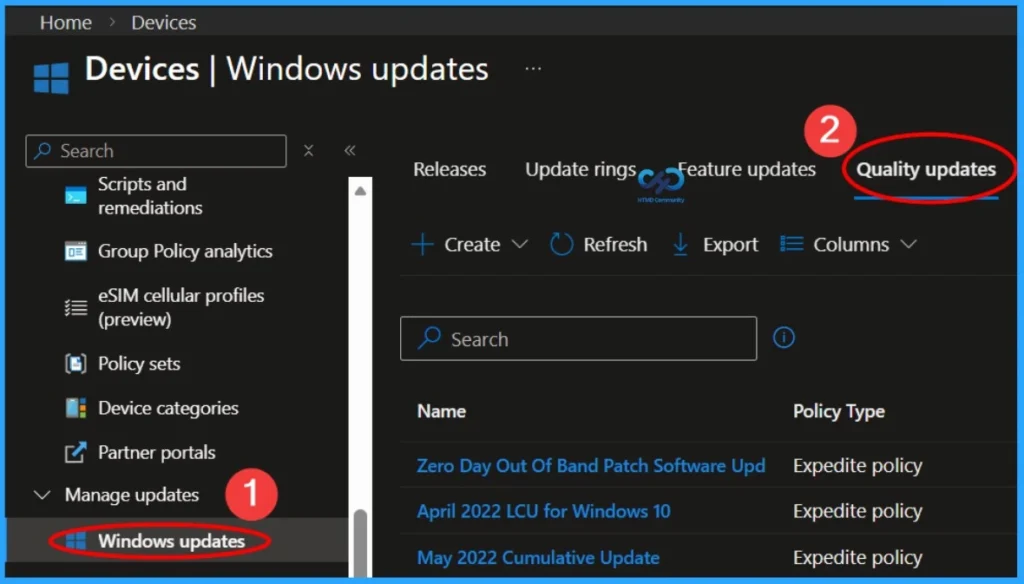
To speed up installation on devices that haven’t yet received the February 2026 update, create a Windows 11 quality update profile in the Intune admin center. Go to Devices > Windows 11 Quality Updates, then configure the profile with details like name, description, faster installation for older devices, and restart enforcement after 1 day. This helps ensure the February 2026 update installs more efficiently and consistently on managed devices.
Read More – Software Update Patching Options with Intune Setup Guide
More Details on Zero Day Out Of Band Patch Deployment Using Intune MEM Expedite Best Option and Intune Reporting Issue: Expedite Windows Security Patch Deployment.
SCCM Windows 11 KB5077181 KB5075941 Deployment
You can deploy the Windows 11 February 2026 Cumulative Update using SCCM, WSUS, or Intune. In SCCM, one of the easiest ways to find and deploy the update is by searching directly from the SCCM admin console. Go to Software Library > Overview > Software Updates > All Software Updates, then initiate a WSUS Sync by right‑clicking the All Software Updates node.
After the sync completes, search using the KB number for the February 2026 update or by keywords like “02-2026 Cumulative Update for Windows 11” to locate the update, then deploy it as part of your monthly patch management process.
Direct Download Links of Windows 11 KB5077181 KB5075941
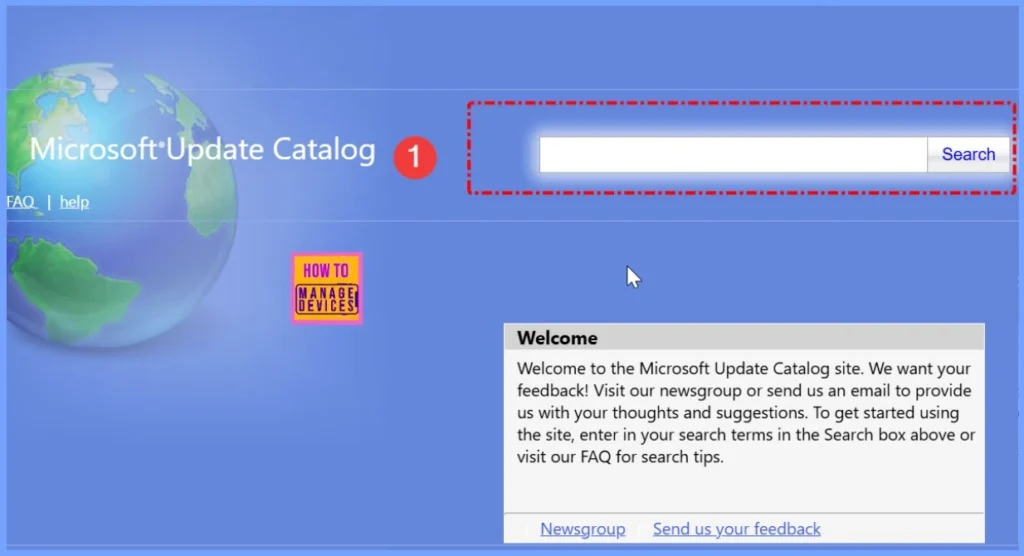
You can manually download the Windows 11 February 2026 Cumulative Update from the Microsoft Update Catalog. The catalog provides direct download links for the update and any associated hotfixes, making it easy to get the standalone installers.
To access them, visit the Microsoft Update Catalog portal at https://www.catalog.update.microsoft.com/, then search for the Feb 2026 cumulative update for Windows 11 to find and download the files you need.
| Cumulative Update for Windows 11 | Products | Size | Direct Download |
|---|---|---|---|
| 2026-01 Cumulative Update for Windows 11, version 25H2 for x64-based Systems(KB5077181) | Windows 11 25H2 | 4479.7 MB | Download |
| 2026-01 Cumulative Update for Windows 11 Version 24H2 for x64-based Systems (KB5077181) | Windows 11 24H2 | 4479.7 MB | Download |
| 2026-01 Cumulative Update for Windows 11 Version 23H2 for x64-based Systems (KB5075941) | Windows 11 23H2 | 998.6 MB | Download |
Need Further Assistance or Have Technical Questions?
Join the LinkedIn Page and Telegram group to get the latest step-by-step guides and news updates. Join our Meetup Page to participate in User group meetings. Also, join the WhatsApp Community and the Whatsapp channel to get the latest news on Microsoft Technologies. We are there on Reddit as well.
Resources
February 10, 2026—KB5077181 (OS Builds 26200.7840 and 26100.7840) – Microsoft Support
Author
Anoop C Nair has been Microsoft MVP for 10 consecutive years from 2015 onwards. He is a Workplace Solution Architect with more than 22+ years of experience in Workplace technologies. He is a Blogger, Speaker, and Local User Group Community leader. His primary focus is on Device Management technologies like SCCM and Intune. He writes about technologies like Intune, SCCM, Windows, Cloud PC, Windows, Entra, Microsoft Security, Career, etc.