
Key Takeaways
- Devices may reboot but fail to wipe, returning to the login screen instead
- Intune may remove the device object prematurely, losing access to BitLocker keys and LAPS
- The issue appears across multiple tenants and device types, suggesting a broader problem
- Some cases are linked to Windows reset failures or OS level issues
In this post we are discussing Understanding Windows Remote Wipe Failures in Microsoft Intune. Windows device wipe failures in Microsoft Intune are becoming a recurring concern for many administrators. Instead of performing a full reset, affected devices simply reboot and return to the login screen while disappearing from Intune. This creates a major gap in device management, especially when administrators rely on BitLocker keys, LAPS credentials, and compliance tracking and all of which become inaccessible once the device object is removed.
Table of Contents
Table of Contents
Understanding Windows Remote Wipe Failures in Microsoft Intune
This issue can be particularly frustrating because Intune reports the wipe action as successful even when the device has not been properly reset. As a result, organizations may unknowingly leave sensitive data on endpoints that are assumed to be wiped, introducing both security and compliance risks.
- Install Required Apps in Windows Autopilot Enrollment Status Page
- How to Resolve Error 0x80070017 on Autopilot Device Setup in Intune
- Beginners Guide Setup Windows Autopilot Deployment
Why this Issue Happens
This issue happens because Microsoft Intune only confirms that the wipe command has been sent to the device, not that the wipe has fully completed. So, when you trigger a wipe, Intune may remove the device from its records assuming the process is successful, even if the device itself failed to complete the reset. If something interrupts the process on the device like a system error, update issue, or recovery failure, the device may just reboot and go back to the login screen instead of being wiped.
Causes for this Issue – Windows Reset or Recovery Failure
The wipe process depends on the Windows reset and the Windows Recovery Environment (WinRE). If WinRE is corrupted, missing, or misconfigured, the reset command may fail to execute properly. In such cases, the device may reboot but return to the login screen instead of wiping, as the recovery process never fully starts.

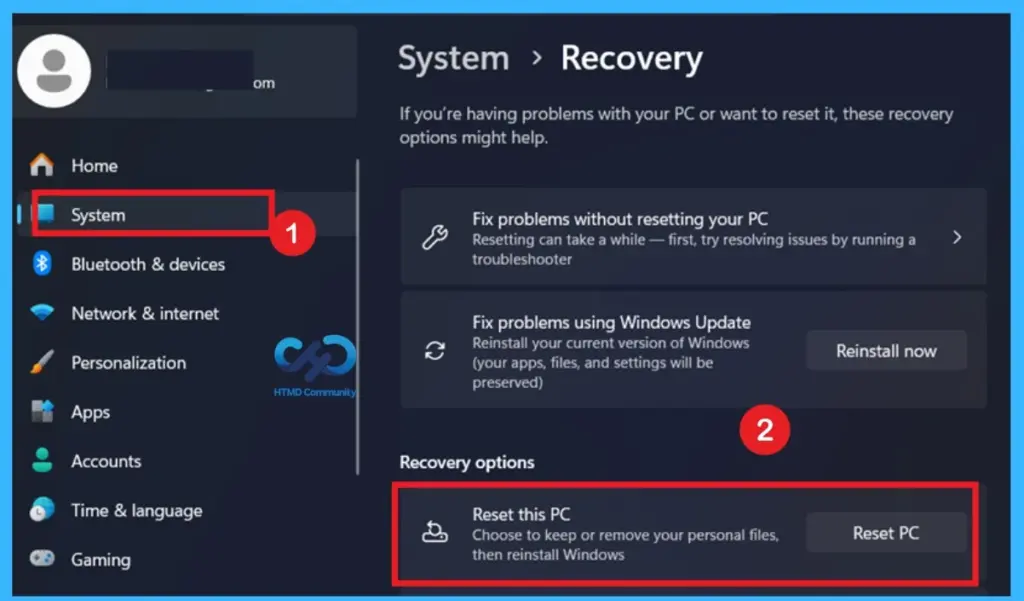
- The Reset this PC option under Windows Recovery settings allows users to reinstall Windows either by keeping personal files or removing everything.
- This screen is used to initiate the reset process when troubleshooting system issues or preparing a device for reuse.
| Issues |
|---|
| Devices reboot but return to the login screen without wiping. |
| Intune assumes the wipe is complete, but the device remains intact. |
| Once removed from Intune, admins lose access to LAPS and BitLocker keys. |
Operating System Bugs or Malware Issues
If the Windows OS have Malware or has pending updates, system files required for reset may not function correctly. Known issues or bugs in specific Windows builds can also interrupt the wipe process, resulting in incomplete resets or errors during execution.
Network or Connectivity Issues
The wipe command on proper communication between the device and Intune. If the device loses network connectivity during execution, the command may not fully complete. This can result in the device appearing wiped in Intune while still being operational locally.
BIOS / UEFI Configuration Issues
Certain firmware settings like RAID mode, Secure Boot, or storage controller configurations can interfere with the reset process. These settings may prevent Windows from accessing the disk properly during reset, causing the wipe to fail or stop midway.
Workaround for the Issue
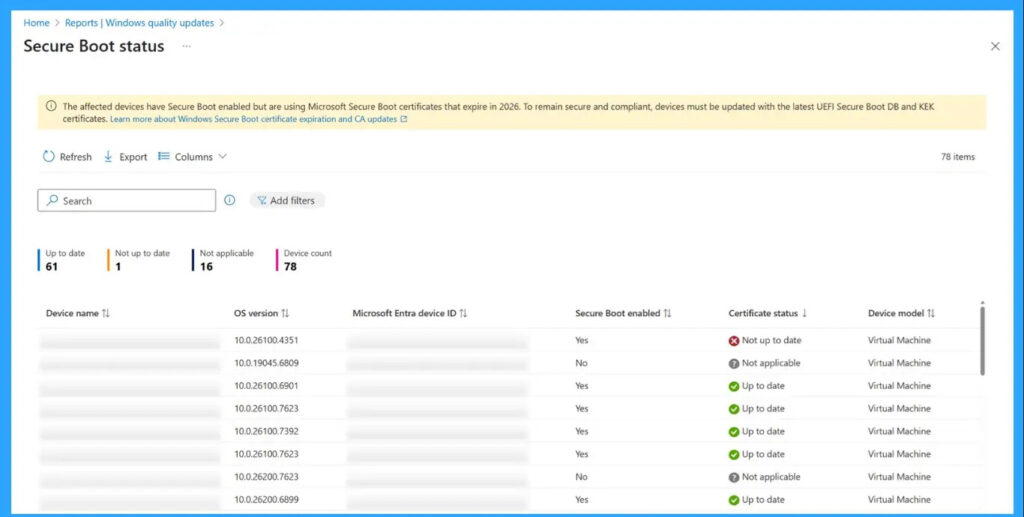
When the Intune wipe doesn’t work, the best option is to reset the device manually using local recovery tools instead of relying on the remote wipe. Some admins also use other management tools to trigger a cloud reset, which can succeed where Intune fails. If you see the error code,0x800f0991, check the BIOS settings and make sure Secure Boot certificates are set up correctly.
Need Further Assistance or Have Technical Questions?
Join the LinkedIn Page and Telegram group to get the latest step-by-step guides and news updates. Join our Meetup Page to participate in User group meetings. Also, join the WhatsApp Community and the Whatsapp channel to get the latest news on Microsoft Technologies. We are there on Reddit as well.
Author
Anoop C Nair is a Workplace Technology solution architect with 25+ years of experience. Microsoft Certified Trainer. Microsoft MVP from 2015 onwards for consecutive 11+ years! He is a blogger, Speaker, and Founder of HTMD Community and HTMD Conference. His main focus is on Device Management technologies like Intune, Windows, and Cloud PC. He writes about technologies like Intune, SCCM, Windows, Cloud PC, Entra, and Microsoft Security.