
Key Takeaways
- BYOD (Bring Your Own Device) allows employees to use personal devices for work, offering flexibility but introducing security risks.
- CYOD (Choose Your Own Device) lets users select from company-approved devices, balancing convenience with control.
- Microsoft Intune provides cloud-based device and app management
Organizations use BYOD and CYOD to give users flexibility in choosing devices while still protecting company data. However, BYOD devices can create security risks because they are personal devices. Mobile Threat Defense (MTD) helps by finding problems like malware, phishing, or unsafe Wi-Fi connections. By using Microsoft Intune IT teams can manage and protect both personal and company-approved devices. In this setup, MTD checks if a device is risky, and Intune blocks or allows access to company resources based on that risk, keeping data secure without fully controlling personal devices.
Table of Content
Table of Contents
How to Secure BYOD and CYOD Devices using Microsoft Intune
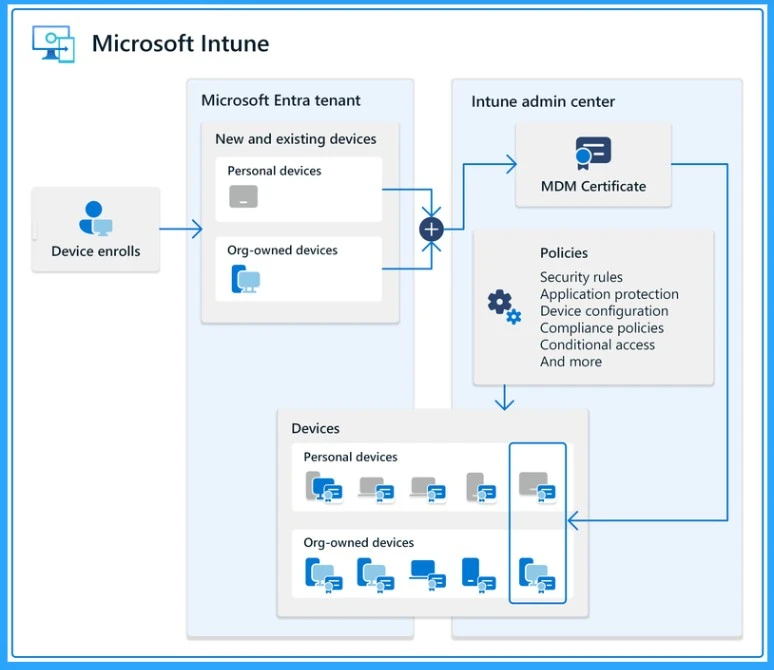
Microsoft Intune provide a strong solution for managing both company-owned and user-owned devices. Mobile and personal devices are secured using Mobile Threat Defense (MTD), where threat signals are evaluated and access to corporate resources is controlled through Intune policies. Overall, this integrated approach allows organizations to manage devices, users, and security policies under one unified platform, making it easier to support flexible work environments without compromising security.
| How to Secure BYOD and CYOD Devices using Microsoft Intune |
|---|
| Company Portal App for BYOD & User-Owned Devices Microsoft Intune Tenant with Co-Management (No Connector Required) Microsoft Intune Subscription (Microsoft 365 / EMS) Co-Management SCCM in SCCM Console Device Lifecycle Management (Enroll, Manage, Retire, Wipe) Device Enrollment (Windows, iOS, Android) via Intune Compliance Policies with Conditional Access (Entra ID) App Management & App Protection Policies (MAM/MAM-WE) Device Inventory & Reporting for BYOD and Corporate Devices Microsoft Defender for Endpoint + Mobile Threat Defense (MTD) Microsoft Entra ID forIdentity & Access Control |
BYOD (Bring Your Own Device)
BYOD allows employees to use their personal devices for work, but it requires clear policies and strong security controls to protect company data while respecting user privacy. BYOD (Bring Your Own Device) means employees use their personal devices, such as smartphones and tablets, to access company email, applications, and data to do their work. Instead of the organization providing every device, employees bring devices they already own and use them for work purposes.
- Organizations adopt BYOD to support:
- Remote and hybrid workers who need access from anywhere
- Developers and technical staff who prefer using their own devices
- Temporary employees, interns, and trainees who need short-term access
- Employees from mergers or acquisitions who need quick access to company resources
- Security risks with BYOD
- Data leakage
- Malware or phishing attacks
- Lost or stolen devices
- Unsecured networks
| Details | Employee | Organisation |
|---|---|---|
| Who owns the device? | Yes | No |
| Who owns personal data? | Yes | No |
| Who owns corporate/work data? | Yes | Yes |
| Who maintains the device hardware & OS? | Yes | No |
| Who manages work apps & policies? | Yes | Yes |
| Who pays ongoing bills? | Yes | No |
| Who owns the phone number? | Yes | No |
CYOD (Choose Your Own Device)
CYOD (Choose Your Own Device) is a device strategy where the organization owns the devices. But employees can choose their device from a list of IT-approved models. This approach balances user flexibility with strong IT control and security.

In a CYOD, the IT team prepares a list of approved devices such as laptops, tablets, and phones. Employees choose a device from this list based on their role and preference. The organization owns the device and manages it using tools like Microsoft Intune. IT applies security policies, installs required applications, and pushes updates centrally to keep the device secure and compliant.
- CYOD helps companies:
- Keep devices secure and compliant
- Reduce IT support effort
- Control costs by supporting fewer device types
- Still give employees some freedom of choice
COPE (Corporate-Owned, Personally-Enabled)
COPE means the company provides the device, but the employee is allowed to use it for both work and personal purposes. The organization owns and manages the device, while the employee can also make personal calls, install approved apps, and use it outside work hours.
- The company buys and owns the device (phone, laptop, tablet)
- IT sets up security, apps, and policies before giving it to the user
- Employees can:
- Make personal calls
- Use personal email
- Install allowed personal apps
- Work data is protected and separated using tools like Microsoft Intune
- If the device is lost or the employee leaves, IT can remove only work data
- BYOD > Employee owns the device, IT has limited control
- COPE > Company owns the device, IT has strong control but allows personal use
COBO (Corporate-Owned, Business-Only)
COBO means the organization owns the device and it is used only for work purposes. Personal use is not allowed at all. These devices are fully managed by IT and are commonly used in scenarios like kiosk devices, shared tablets, Zoom Room controllers, frontline devices, or dedicated business phones.
In some cases, a COBO device may be issued to an individual, but strict policies ensure it is used only for business activities. Intune fully manages these devices, locking them down, controlling apps, and monitoring compliance.
Need Further Assistance or Have Technical Questions?
Join the LinkedIn Page and Telegram group to get the latest step-by-step guides and news updates. Join our Meetup Page to participate in User group meetings. Also, join the WhatsApp Community and the Whatsapp channel to get the latest news on Microsoft Technologies. We are there on Reddit as well.
Author
Anoop C Nair is Microsoft MVP from 2015 onwards for consecutive 10 years! He is a Workplace Solution Architect with more than 22+ years of experience in Workplace technologies. He is a Blogger, Speaker, and Local User Group Community leader. His main focus is on Device Management technologies like SCCM and Intune. He writes about technologies like Intune, SCCM, Windows, Cloud PC, Windows, Entra, Microsoft Security, Career etc…
Anoop C Nair is Workplace Technology solution architect with 25+ years of experience in global enterprise organizations such as JP Morgan, Capgemini, etc. He is Microsoft Certified Trainer. Microsoft MVP from 2015 onwards for consecutive 11 years! He also conducts Intune and modern workplace tech training for enterprise organizations. He is Blogger, Speaker, and Founder of HTMD Community and HTMD Conference. His focus is on Device Management technologies such as Intune, Windows, Cloud PC. He writes about technologies like Intune, SCCM, Windows, Cloud PC, Windows, Entra, Microsoft Security.