
Key Takeaways:
- Visibility gap in Intune’s Device Detail Management
- Admins may not receive accurate signals when update deferrals don’t apply correctly
- Cause confusion in reporting and troubleshooting
- Possible workarounds of Intune DDM and iOS Update Visibility issue
Let’s discuss about How to Fix Issue on Intune DDM and iOS Update Visibility | Admin Alert for Deferral Failures. Intune Admin was configured Device Deployment Manager (DDM) policy to defer iOS updates for 7 days, then enforce installation after 10 days at 8 PM. The update is became visible instead of being hidden.
Table of Contents
Table of Contents
How to Fix Issue on Intune DDM and iOS Update Visibility | Admin Alert for Deferral Failures
One of the Intune admin recently configured a DDM policy for their iOS devices (around 10K). This policy configured to defer iOS updates for 7 days, then enforce installation after 10 days at 8 PM The admin noticed that, the deferral does not work as expected as the update becomes visible as soon as it’s released. This happened with the iOS 26.2.1, iOS 26.3 update.
| Configuration Settings | True |
|---|---|
| Enforce Latest Update Version | True |
| Delay in Days | 10 |
| Install Time | 20:0 |
| Automatic Download | Always On |
| Automatic Install OS Updates | Always On |
| Automatic Install Security Update | Always On |
| Background Security Improvement Settings | Enable |
| Deferrals Combined Period in Days | 7 |
| Notifications | Enable |
How to Fix Issue on Intune DDM and iOS Update Visibility | Admin Alert for Deferral Failures – Table.1
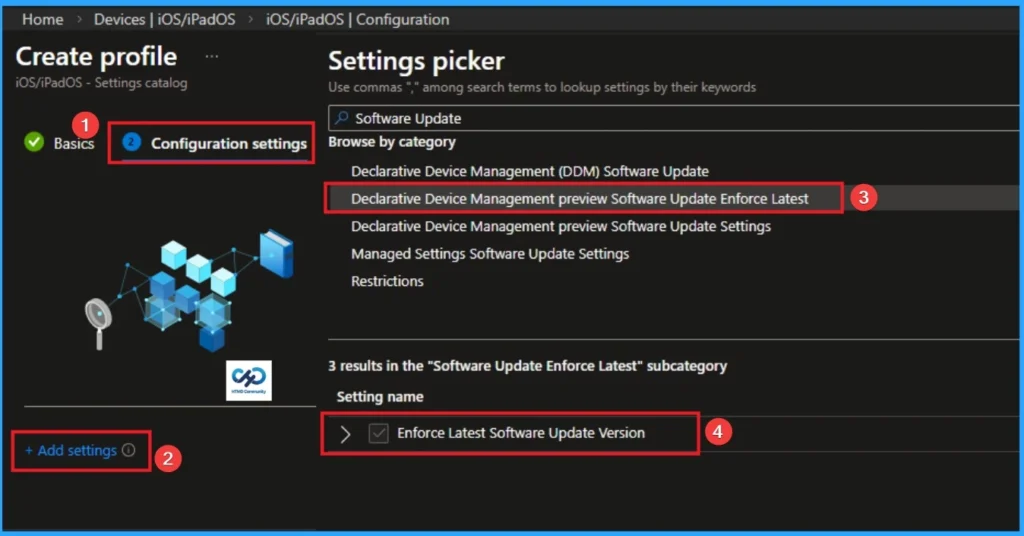
The following screenshot shows the Configuration settings of DDM Software Update – Enforce Latest”). Here you can configure Enforce latest software update version.

- Managing Default Messaging App Preferences on iOS Devices using Intune
- Microsoft Intune Issues with Rapid Security Response Version of iOS iPadOS and macOS Update
- Intune Company Portal Freeze Issue on iOS devices during sign in
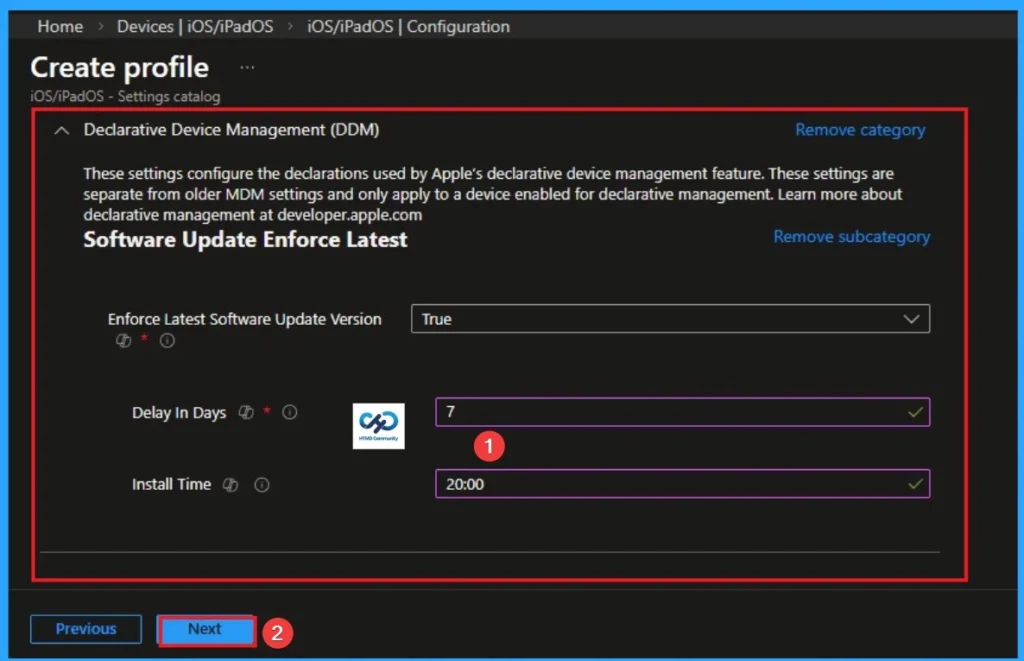
Here the delays in Days are given as 7 and Install time is 20:00. This image shows exactly same as the Admin who raised the issue above.
Impact of this Issue
The deferral setting (7 days) is ignored, meaning the intended staggered rollout fails. And Auto-install settings may override deferrals, creating inconsistent behavior across devices.
Possible Workarounds
MS support think this issue occurred due to the Auto Install setting being Always On (for both iOS updates and Security updates). So the Auto Install Always On” option seems to override the deferral. You can try setting Auto Install Not Configured or Install Later so that the deferral period can take effect before enforcement.
- Admins Ensure that only one update policy applies per device to avoid conflicts
Need Further Assistance or Have Technical Questions?
Join the LinkedIn Page and Telegram group to get the step-by-step guides and news updates. Join our Meetup Page to participate in User group meetings. Also, Join the WhatsApp Community and WhatsApp Channel to get the latest news on Microsoft Technologies. We are there on Reddit as well.
Author
Anoop C Nair has been Microsoft MVP for 10 consecutive years from 2015 onwards. He is a Workplace Solution Architect with more than 22+ years of experience in Workplace technologies. He is a Blogger, Speaker, and Local User Group Community leader. His primary focus is on Device Management technologies like SCCM and Intune. He writes about technologies like Intune, SCCM, Windows, Cloud PC, Windows, Entra, Microsoft Security, Career, etc.
Did you ever get a conclusive answer/fix? It seems the settings “Auto Install” can’t be set to Not Configured or Install Later. The only options available are Allowed or AlwaysOff.
Thanks!