

Key Takeaways
- Graph API enables precise auditing of dynamic group membership changes.
- Audit logs are the source of truth, capturing every membership event with timestamps, initiators, and affected objects.
- Dynamic groups recalculate automatically, so changes may occur without direct admin action – making API queries essential for tracking.
- Automated reporting improves compliance.
How to Audit Security Dynamic Group Membership Changes using Microsoft Graph API! Dynamic groups simplify access management by allowing resource owners and Microsoft Entra ID directory admins to assign a consistent set of permissions to all members automatically. Beyond that, group ownership can be delegated to trusted individuals, such as department heads or help desk staff, so they can manage membership directly. This delegation empowers teams to add or remove members as needed, reducing administrative overhead while maintaining secure, role‑based access control.
Table of Content
Table of Contents
Why Group Auditing Matters in Modern Endpoint Management
Auditing group activity in Intune and Microsoft Entra ID is essential for maintaining both security and operational clarity. Groups are the backbone of access management, controlling which users and devices receive policies, applications, or permissions. Without proper auditing, it becomes difficult to trace who made changes, when memberships were updated, or why certain users gained access.
Beyond security, group auditing also plays a critical role in day‑to‑day IT efficiency. Dynamic groups in particular recalculate membership automatically, which means changes can occur without direct administrator input. Having audit logs and Graph API queries available allows IT teams to validate that rules are working as intended and that Intune targeting remains accurate.
- How to Validate Microsoft Entra Dynamic Group Membership Rules in Intune
- Key Scenarios of MS Entra External Identity Deployment Architectures
- How to Restore Deleted Cloud Security Groups in Microsoft Entra ID
By keeping a clear record of membership changes, administrators can quickly identify misconfigurations, spot unauthorised actions, and ensure that compliance requirements are consistently met. This visibility not only strengthens governance but also builds confidence across departments, ensuring that resource owners and help desk teams can manage memberships responsibly while administrators retain oversight.

Types of Auditing in Intune and Entra
Auditing in Intune and Entra spans multiple layers from group membership to device compliance. The table below highlights the key types of auditing and their practical value.
| Audit Type | Scope | What It Tracks | Use Case |
|---|---|---|---|
| Group Membership Auditing | Entra ID Groups (Dynamic & Security) | Adds/removes of users/devices, last membership change, initiator details | Validate Intune targeting, ensure compliance, detect unauthorized changes |
| Device Auditing | Intune‑managed endpoints | Enrollment events, compliance status changes, configuration profile assignments | Monitor device lifecycle, troubleshoot enrollment issues, enforce compliance |
| Policy & Configuration Auditing | Intune policies and profiles | Assignments, modifications, deployment status, success/failure logs | Track who changed policies, validate rollout, troubleshoot failed deployments |
| Application Auditing | Intune app deployments | Install/uninstall events, assignment changes, app protection policy updates | Ensure correct app delivery, monitor protection policies, detect anomalies |
| Access & Sign‑In Auditing | Entra ID sign‑ins and conditional access logs | User sign‑ins, MFA usage, conditional access evaluations, risky sign‑ins | Ensure correct app delivery, monitor protection policies, and detect anomalies |
How to Check Dynamic Group Membership Changes Manually
It’s always better to learn how to check the membership change date and time of a dynamic group manually in the portal before automating. Let’s do it..!
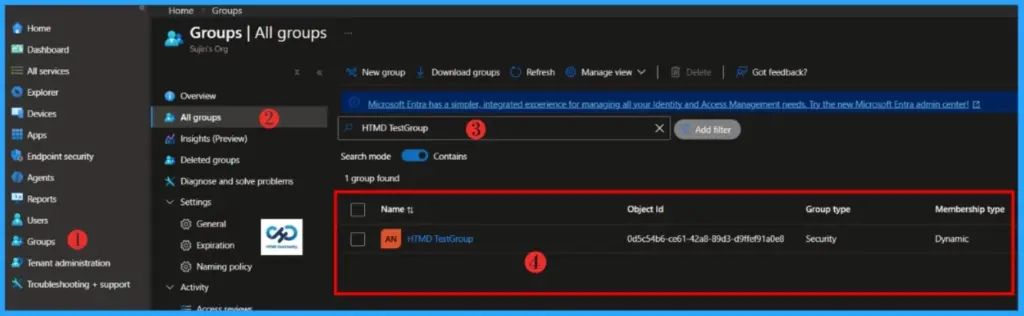
- Sign in to the Microsoft Intune Admin Portal with your credentials.
- Select Groups > All Groups
- Choose the Dynamic Group whose membership changes you want to audit
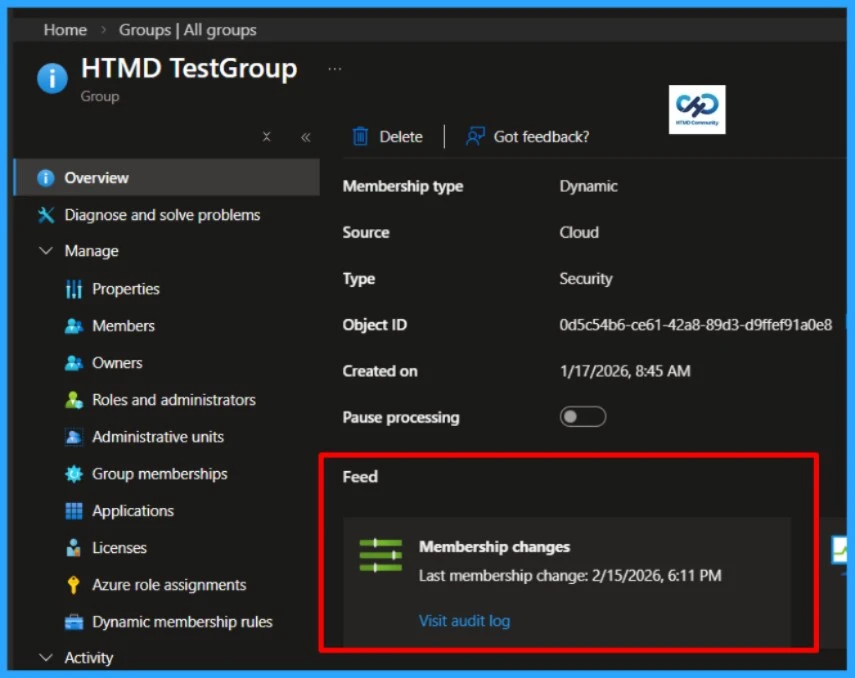
Double‑click on the group you want to audit and go to its Overview page. Scroll down to the Feed section, where you’ll find a record of recent activity. Under Membership changes, you can see the exact date and time of the last update.
PowerShell Script to Audit Security Dynamic Group Membership Changes
Let’s automate the Audit of Security Dynamic Group Membership Changes using Microsoft Graph API and PowerShell. Remember, you must install the Microsoft Graph module before running this automation, and open PowerShell ISE or Visual Studio Code as an Administrator.
- Best Guide to Install Microsoft Graph PowerShell Modules
- Best Guide to Run Intune Device Query with Microsoft Graph API
##########################################################################

#AuditDynamicGroup.ps1

#Author: Sujin Nelladath

#LinkedIn : https://www.linkedin.com/in/sujin-nelladath-8911968a/

############################################################################


param(

    [Parameter(Mandatory)]
    [string]$GroupName,
    [string]$ExportCsv
)

# Make sure the Graph module is available
if (-not (Get-Module -ListAvailable Microsoft.Graph.Authentication))

{
    Install-Module Microsoft.Graph.Authentication -Scope CurrentUser -Force
}

Import-Module Microsoft.Graph.Authentication

Connect-MgGraph -Scopes "Group.Read.All","GroupMember.Read.All" -NoWelcome

# Find the group by display name
$uri = "https://graph.microsoft.com/v1.0/groups?`$filter=displayName eq '$GroupName'&`$select=id,displayName,membershipRule"

$result = Invoke-MgGraphRequest -Method GET -Uri $uri

if (-not $result.value)
{
    Write-Error "Could not find a group named '$GroupName'"
    return
}

$group = $result.value[0]
Write-Host "Group : $($group.displayName) ($($group.id))" -ForegroundColor Green
Write-Host "Rule  : $($group.membershipRule)" -ForegroundColor Green

# Get membership rule processing status
$statusUri = "https://graph.microsoft.com/beta/groups/$($group.id)?`$select=membershipRuleProcessingStatus"
$data = Invoke-MgGraphRequest -Method GET -Uri $statusUri
$s = $data.membershipRuleProcessingStatus

$result = [PSCustomObject]@{
    GroupName             = $group.displayName
    GroupId               = $group.id
    Status                = if ($s.status) { $s.status } else { 'N/A' }
    StatusDetails         = if ($s.statusDetails) { $s.statusDetails } else { 'N/A' }
    LastMembershipUpdated = if ($s.lastMembershipUpdated) { $s.lastMembershipUpdated } else { 'N/A' }
    RuleEvaluationStatus  = if ($s.membershipRuleEvaluationStatus) { $s.membershipRuleEvaluationStatus } else { 'N/A' }
    CheckedAt             = (Get-Date -Format 'yyyy-MM-dd HH:mm:ss')
}

$result | Format-List

if ($ExportCsv)

{
    $result | Export-Csv -Path $ExportCsv -NoTypeInformation -Encoding UTF8
    Write-Host "Saved to $ExportCsv"
}
- Automate Microsoft Intune Device Compliance Report using Graph API
- Complete Guide to Install the New Microsoft Entra PowerShell Module
- Microsoft Graph API Automation to Reclaim the Microsoft 365 License of Disabled Users
End Result
We’ve put the automation in place, and the heavy lifting is done. Now comes the exciting part – let’s see the end result in action.
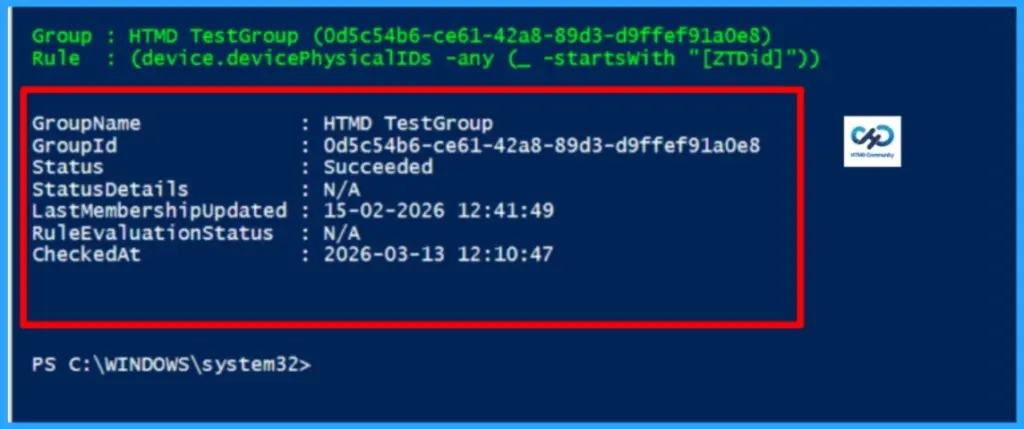
Download the Script : AuditDynamicGroup.PS1I trust that this article will significantly benefit you and your organisation. I appreciate your patience in reading this post. I look forward to seeing you in the next post. Keep supporting the HTMD Community.
Need Further Assistance or Have Technical Questions?
Join the LinkedIn Page and Telegram group to get the latest step-by-step guides and news updates. Join our Meetup Page to participate in User group meetings. Also, Join the WhatsApp Community to get the latest news on Microsoft Technologies. We are there on Reddit as well.Author
About the Author: Sujin Nelladath, a Microsoft Graph MVP with over 12 years of experience in SCCM device management and Automation solutions, writes and shares his experiences with Microsoft device management technologies, Azure, DevOps and PowerShell automation.