
Key Takeaways
- Runbooks allow scripts to run in the cloud without relying on local devices
- Automation becomes faster and more scalable using Microsoft infrastructure
- Application permissions enable secure, user-independent execution
- Choosing between HTTP requests and modules depends on control vs simplicity
In this post we are discussing the How to Scale PowerShell Automation Using Cloud Runbooks. Mr. Erik Loef discussing in a technical takeoff, that automation has become an essential part, especially handling repetitive tasks like user onboarding, device setup, and reporting. Traditionally, PowerShell scripts have been used locally to perform these actions. While effective, this approach depends heavily on individual devices and manual execution, which can slow down operations.
Table of Contents
Table of Contents
How to Scale PowerShell Automation Using Cloud Runbooks
Running scripts locally or asking others to execute them is not always practical, especially in large environments. This is where cloud-based automation steps in, offering a more scalable and efficient solution that reduces dependency on user device.
- Automate the Process of Removing Primary User from Intune Device using Microsoft Graph API
- Best way to Deploy Shell Scripts using Intune
- Run Remediation Script on-demand for Windows Devices using Intune
Why Runbooks
Runbooks eliminate the need to run scripts on local machines. Instead, they execute directly in the cloud, making the process much faster and more efficient. Since they run on Microsoft’s infrastructure, tasks can complete in a fraction of the time compared to local execution. Another advantage is flexibility. Runbooks can be scheduled to run automatically, such as sending daily reports, through webhooks when needed. This reduces manual effort and ensures consistency in operations.
Automating Scripts with Azure Runbooks
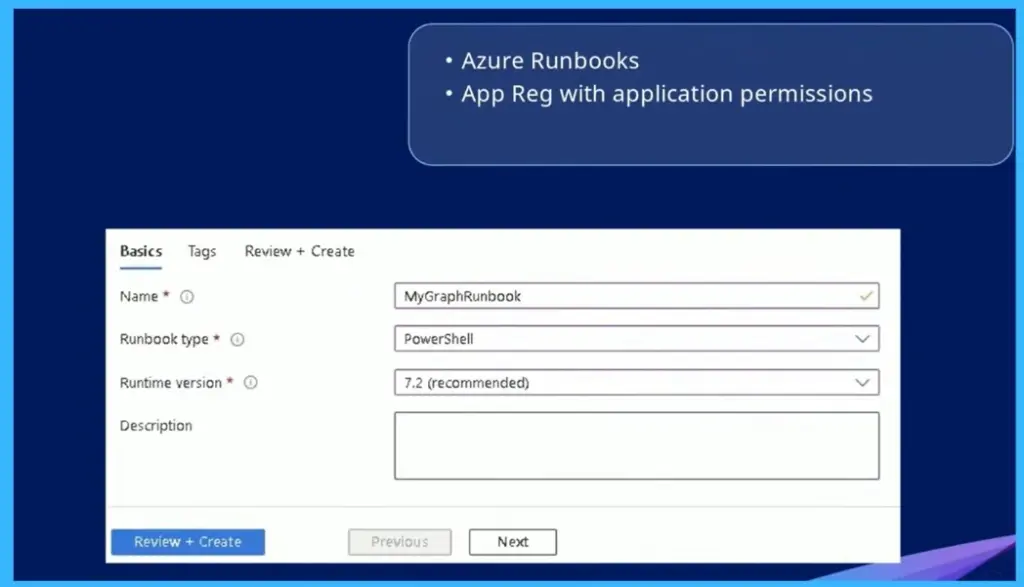
This image shows how a PowerShell script can be moved from local execution to cloud-based automation using Azure Runbooks. Instead of running scripts manually on individual devices, runbooks allow you to execute them centrally in the cloud, making the process faster and more scalable.

To set this up, you create a runbook by defining the name, selecting PowerShell as the runbook type, and choosing the appropriate runtime version. These runbooks can then be connected with a Microsoft Graph application using application permissions, enabling secure, automated execution without user interactions.
| Basics | Details |
|---|---|
| Name | MyGraphRunbook |
| Runbook type | PowerShell |
| Runtime version | 7.2 (recommended) |
Handling Pagination in Graph API
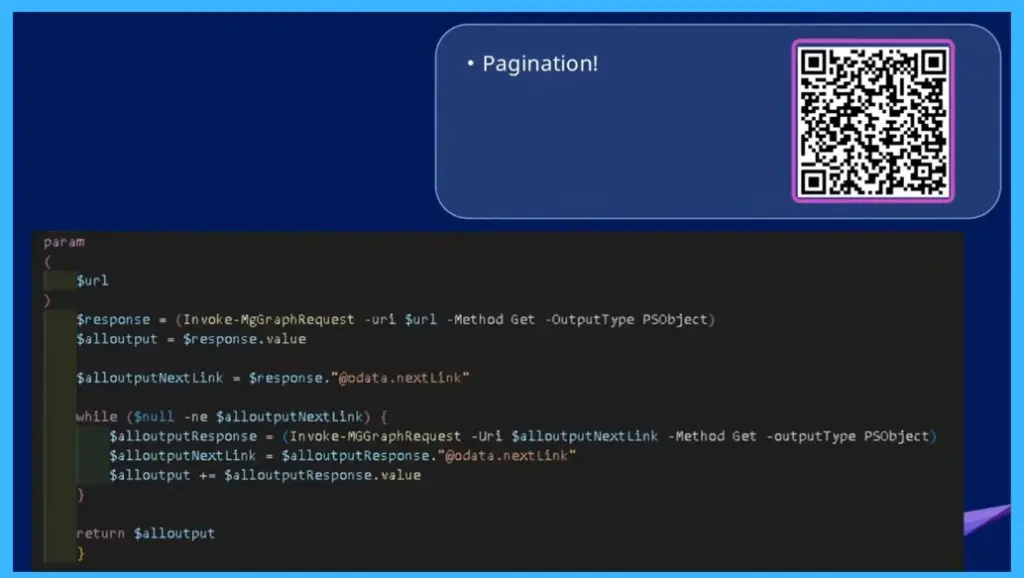
The script initially sends a request using Invoke-MgGraphRequest and stores the first batch of results, then checks for the presence of an @odata.nextLink, which indicates more data is available. Using a loop, it continuously calls the next link to fetch additional pages the result until all data is collected. This approach ensures you don’t miss records when working with large environments, as Graph APIs return data in chunks rather than a single complete response.
Device ID Differences Across Platforms
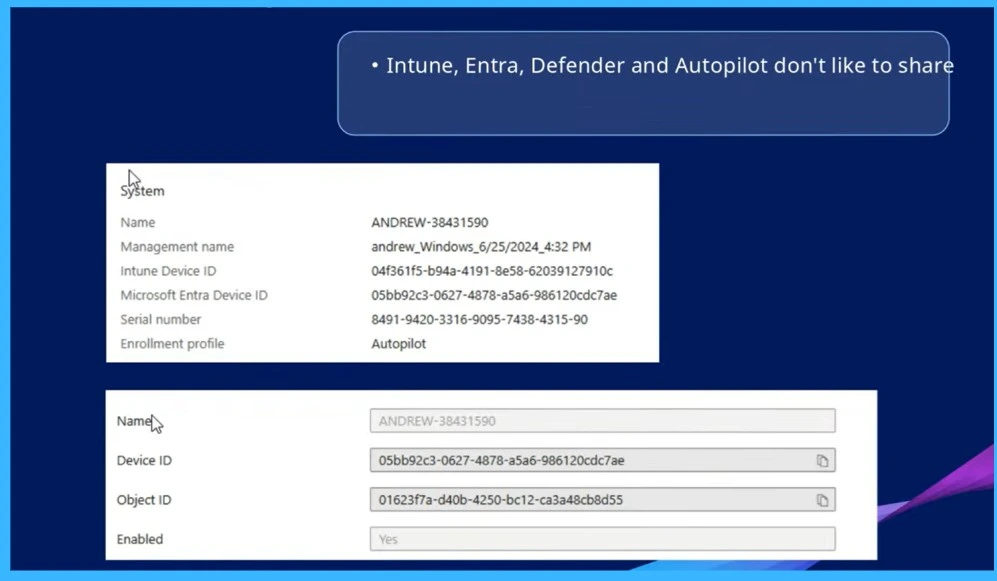
Even though the same device shows up in Intune, Microsoft Entra ID, Defender, and Autopilot, each service gives it a different ID (like Intune Device ID, Entra Device ID, Object ID). These IDs don’t match across platforms, which can be confusing when you’re trying to look up a device or automate tasks.
- The key point is you need to start from the right platform and know how to map the IDs correctly so you get the right data when working across services.
Need Further Assistance or Have Technical Questions?
Join the LinkedIn Page and Telegram group to get the latest step-by-step guides and news updates. Join our Meetup Page to participate in User group meetings. Also, join the WhatsApp Community and the Whatsapp channel to get the latest news on Microsoft Technologies. We are there on Reddit as well.
Author
Anoop C Nair is a Workplace Technology solution architect with 25+ years of experience. Microsoft Certified Trainer. Microsoft MVP from 2015 onwards for consecutive 11+ years! He is a blogger, Speaker, and Founder of HTMD Community and HTMD Conference. His main focus is on Device Management technologies like Intune, Windows, and Cloud PC. He writes about technologies like Intune, SCCM, Windows, Cloud PC, Entra, and Microsoft Security.