
Key Takeaways
- Microsoft introduced the VBS Enclave SDK for secure data processing
- Sensitive data is isolated in protected memory environments
- Integration with Windows Hello enables user-based authorization
- High-assurance authorization adds multiple layers of security
In this post we are discussing Microsoft Enhances Security with User-Bound Encryption and VBS Enclaves. Microsoft has introduced a powerful new security capability focused on protecting sensitive data and strengthening user authentication. At the center of this update is the VBS Enclave SDK, a new development toolkit that enables applications to run critical operations inside a highly secure, isolated environment.
Table of Contents
Table of Contents
Microsoft Enhances Security with User-Bound Encryption and VBS Enclaves
This marks a significant step forward in secure credentials and confidential information from both system-level and application-level threats. The new approach builds on virtualization-based security (VBS), allowing applications to create secure enclaves where sensitive data can be processed without exposure to the rest of the operating system.
These enclaves act as protected memory regions, ensuring that privileged components like the OS kernel cannot access the data without explicit authorization. This level of isolation is designed to meet the growing demand for stronger data protection in modern applications.
- Windows Elevates Passkey Security with Plug-in Credential Manager Integration
- Native Authentication for Microsoft Entra External ID | Complete Control Over Login Experience
- How to Setup Passwordless Login for Microsoft Accounts
- Entra External ID Now Supports SMS as an MFA Option
What is VBS Enclave SDK?
The VBS Enclave SDK allows developers to isolate sensitive parts of their applications inside secure enclaves. These enclaves function as trusted execution environments where critical operations can run safely, separate from the host application and the rest of the system. This ensures that-

- Sensitive data remains protected in memory
- Unauthorized access is prevented, even from system-level processes
- Applications can securely handle secrets like credentials and encryption keys
Virtualization-Based Security (VBS) Enclave
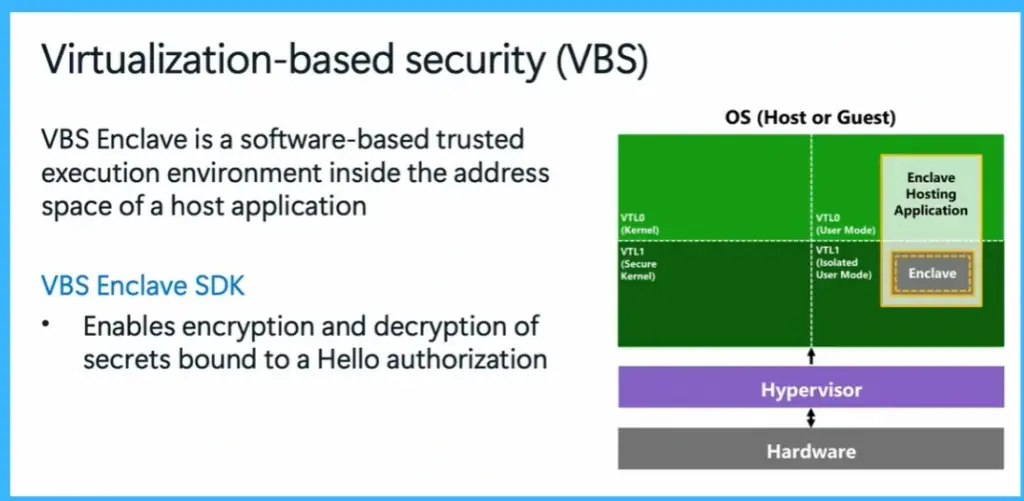
The VBS Enclave SDK introduces a secure execution environment called a VBS enclave, which runs inside the address space of a host application but remains isolated from it. This enclave acts as a protected area where sensitive data such as credentials and encryption keys can be securely processed. Even the operating system kernel cannot directly access this data without proper authorization.
The SDK also enables encryption and decryption of secrets that are bound to Windows Hello, ensuring that only an authenticated user can access them. By virtualization and hardware-level isolation, this approach provides strong protection against unauthorized access and enhances overall system security.
- VBS Enclave is a software-based trusted execution environment inside the address space of a host application.
- VBS Enclave SDK -Enables encryption and decryption of secrets bound to a Hello authorization.
Integrating with the VBS Enclave SDK
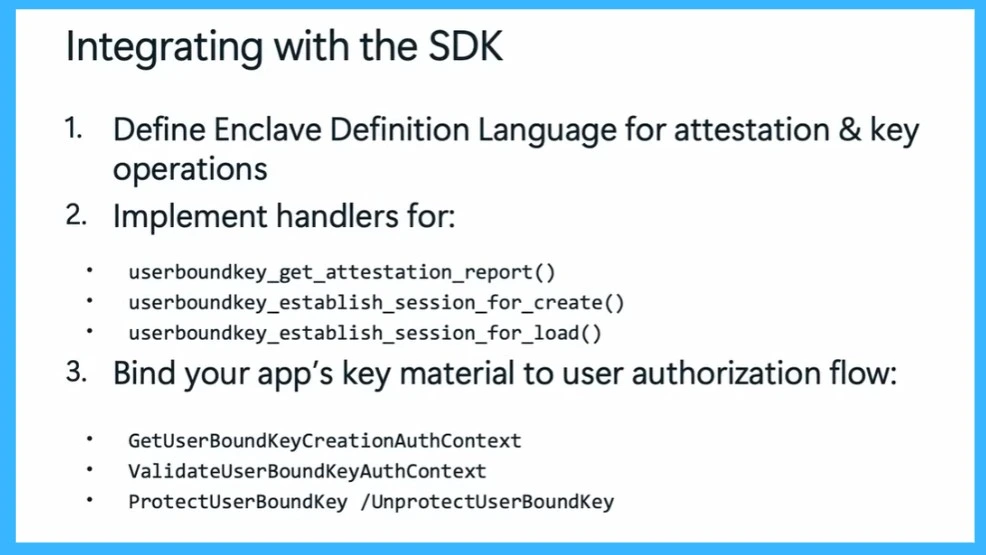
Integrating applications with the VBS Enclave SDK involves a structured process to ensure secure communication and data handling. First, developers define an Enclave Definition Language (EDL), which specifies how the application and enclave interact, including attestation and key operations. Next, they implement for key functions such as generating attestation reports, establishing secure sessions for creating and loading user-bound keys.
Finally, applications bind their key material to user authorization flows using APIs like creating and validating user-bound key contexts and protecting or unprotecting keys. This process ensures that all sensitive operations are securely tied to user authentication and executed within a trusted environment.
| Integrating with the SDK | Info |
|---|---|
| 1 | Define Enclave Definition Language for attestation & key operations |
| 2 | Implement handlers for – userboundkey_get_attestation_report() userboundkey_establish_session_for_create() userboundkey_establish_session_for_load() |
| 3 | Bind your app’s key material to user authorization flow -GetUserBoundKeyCreationAuthContext, ValidateUserBoundKeyAuthContext, ProtectUserBoundKey /UnprotectUserBoundKey |
Need Further Assistance or Have Technical Questions?
Join the LinkedIn Page and Telegram group to get the latest step-by-step guides and news updates. Join our Meetup Page to participate in User group meetings. Also, join the WhatsApp Community and the Whatsapp channel to get the latest news on Microsoft Technologies. We are there on Reddit as well.
Author
Anoop C Nair is a Workplace Technology solution architect with 25+ years of experience. Microsoft Certified Trainer. Microsoft MVP from 2015 onwards for consecutive 11+ years! He is a blogger, Speaker, and Founder of HTMD Community and HTMD Conference. His main focus is on Device Management technologies like Intune, Windows, and Cloud PC. He writes about technologies like Intune, SCCM, Windows, Cloud PC, Entra, and Microsoft Security.