
Key Takeaways
- Smart App Control no longer requires reinstalling Windows to manage it.
- It is accessible through the Windows Security app.
- The feature allows only trusted apps to run, blocking untrusted ones.
- You can now turn Smart App Control on or off.
Hey, let’s discuss about Windows 11 April 2026 Update Introduces Smart App Control Without Reinstallation. Windows 11 will start receiving the April 2026 Security Update on April 14, bringing new features, improvements, and security fixes. The update enhances Smart App Control, adds AI image descriptions to Narrator, improves File Explorer, refreshes the Settings app design, and introduces new refresh rate support for versions 25H2 and 24H2.
Table of Contents
Table of Contents
Windows 11 April 2026 Update Introduces Smart App Control Without Reinstallation
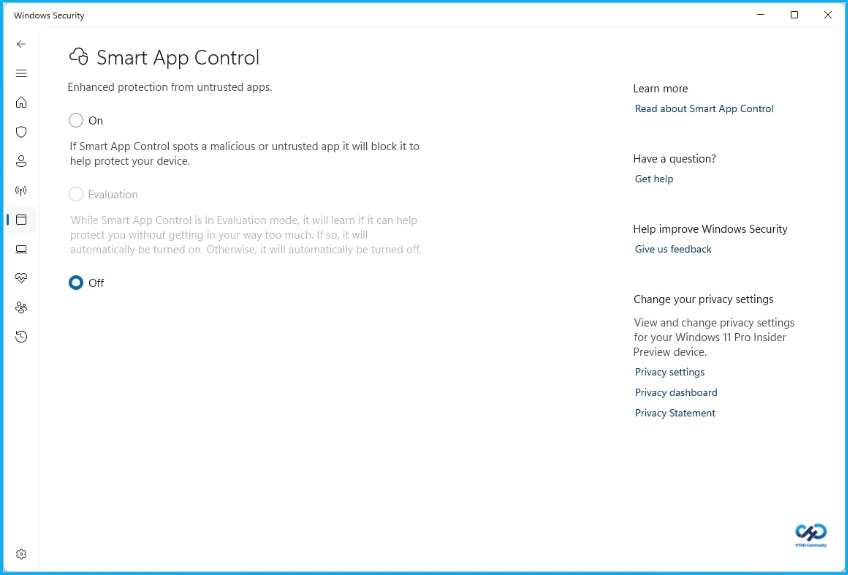
Smart App Control (SAC) has now been updated to no longer require an operating system reinstallation to manage it. The feature is available through the Windows Security app, and it locks the system down, allowing only trusted apps to run in the operating system to prevent unwanted behavior from untrusted apps. Originally, Smart App Control was available for new installations, and it required completing the installation to turn it off, but this is changing with the release of the April 2026 Security Update.
| Feature | Navigation Path |
|---|---|
| Smart App Control | Windows Security > App & Browser Control > Smart App Control |
- New Windows 11 OOBE Restore Feature Helps Users Recover Apps and Settings Quickly
- Windows 11 25H2 Device Readiness Report in Intune for Clear Status Hardware Insights and Smarter Upgrade Planning for IT Admins
- Top 5 Windows 11 2026 Enhancements With Run Box Dark Mode and Copilot Upgrades
- Secure Windows Devices with App Control for Business Code Integrity Policy using Intune
Smart App Control stages
Smart App Control has two modes evaluation and enforcement. In evaluation mode, Smart App Control runs in the background, observing activity on the device and evaluating whether the device is a good fit for the protection it offers based on the variety of apps installed and used. In enforcement mode, Smart App Control actively protects the device, and apps cannot be run unless they are recognized by Microsoft’s app intelligence services or signed with a trusted certificate.
Checking Smart App Control Mode
If On is selected, Smart App Control is running in enforcement mode. If Evaluation is selected, it is running in evaluation mode. If Off is selected, Smart App Control is not running on the device.

Need Further Assistance or Have Technical Questions?
Join the LinkedIn Page and Telegram group to get the latest step-by-step guides and news updates. Join our Meetup Page to participate in User group meetings. Also, join the WhatsApp Community and the Whatsapp channel to get the latest news on Microsoft Technologies. We are there on Reddit as well.
Author
Anoop C Nair is a Workplace Technology solution architect with 25+ years of experience. Microsoft Certified Trainer. Microsoft MVP from 2015 onwards for consecutive 11+ years! He is a blogger, Speaker, and Founder of HTMD Community and HTMD Conference. His main focus is on Device Management technologies like Intune, Windows, and Cloud PC. He writes about technologies like Intune, SCCM, Windows, Cloud PC, Entra, and Microsoft Security.