
Key Takeaways
- Understanding real-world device usage is critical before migration
- Focus on what devices do, not just who uses them
- Identify gaps between expected and actual usage early
- Use inventory data to support decisions, not just for tracking
- Standardization can improve long-term device management
In this post we are discussing Frontline Device Migration Close the Visibility Gap Before it Slows You Down. Recently, Microsoft explained an important challenge organization face when migrating frontline mobile devices. Frontline, managing devices becomes more complex, making it difficult for IT teams to maintain visibility and consistency across the environment.
Table of Contents
Table of Contents
Frontline Device Migration Close the Visibility Gap Before it Slows You Down
Many devices are shared, reused, or even left unused. Because of this, there is often a gap between how devices are expected to work and how they are really used in daily operations. understanding this real usage is important before starting any migration. This helps organizations avoid problems and ensures a smoother process.
- How to Setup Windows 365 Cloud PCs with Autopilot Device Preparation
- Easy Way to Update New Multi-Region Selection in Windows 365
- Seamless Provisioning of Windows 365 Cloud PCs for External Identities with Intune
- How to Fix Windows 365 Inactive Azure Network Connection in Intune
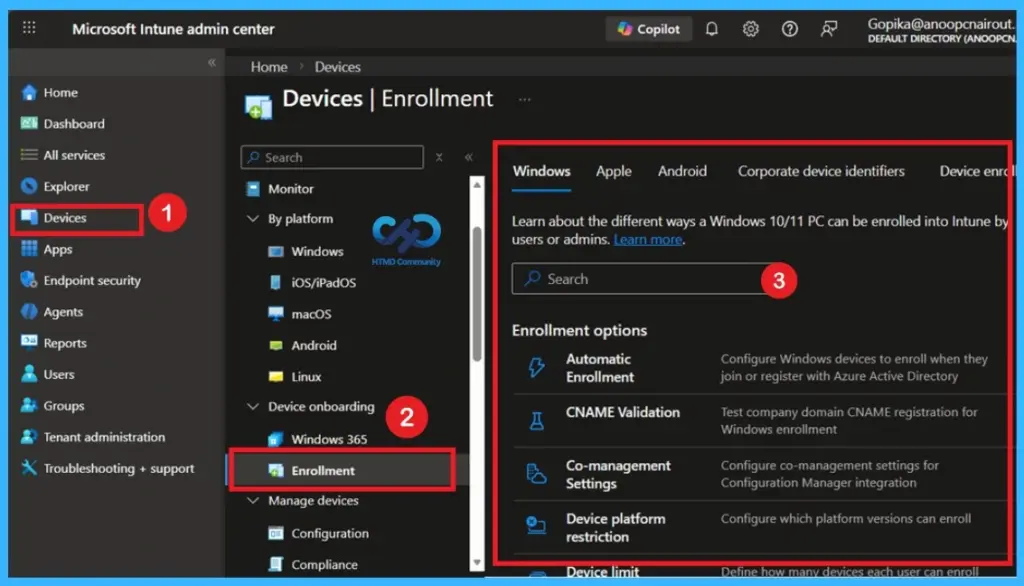
Understand Actual Usage
In many cases, devices are not used the way IT teams expect. A device assigned to one person might actually be shared across multiple users, or a single-purpose device might be used for multiple applications. To avoid problems during migration, organizations need to check real usage through workflow reviews.
Importance of Device Inventory
Having a complete inventory is helpful, but what matters more is having the right information. Teams need to know which devices are active, what operating systems they run, and whether they are still supported. This helps organizations understand limitations, such as outdated hardware or unsupported software, which can impact migration decisions.

- In below table, the device details of organizations should focus on for effective migration planning. It helps teams prioritize important information instead of trying to build a complete but less useful inventory list.
| Category | Info |
|---|---|
| Device types and OEMs | Different device models and manufacturers (OEMs) |
| OS version ranges | OS versions and whether they are supported |
| Device status | Active, unused, or missing devices |
| Business Usage | How devices are used for critical tasks |
| Specialist devices | Purchased by IT or different departments |
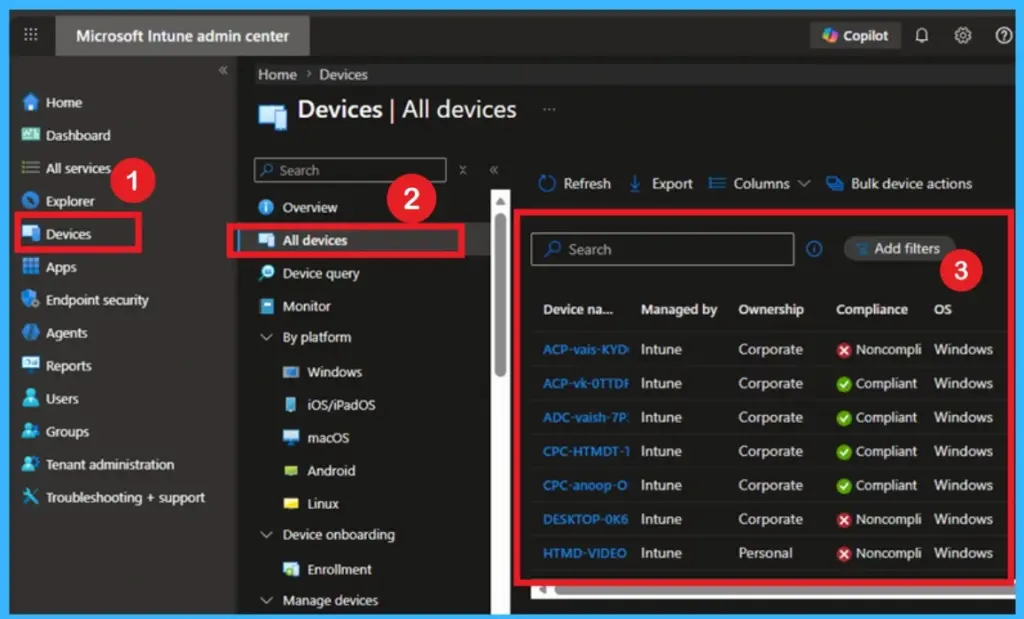
Understanding Device Usage
frontline devices are often used differently than expected. Devices may be shared across users, used for multiple tasks, or continue running longer than planned. Sometimes they are even used for personal activities, which can create risks during migration. This also helps uncover issues like shared credentials, offline dependency, and reliance on older devices.
- Device inventory should support decision making rather than just tracking.
- Knowing key details like device types, operating systems, and usage status helps organizations understand their environment more clearly.
- With proper insights into usage and inventory, teams can plan smoother migrations, reduce risks, and build more consistent device management.
Need Further Assistance or Have Technical Questions?
Join the LinkedIn Page and Telegram group to get the latest step-by-step guides and news updates. Join our Meetup Page to participate in User group meetings. Also, join the WhatsApp Community and the Whatsapp channel to get the latest news on Microsoft Technologies. We are there on Reddit as well
Author
Anoop C Nair is a Workplace Technology solution architect with 25+ years of experience. Microsoft Certified Trainer. Microsoft MVP from 2015 onwards for consecutive 11+ years! He is a blogger, Speaker, and Founder of HTMD Community and HTMD Conference. His main focus is on Device Management technologies like Intune, Windows, and Cloud PC. He writes about technologies like Intune, SCCM, Windows, Cloud PC, Entra, and Microsoft Security.