

Key Takeaways
- New Windows Autopatch report improves visibility into patch compliance
- Centralized dashboard simplifies update monitoring
- Faster update timelines reduce security risks
- Hotpatch updates and improved configurations enhance protection
In this post, we are discussing the New Windows Autopatch Report in Intune Enhances Patch Visibility and Risk Management. Microsoft has introduced a new update to help organizations manage Windows updates more easily and improve security. A new report in Windows Autopatch will soon be available, giving clear information about how up to date devices are. Keeping devices updated is very important today because cyber threats are increasing quickly.
Table of Contents
Table of Contents
New Windows Autopatch Report in Intune Enhances Patch Visibility and Risk Management
If updates are delayed, systems can become vulnerable. Microsoft is now encouraging organizations to install updates faster to stay protected. To make this easier, a new dashboard in Microsoft Intune shows all update information in one place. IT teams can quickly see which devices are updated and which ones need attention, without using multiple tools.
- How Windows Autopatch Adds Reader and Administrator RBAC Roles in Intune
- How Windows Autopatch and Intune now Enable Custom Update Settings for Each Autopatch Group
- Learn How Windows 11 Hotpatching Works using Windows Autopatch and Intune
What’s New in Windows Autopatch
The latest update to Windows Autopatch introduces a detailed report that helps organizations understand their patching status more clearly. It shows exact patch versions across devices and highlights policies that may increase security risks. It also includes actionable steps to improve compliance and reduce exposure.
| Category | Details |
|---|---|
| New Feature | New report available in Windows Autopatch |
| Dashboard | Centralized view in Microsoft Intune |
| Current safe devices | Updates installed within 3 days |
| Exposed | Updates delayed 3 to 7 days |
| Critical Risk | Updates delayed more than 7 days |
| For Older Devices | Use Extended Security Updates (ESU) for Windows 10 |
Current Update Status Across Devices
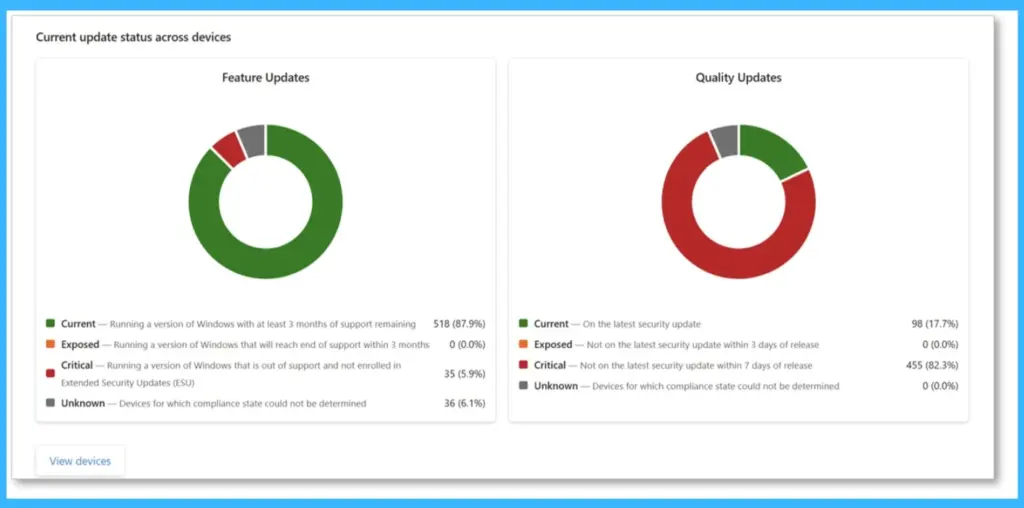
This view shows the current update status of devices, including both feature and quality updates. It helps quickly understand how many devices are up to date, at risk, or not compliant. The visual charts make it easy for IT teams to identify gaps and take action to keep devices secure and properly updated.

- Showing detailed device patching status
- Highlighting policy risk exposure
- Breaking down specific patch versions across devices
- Identifying policies that may put devices at risk
Updated Recommendations for Servicing Windows
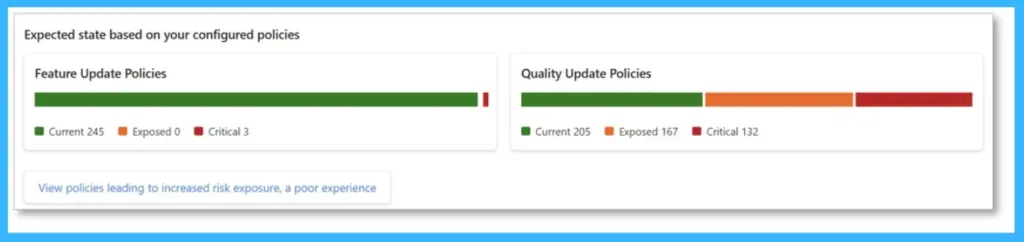
In the below chart, highlights how update strategies are changing to reduce risk and keep devices secure. Earlier, many organizations followed a 14- or 28-day timeline to apply updates, but in today’s fast-moving threat landscape, this delay can leave devices exposed. This section helps IT teams understand the need for faster updates and better policy alignment to keep devices protected and up to date.
Policies Leading to Increased Risk
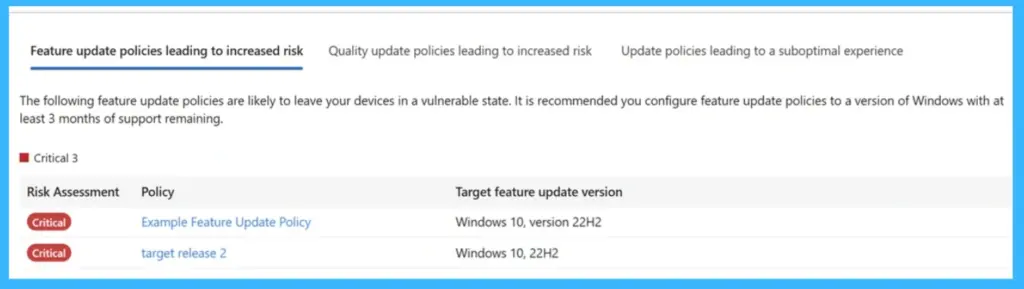
This update policies may put devices at risk based on the latest recommendations. Microsoft now suggests installing security updates within 3 days to stay fully protected, while delays up to 7 days can still leave devices at risk. Devices updated between 3 to 7 days are considered exposed, and beyond that, they may become critical.
- This section helps identify policies that do not meet these timelines, allowing IT teams to review and adjust them to reduce risk and improve device security.
| Policy Settings | Recommended Value |
|---|---|
| Quality update deferral | Less than 3 days |
| Quality update deadline | 0 or 1 day |
| Grace period | 1 or 2 days |
| Hotpatch updates | Enabled |
Need Further Assistance or Have Technical Questions?
Join the LinkedIn Page and Telegram group to get the latest step-by-step guides and news updates. Join our Meetup Page to participate in User group meetings. Also, join the WhatsApp Community and the Whatsapp channel to get the latest news on Microsoft Technologies. We are there on Reddit as well.
Author
Anoop C Nair is a Workplace Technology solution architect with 25+ years of experience. Microsoft Certified Trainer. Microsoft MVP from 2015 onwards for consecutive 11+ years! He is a blogger, Speaker, and Founder of HTMD Community and HTMD Conference. His main focus is on Device Management technologies like Intune, Windows, and Cloud PC. He writes about technologies like Intune, SCCM, Windows, Cloud PC, Entra, and Microsoft Security.