
Key Takeaways
- Microsoft Defender gives IT teams a single view of Secure Boot 2023 certificate readiness across all devices.
- Devices are categorised as exposed, compliant, or not applicable to simplify tracking and prioritisation.
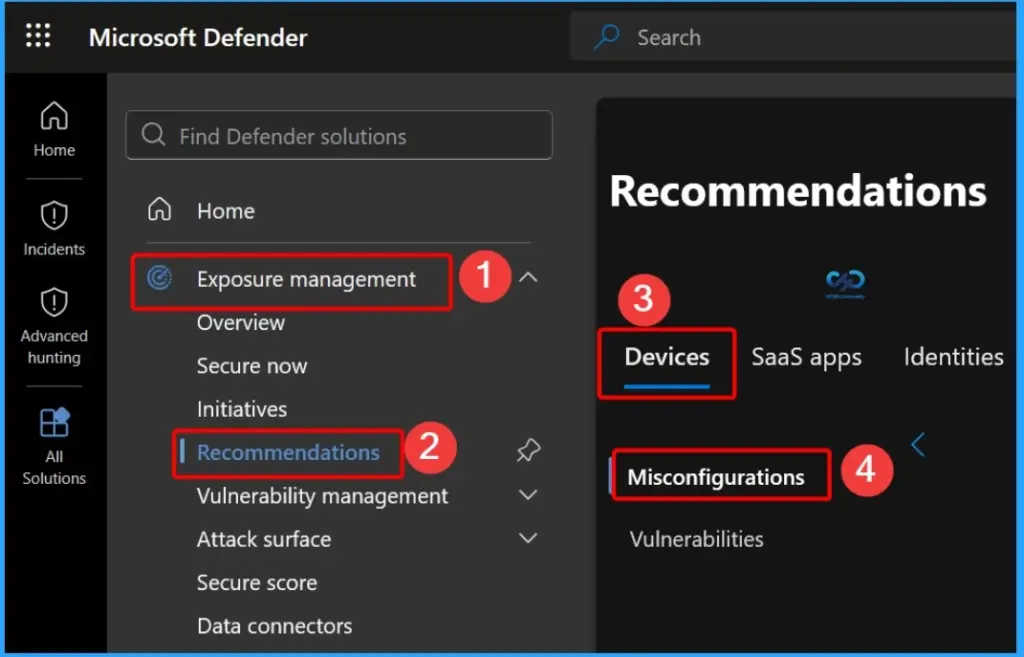
- Access insights in the Defender portal under Exposure Management > Recommendations > Devices > Misconfigurations.
- Exposed devices come with built-in guidance to help fix issues quickly.
- Helps organisations get ready for the Secure Boot 2023 transition before certificate expiry.
Track Secure Boot Certificate Expiry in MDE Security Console for Easy Device Tracking and Readiness! Companies need to get ready for an important security update. The old Secure Boot certificates from 2011 will expire in June 2026, so they must be replaced with new 2023 certificates to keep devices safe. To help with this, Microsoft Defender has a tool that shows which devices are updated and which still need changes.
Table of Content
Table of Contents
Track Secure Boot Certificate Expiry in MDE Security Console for Easy Device Tracking and Readiness
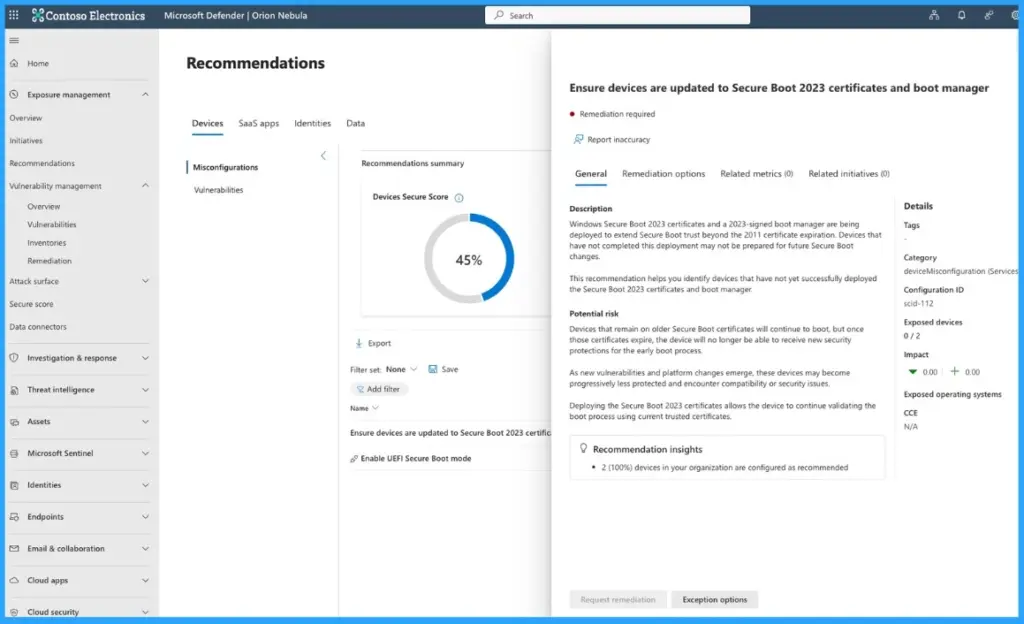
Microsoft Defender now offers a new recommendation that helps you make sure devices are updated to Secure Boot 2023 certificates and the latest boot manager. It gives you a simple, central view of your device security status across your organization.
You can easily use this tool in the Microsoft Defender portal by going to Exposure Management > Recommendations > Devices > Misconfigurations. It helps you quickly find devices that are not updated and gives clear steps to fix them.
- Secure Boot 2023 Readiness Check in Microsoft Defender
- The tool automatically groups devices into three types
- Exposed devices (still using old certificates)
- Compliant devices (updated and secure with 2023 certificates), and
- Not applicable devices (where Secure Boot is turned off or not supported).
- The tool automatically groups devices into three types
| Action | Details |
|---|---|
| Drill down into exposed devices | Identify exactly which systems need attention |
| Filter and prioritize | Use OS platform and device details to focus on critical fixes |
| Export device data | Share insights with infrastructure and platform teams |
| Track progress | Monitor rollout and updates across your organization |
| Integrate with workflows | Add findings into your existing security and compliance processes |
- MS Intune Secure Boot Certificate Status Report Now Shows Detailed Status For Each Certificate
- Missing Intune Autopatch Secure Boot Certificate Status Report in Intune Console
- How to Create Secure Boot Compliance Policy with Intune
- Understanding Windows 10 UEFI Secure Boot – How it helps to secure Pre-Boot Phase
- Understanding Windows 10 UEFI Secure Boot – How it helps to secure Pre-Boot Phase
- Windows Measured Boot – How it helps to secure Windows OS Platform
- What is Windows 365 Boot
Plan and Manage Your Secure Boot Updates
Use the Microsoft Defender tool to understand your current risk and take the right steps to secure your devices before the deadline. This helps you stay organised, involve the right teams, and ensure important systems are protected on time.

- Assess your exposure – Check how many devices need updates in your environment
- Engage the right teams – Work with infrastructure and platform teams responsible for deployment
- Prioritize critical devices – Focus first on high-value and sensitive systems
- Track progress – Monitor updates and improve coverage before the June 2026 deadline
Need Further Assistance or Have Technical Questions?
Join the LinkedIn Page and Telegram group to get the latest step-by-step guides and news updates. Join our Meetup Page to participate in User group meetings. Also, join the WhatsApp Community and the Whatsapp channel to get the latest news on Microsoft Technologies. We are there on Reddit as well.
Author
Anoop C Nair is a Workplace Technology solution architect with 25+ years of experience. Microsoft Certified Trainer. Microsoft MVP from 2015 onwards for consecutive 11+ years! He is a blogger, Speaker, and Founder of HTMD Community and HTMD Conference. His main focus is on Device Management technologies like Intune, Windows, and Cloud PC. He writes about technologies like Intune, SCCM, Windows, Cloud PC, Entra, and Microsoft Security.