
Key Takeaways
- Detects sensitive documents using document structure and layout instead of only keywords
- Creates a unique fingerprint from sample business documents like invoices, forms, and templates
- Automatically applies DLP policies and retention labels to matching documents
- Helps prevent accidental sharing of confidential company documents with external users
- Supports configuration through Microsoft Purview UI and PowerShell for automated protection workflows
Microsoft Purview Document Fingerprinting helps organizations protect sensitive business documents by identifying them based on their structure, layout, and content patterns instead of relying only on keywords. Administrators can upload sample files such as invoices, HR forms, contracts, or templates, and Purview creates a unique fingerprint that can later recognize similar documents even when values like names, dates, or numbers change.
Table of Content
Table of Contents
Microsoft Purview Document Fingerprinting SITs for Secure Protection of Business Forms Invoices and Templates
Once the fingerprint-based Sensitive Information Type (SIT) is created, organizations can use it in Data Loss Prevention (DLP) policies and retention labels to automatically secure matching documents. This improves detection accuracy, reduces false positives, and helps prevent accidental sharing of confidential files with external users. The feature supports PDF, DOCX, and TXT files and can be configured through the Microsoft Purview portal or PowerShell.
| Process | Description |
|---|---|
| Upload a Sample Document | Upload a standard business document such as a form, invoice, or template to Microsoft Purview |
| Create Document Fingerprint | Purview analyzes the document layout, structure, and patterns to generate a unique fingerprint |
| Create Sensitive Information Type (SIT) | The generated fingerprint is used to create a fingerprint-based SIT for detection |
| Apply Protection Policies | Use the SIT in DLP policies or retention labels to automatically protect matching documents |
| Detect Similar Documents | Purview identifies similar documents even when content like names, dates, or values change |
- New Microsoft Purview Message Encryption Portal Migration to Static Microsoft Domain
- Protect Corporate Data using Data Loss Protection Policies with Microsoft Purview Portal
Configure Microsoft Purview Document Fingerprinting SITs for Automated DLP and Retention Protection
Microsoft Purview Document Fingerprinting allows organisations to automatically detect and protect standard business documents by using fingerprint-based Sensitive Information Types (SITs). When users store, upload, or share documents that match the fingerprint of approved templates such as invoices, forms, or contracts, Microsoft Purview can automatically trigger Data Loss Prevention (DLP) policies, apply retention labels, or block external sharing to reduce the risk of sensitive data exposure.
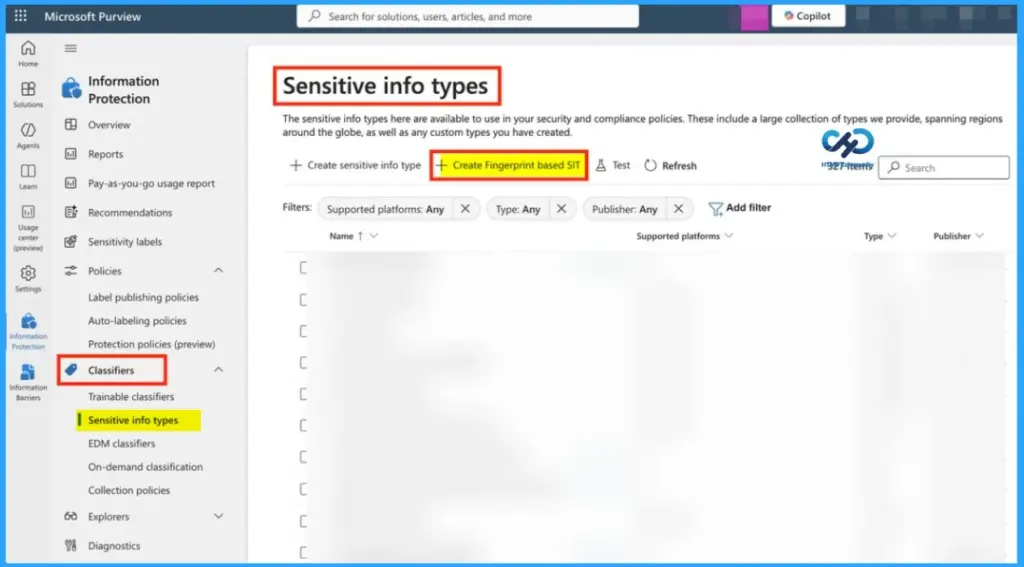
- Setup Process Using Microsoft Purview UI
- Go to Solutions
- Open Information Protection
- Select Classifiers
- Navigate to Sensitive info types
- Choose Create Fingerprint-based SIT
- Upload a sample document to generate the fingerprint
- PowerShell Configuration Steps
- Connect to Microsoft Purview Security & Compliance Center
- Connect-IPPSSession
- Import the sample document file
- $yourDoc = Get-Content -Path “locate_your_document” -Encoding Byte
- Create the document fingerprint
- $Fingerprint_template = New-DlpFingerprint -FileData $yourDoc -Description “any description…”
- Create the fingerprint-based Sensitive Information Type (SIT)
- New-DlpSensitiveInformationType -Name ‘Document Fingerprint SIT One’ -Fingerprints $Fingerprint_template –Description “any description…”
- Connect to Microsoft Purview Security & Compliance Center
| Supported File Types |
|---|
| PDF DOCX TXT |
Key Benefits of Microsoft Purview Document Fingerprinting SITs
Microsoft Purview Document Fingerprinting helps organisations protect important business documents like invoices, forms, and templates more accurately. Instead of checking only keywords, it detects the document’s structure and format, which improves protection and reduces false alerts.

- It can also automatically apply DLP policies and retention labels to prevent sensitive documents from being shared externally while reducing manual work through automation.
Need Further Assistance or Have Technical Questions?
Join the LinkedIn Page and Telegram group to get the latest step-by-step guides and news updates. Join our Meetup Page to participate in User group meetings. Also, join the WhatsApp Community and the Whatsapp channel to get the latest news on Microsoft Technologies. We are there on Reddit as well
Resources
About document fingerprinting | Microsoft Learn
Author
Anoop C Nair has been Microsoft MVP for 10 consecutive years from 2015 onwards. He is a Workplace Solution Architect with more than 22+ years of experience in Workplace technologies. He is a Blogger, Speaker, and Local User Group Community leader. His primary focus is on Device Management technologies like SCCM and Intune. He writes about technologies like Intune, SCCM, Windows, Cloud PC, Windows, Entra, Microsoft Security, Career, etc.