
Key Takeaways
- Microsoft is adding major security and Intune features into existing Microsoft 365 plans, including Defender for Office 365 P1, Remote Help, Advanced Analytics, EPM, and Cloud PKI.
- Real-time protection is getting stronger with Time-of-Click Protection to help block malicious links and phishing attacks instantly.
- Exchange Online users will receive an additional 50GB mailbox storage, improving email capacity for organisations.
- Microsoft 365 pricing is increasing across Business and Enterprise plans starting July 1, 2026, with E3 and E5 seeing notable per-user cost increases.
- IT admins should review Defender policies, validate licensing changes, and audit current subscriptions before renewal to avoid unexpected costs and feature gaps.
Microsoft Announces Major Microsoft 365 Pricing and Packaging Changes Coming in Mid-2026! Microsoft is introducing major updates to Microsoft 365, Office 365, and EMS suites in mid-2026, adding several advanced security and management capabilities directly into existing plans. New additions include Defender for Office 365 P1, Time-of-Click Protection for malicious URL scanning, Intune Remote Help, Advanced Analytics, Endpoint Privilege Management, Cloud PKI, and an additional 50GB of Exchange Online mailbox storage. These updates aim to strengthen security, improve endpoint management, and enhance productivity for organizations.
Table of Content
Table of Contents
Microsoft Announces Major Microsoft 365 Pricing and Packaging Changes Coming in Mid-2026
Along with the feature upgrades, Microsoft is also increasing pricing across multiple Microsoft 365 plans starting July 1, 2026. Business Basic, Business Standard, M365 E3, and M365 E5 licenses will all see per-user price increases. Organisations should review their current licensing setup, validate which new features are included in their subscriptions, and audit Defender and Intune configurations before their next renewal cycle to better prepare for the upcoming changes.
- New Features Added to Microsoft 365 Suites (Rolling Out Mid-June to August 2026)
- Enhanced Email Security
- Defender for Office 365 P1 included
- Advanced phishing and malware protection enabled
- Smarter Link Protection
- Time-of-Click Protection added
- Real-time scanning blocks malicious URLs before access
- Advanced Intune Capabilities
- Remote Help support included
- Advanced Analytics added
- Intune Plan 2 features now available
- Stronger Access & Identity Controls
- Endpoint Privilege Management (EPM) included
- Cloud PKI support added for modern certificate management
- More Exchange Online Storage
- Additional 50GB mailbox storage for users
- Enhanced Email Security

- Microsoft 365 E5 Security Add-on Now Available to Enhanced Cybersecurity for SMBs
- Microsoft 365 E7 has Arrived with E5 Security Copilot Agent 365 Entra ID Suite Defender and Intune
- How Microsoft M365-E7 2026 Delivers an AI-First Premium Experience with Integrated Copilot Governance and Entra Identity
- Microsoft 365 Copilot Oversharing Blueprint 3 Phases Shared on Ignite 2024
- Microsoft 365 Copilot BizChat AI Assistant Work and Web Model
- Create PPT from Word PDF Files using Microsoft 365 Copilot in PowerPoint
Microsoft 365 Pricing Increases Starting July 1, 2026
Microsoft is increasing pricing across several Microsoft 365 Business and Enterprise plans as part of the upcoming feature and security enhancements rolling out in 2026. The updated pricing reflects the addition of advanced Defender, Intune, identity protection, and Exchange Online capabilities included in the suites.
| Updated Pricing Changes | Old Price | Updated Price |
|---|---|---|
| M365 Business Basic | $6 | $7 per user |
| M365 Business Standard | $12.50 | $14 per user |
| M365 E3 | $36 | $39 per user |
| M365 E5 | $57 | $60 per user |
Admin To-Do List Before Microsoft 365 Changes Roll Out
IT admins should start preparing now for the upcoming Microsoft 365 pricing and feature updates arriving in mid-2026. Organisations are encouraged to review their current Defender security configurations, especially the “Built-in Protection” policies, to ensure the newly included security capabilities are properly aligned with existing settings. Admins should also verify Microsoft licensing documentation to understand which new features are included in their specific Microsoft 365, Office 365, or EMS plans.

Before the next renewal cycle, it is important to audit current license usage, identify unused or overlapping subscriptions, and evaluate how the upcoming bundled features may impact existing third-party tools or add-ons. Early planning can help organisations optimise costs, simplify management, and maximise the value of the new Microsoft 365 enhancements.
Need Further Assistance or Have Technical Questions?
Join the LinkedIn Page and Telegram group to get the latest step-by-step guides and news updates. Join our Meetup Page to participate in User group meetings. Also, join the WhatsApp Community and the Whatsapp channel to get the latest news on Microsoft Technologies. We are there on Reddit as well
Resources
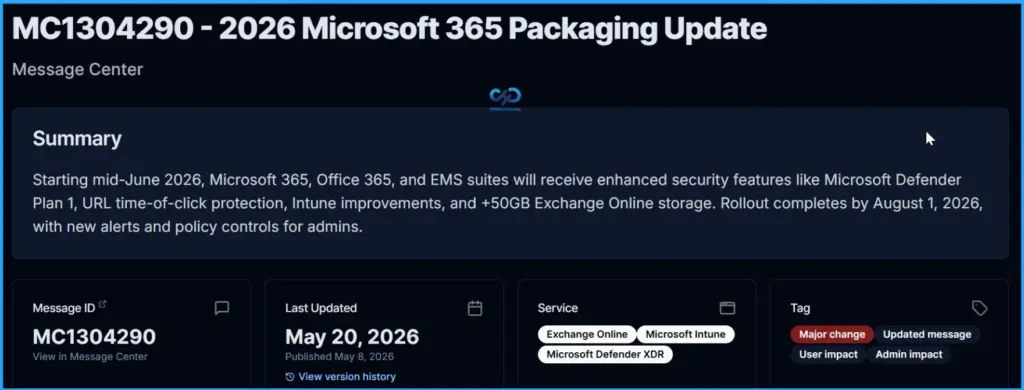
MC1304290 – 2026 Microsoft 365 Packaging Update | Microsoft 365 Message Center Archive
Microsoft 365 Pricing and Packaging Updates | Microsoft Licensing Resources
Author
Anoop C Nair has been Microsoft MVP for 10 consecutive years from 2015 onwards. He is a Workplace Solution Architect with more than 22+ years of experience in Workplace technologies. He is a Blogger, Speaker, and Local User Group Community leader. His primary focus is on Device Management technologies like SCCM and Intune. He writes about technologies like Intune, SCCM, Windows, Cloud PC, Windows, Entra, Microsoft Security, Career, etc.