
Key Takeaways
- Admins can now discover and track locally installed AI agents on managed Windows devices directly from Microsoft Intune.
- Publisher, execution context, and installation details help identify unauthorised or risky AI applications in the environment.
- Inventory data includes install method, install location, user scope, and host process information for deeper troubleshooting and governance.
- Intune can differentiate whether an AI agent is installed for a specific user or system-wide across the device.
- Organisations can use this inventory data to build policies, reporting, and compliance controls around AI tool usage on corporate devices.
Microsoft Intune Adds Local AI Agent Inventory for Better AI Visibility and Security on Windows Devices! Microsoft Intune now allows admins to extend Windows device inventory by collecting details about locally installed AI agents through the Properties Catalog feature. This helps organisations improve visibility, security, compliance, and governance for AI tools running on managed devices.
Table of Content
Table of Contents
Microsoft Intune Adds Local AI Agent Inventory for Better AI Visibility and Security on Windows Devices
The Local AI Agent (Preview) inventory capability in Microsoft Intune helps administrators collect detailed information about AI-related applications and agents installed on managed Windows devices. This enhanced visibility helps organisations identify AI tools running in their environment, improve security monitoring, support compliance requirements, and strengthen AI governance across enterprise devices.
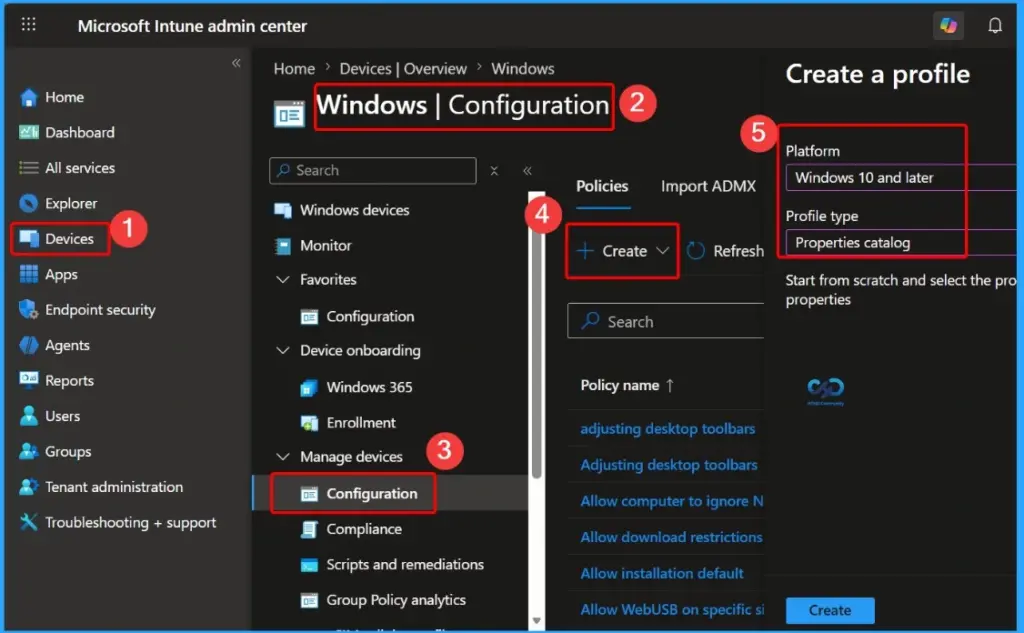
- Sign in to the Microsoft Intune admin center.
- Select Devices > Manage devices > Configuration > Create > New policy.
- Select the following settings:
- Platform: Windows 10 and later
- Profile type: Properties catalog
- Select Create.
- How to Track Device Battery Information using Intune Property Catalog
- How to Collect Physical and Virtual Memory Information using Intune Properties Catalog
- Intune Managing OneDrive File Downloads for Low Disk Space
- How to Collect Disk Drive ID Details using Intune Property Catalog
How Local AI Agent Inventory Helps Intune Admins
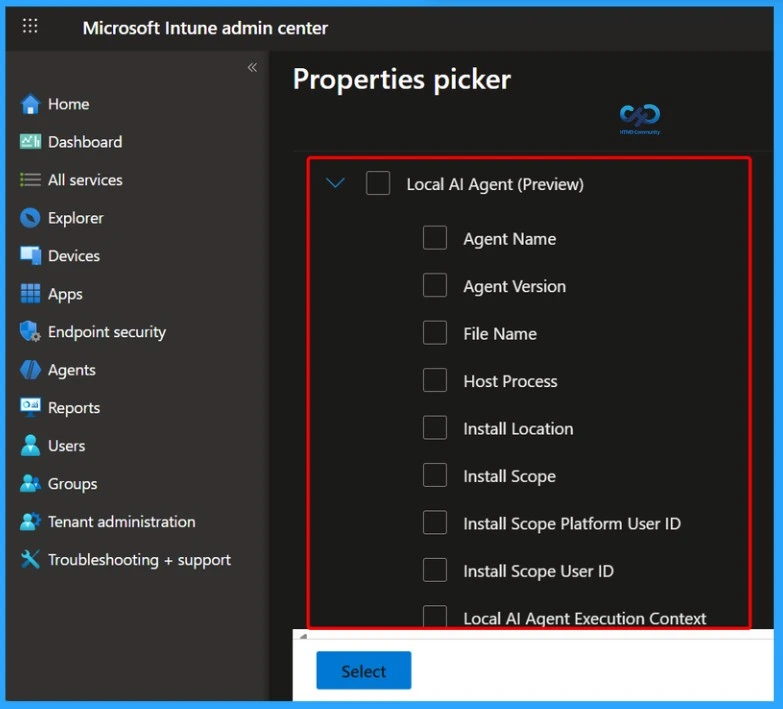
The Local AI Agent (Preview) inventory data in Microsoft Intune provides administrators with better visibility into AI-related applications running on managed Windows devices. With this information, admins can detect locally installed AI applications, identify unauthorised or unapproved AI tools, and improve overall security and compliance monitoring.
| What Does Local AI Agent Collect in Intune? |
|---|
| Agent Name Agent Version File Name Host Process Install Location Install Scope Install Scope Platform User ID Install Scope User ID Local Al Agent Execution Context Local Ai agent installation method publisher |
- How Agent 365 and Windows 365 for Agents Enable Secure Governed Control and Execution for Enterprise AI
- 6 AI Agentic Features within Windows 365 Cloud PC
- Enhancing Threat Detection and Identity Protection with AI Security Copilot Agents
Need Further Assistance or Have Technical Questions?
Join the LinkedIn Page and Telegram group to get the latest step-by-step guides and news updates. Join our Meetup Page to participate in User group meetings. Also, join the WhatsApp Community and the Whatsapp channel to get the latest news on Microsoft Technologies. We are there on Reddit as well

Author
Anoop C Nair has been Microsoft MVP for 10 consecutive years from 2015 onwards. He is a Workplace Solution Architect with more than 22+ years of experience in Workplace technologies. He is a Blogger, Speaker, and Local User Group Community leader. His primary focus is on Device Management technologies like SCCM and Intune. He writes about technologies like Intune, SCCM, Windows, Cloud PC, Windows, Entra, Microsoft Security, Career, etc.