
Key Takeaways
- New Local AI Agent Baseline for OpenClaw is now available in MSIntune (Preview).
- Helps block unauthorized local AI agent activity on Windows devices.
- Uses firewall rules and runtime restrictions to limit common AI execution paths.
- Improves enterprise AI security, compliance, and governance visibility.
- May impact legitimate apps using NodeJS or Windows Subsystem for Linux.
The Local AI Agent Baseline OpenClaw in MS Intune helps organisations reduce the use of unauthorised local AI agents by applying device settings that interrupt commonly used execution methods. The baseline includes firewall rules that restrict outbound network communication from popular local AI runtime environments such as NodeJS, helping improve endpoint security and AI governance across managed Windows devices.
Table of Content
Table of Contents
New Local AI Agent Security Baseline in MS Intune to Improve OpenClaw Security and Compliance
This baseline also applies controls on runtime environments like Windows Subsystem for Linux (WSL) and NodeJS, which are frequently leveraged by local AI agents. However, Microsoft warns that these protections may not block every possible execution path and could also impact legitimate applications or workloads that depend on these runtime environments. Admins can disable specific settings if required to avoid operational issues.
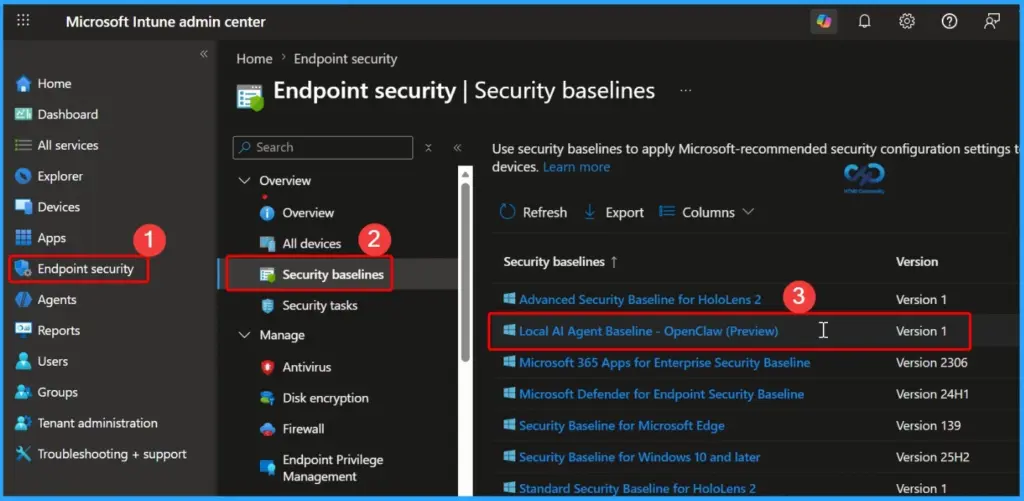
- Sign in to the Microsoft Intune admin center.
- Select Endpoint security > Security baselines to view the list of available baselines.
- In the Security baselines list, you can see the Local AI Agent Baseline Openclaw preview
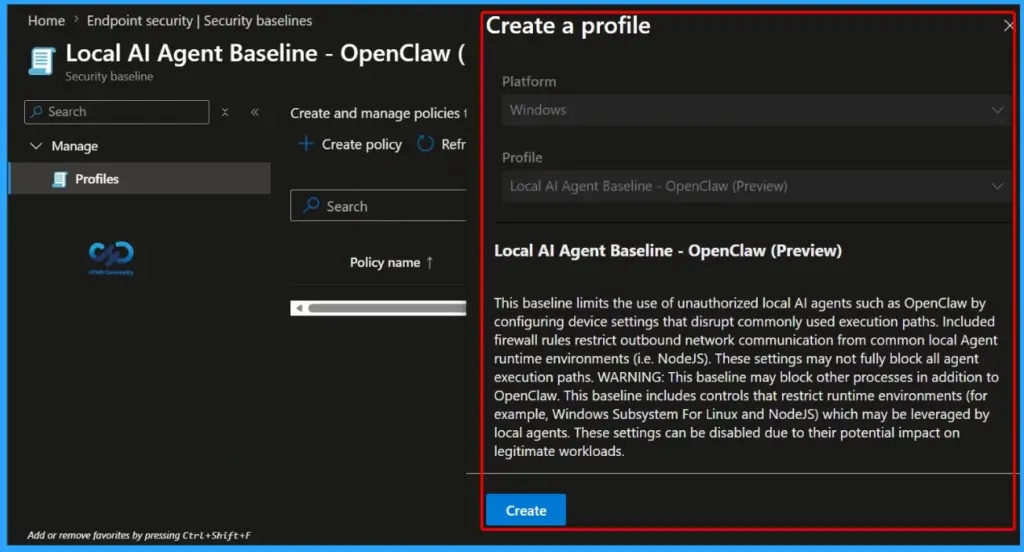
| Local AI Agent Baseline – OpenClaw (Preview) |
|---|
| This baseline limits the use of unauthorized local AI agents such as OpenClaw by configuring device settings that disrupt commonly used execution paths. Included firewall rules restrict outbound network communication from common local Agent runtime environments (i.e. NodeJS). These settings may not fully block all agent execution paths. WARNING: This baseline may block other processes in addition to OpenClaw. This baseline includes controls that restrict runtime environments (for example, Windows Subsystem For Linux and NodeJS) which may be leveraged by local agents. These settings can be disabled due to their potential impact on legitimate workloads. |
- Intune Security Baselines Policies for Windows 10 or Windows 11 Deployment Guide
- Intune Security Baseline Microsoft Defender Policy Troubleshooting Tips for Cloud PCs
- Update Security Baselines for Microsoft 365 Apps from Intune
How the OpenClaw Local AI Agent Baseline Helps Organizations Improve AI Security and Governance in MSIntune
The Local AI Agent Baseline OpenClaw (Preview) helps organisations strengthen security and gain better control over unauthorised AI tools running on corporate Windows devices. By restricting common AI execution paths and outbound communications, organisations can reduce potential security risks, improve compliance posture, and enhance visibility into locally installed AI agents that may bypass standard governance processes.
How the OpenClaw Baseline Helps IT Admins Manage Local AI Security in MS Intune
The Local AI Agent Baseline OpenClaw (Preview) helps IT admins simplify AI security management in MSIntune by offering preconfigured security settings for commonly used AI runtime environments like NodeJS and Windows Subsystem for Linux (WSL). These controls help reduce the risk of unauthorised or unmanaged AI agents running on enterprise Windows devices.

Need Further Assistance or Have Technical Questions?
Join the LinkedIn Page and Telegram group to get the latest step-by-step guides and news updates. Join our Meetup Page to participate in User group meetings. Also, join the WhatsApp Community and the Whatsapp channel to get the latest news on Microsoft Technologies. We are there on Reddit as well
Author
Anoop C Nair has been Microsoft MVP for 10 consecutive years from 2015 onwards. He is a Workplace Solution Architect with more than 22+ years of experience in Workplace technologies. He is a Blogger, Speaker, and Local User Group Community leader. His primary focus is on Device Management technologies like SCCM and Intune. He writes about technologies like Intune, SCCM, Windows, Cloud PC, Windows, Entra, Microsoft Security, Career, etc.