
Key Takeaways:
- Microsoft Intune Device Reported Values
- Helps to Transform Reports and Troubleshooting Made Easier
- Compliance reports now include a Setting column showing values
- Extra context for Android app configuration reporting
Let’s discuss about How Intune Device Reported Values Transform Reports and Troubleshooting Made Easier. Device‑reported values in compliance reports are a new Intune feature. Microsoft recently added this capability to provide admins with more context when troubleshooting noncompliance.
Key Takeaways:
Table of Contents
How Intune Device Reported Values Transform Reports and Troubleshooting Made Easier
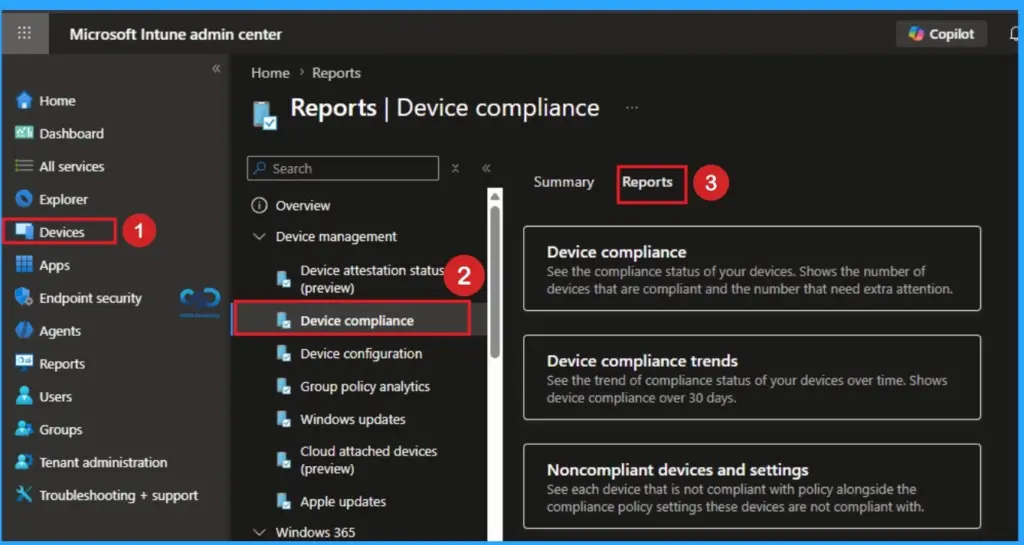
Some compliance reports now include a Setting column showing values reported directly by the device itself. Intune Device Reported Values Applies to scenarios like custom compliance policies and Android app configuration reporting. Microsoft clarified that these values are informational only they help explain why a device might appear noncompliant, but they are not the compliance verdict themselves.
- Intune Patch Compliance Reports in Details
- Updated Guidance for Interpreting Microsoft Intune Compliance Policy Reports
- Create Custom Dashboards Alerts and 30-Day Compliance Trends using MS Intune and Azure Log Analytics
Purpose of Device‑Reported Values
These values provide extra context for noncompliance scenarios, such as, Custom compliance policies and Android app configuration reporting.
Security Considerations
Admins are advised to carefully review device‑reported data, keeping in mind that it may not always reflect policy enforcement but rather the device’s own state.

Practical Takeaway
Device-reported values in compliance reports used for many purpose. The following tables shows the practical takeaways.
| Practical Takeaways |
|---|
| Use device‑reported values to diagnose and contextualize issues, not as the sole compliance metric. |
| Cross‑check with Intune policy results to confirm compliance status. |
| Be mindful of potential discrepancies between device‑reported data and Intune’s compliance evaluation. |
Need Further Assistance or Have Technical Questions?
Join the LinkedIn Page and Telegram group to get the latest step-by-step guides and news updates. Join our Meetup Page to participate in User group meetings. Also, join the WhatsApp Community and the Whatsapp channel to get the latest news on Microsoft Technologies. We are there on Reddit as well.
Author
Anoop C Nair has been a Microsoft MVP from 2015 onwards for 10 consecutive years! He is a Workplace Solution Architect with more than 22+ years of experience in Workplace technologies. He is also a Blogger, Speaker, and Local User Group Community leader. His primary focus is on Device Management technologies like SCCM and Intune. He writes about technologies like Intune, SCCM, Windows, Cloud PC, Windows Entra, Microsoft Security, Career, etc.